
 WhatsApp: +86 16626708626
 Email:
  Phone: +86 16626708626
Description
Key Technical Specifications
| Parameter | Value |
| Network Protocols | TCP/IP, SRTP (Server/Client), Modbus TCP, ICMP (Ping) |
| Physical Interfaces | 15-pin AUI Port, 10Base-T RJ45 Transceiver support, BNC Coaxial |
| Data Rate | 10 Mbps Ethernet |
| Backplane Current Draw | 1.6 A @ +5 VDC (from VME backplane) |
| Max Concurrent Server Channels | Up to 16 TCP/IP server connections |
| Max Concurrent Client Channels | Up to 32 explicit channels |
| Diagnostics | LED Indicators (OK, LAN, STAT, MODULE OK) + Station Diagnostics |
| Backplane Interface | VMEbus (Series 90-70 IC697 Rack) |
| Operating Temperature | 0 °C to 60 °C (32 °F to 140 °F) |
| Isolation | 1500 VAC network-to-backplane isolation |
Product Introduction & Supply Chain Strategy
The GE Fanuc / Emerson IC697CMM742 is a Type 2 Ethernet Interface module designed for Series 90-70 programmable logic controllers. It establishes high-speed network integration between CPU racks, SCADA systems, HMIs, and plant-wide industrial Ethernet networks using SRTP and Modbus TCP protocols.
With the GE Series 90-70 family fully phased out by the OEM, securing an IC697CMM742 as New Surplus is an essential risk-mitigation strategy. Refurbished communication cards often suffer from degraded Ethernet PHY chips, dried-out filtering capacitors, and cracked solder joints on legacy network ports. Stocking verified New Surplus inventory eliminates unpredictable communication dropouts, protecting against unplanned plant downtime while preserving capital prior to full platform modernization.
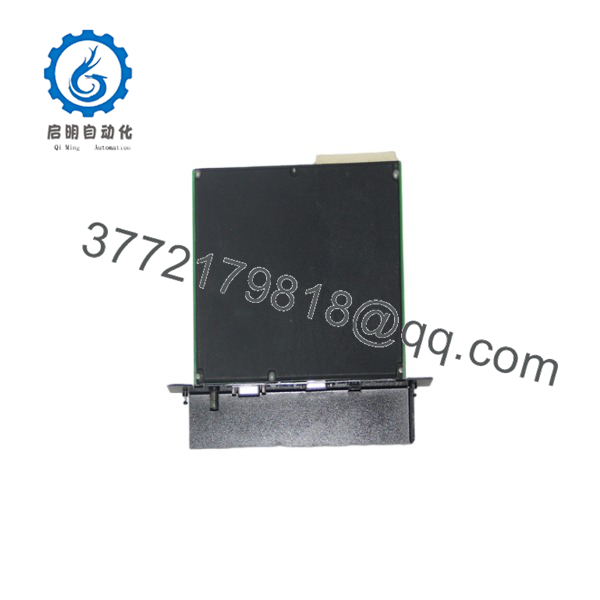
IC697CMM742
Installation & Configuration Guide
1.Pre-Installation (Prep & Safety):Safety measures and system setup validation.
De-energize the PLC rack enclosure following standard LOTO protocols. Attach a grounded ESD wrist strap to an unpainted metal section of the cabinet frame. Document the current network topology, MAC address, IP address, and software hardware configuration files in Proficy Machine Edition or Logicmaster 90.
2.Removal:Safe extraction techniques for VME cards.
Disconnect the AUI/RJ45 transceiver cable from the front panel port of the IC697CMM742. Loosen the top and bottom captive mounting screws holding the module to the VME frame. Unlatch the upper and lower ejection levers, then slide the card straight out of the rack guide rails to prevent bending the VME bus backplane pins.
3.Installation (Clone & Seat):Hardware mounting and physical verification.
Inspect the rear edge connectors of the new IC697CMM742 for bent pins or dust. Align the board edges with the guide channels of the designated VME slot in the Series 90-70 backplane. Firmly push the module rearward until both retention latches snap securely, then tighten the top and bottom retaining screws.
4.Power-On & Testing:Initialization and network verification.
Re-energize the rack power supply and observe the front-panel LED indicators. Verify that the MODULE OK LED glows solid green and the LAN indicator blinks during initialization. Ping the configured IP address from a network terminal and verify active SRTP data transfers to SCADA/HMI nodes.
Firmware/Software Versions & Upgrade Notes
- Firmware Compatibility: Revision IC697CMM742-CC (or later) runs optimal on Firmware Revision 6.00 or higher, fully supported by Logicmaster 90-70 V6.0+ and Proficy Machine Edition.
- IP Address Configuration: The IC697CMM742 stores its IP configuration in the CPU hardware configuration memory table. Swapping the hardware module does not require re-flashing the IP address into the module itself, provided the replacement module matches the catalog series.
- Firmware Upgrade Risks: Flashing firmware on an Ethernet card while connected to an active control network will immediately drop all client and server channels, causing communication loss to connected HMIs and supervisory systems. Always perform firmware procedures offline on a bench rack.
Frequently Asked Questions (FAQ)
Is the completely new and unused?
Yes. This product is a Brand New Surplus unit. It is not used, not pulled from a decommissioned plant, and not refurbished. All modules undergo rigorous quality verification to ensure OEM-level reliability. Original factory packaging is opened solely for visual inspection, pin check, and anti-counterfeit serial verification.
Why is buying a New Surplus better than buying a refurbished unit?
Refurbished communication modules frequently suffer from thermal fatigue on onboard processors and network transceivers. An intermittent loss of network communication can cause HMI screens to go blank or trip supervisory safety interlocks. Buying New Surplus guarantees factory-level component integrity and long-term operating life.
What is the difference between the and older Ethernet cards like the IC697CMM741?
The (Type 2 Ethernet Interface) features enhanced processing power, larger onboard memory buffer, and expanded channel capacity compared to earlier Type 1 modules (IC697CMM741). It also offers better firmware stability under high network traffic conditions.
Does the require an external transceiver?
The features a standard 15-pin AUI connector port. Connecting it to a standard Twisted Pair 10Base-T (RJ45) Ethernet network requires an external AUI-to-RJ45 transceiver module (such as the GE IC649AUI001 or equivalent 10Base-T media converter).
Can the be hot-swapped while the rack is powered?
No. The Series 90-70 VME backplane does not support Hot-Swapping (Removal and Insertion Under Power). Attempting to remove or insert the while the backplane is energized can arc pins, cause backplane bus faults, or permanently damage the onboard CPU.
What warranty coverage is included with this New Surplus Ethernet module?
We back this module with a comprehensive 1-year functional replacement warranty. If any hardware defect or backplane communication error occurs under normal operating conditions within 12 months, we will immediately supply a replacement module from our stock.



