
 WhatsApp: +86 16626708626
 Email:
  Phone: +86 16626708626
Description
3. Key Technical Specifications
| Parameter | Value |
|---|---|
| Display | 240 × 64 pixel LCD with LED backlight |
| Input Method | Integrated physical keypad (no touch screen) |
| Power Supply | 12–35 VDC (typical industrial rating) |
| Communications | RS-232 / RS-485 serial |
| Supported Protocols | GE SNP / SNP-X, Modbus (via configuration) |
| Configuration Software | DataDesigner (IC752DDZ000 or equivalent) |
| Mounting | Panel mount (flush) |
| Operating Temperature | Approximately 0 to 55–60 °C |
| Certifications | UL, cUL, CE, UL1604 (Class I Div 2 capable) |
| Text Support | Multiple text sizes supported |
| PC/104 Expansion | Not supported |
4. Product Introduction
The IC752DFT000-AA is the GE Fanuc DataPanel 150, a compact text-based operator interface designed for industrial control systems. It features a 240 × 64 LCD with LED backlight and an integrated keypad for navigation and data entry.
It connects to Series 90-30, Series 90-70, VersaMax, and other compatible controllers via RS-232 or RS-485 using SNP/SNP-X or Modbus protocols. Configuration is performed with DataDesigner software. The panel is intended for applications where simple text status, alarms, and data entry are required without the complexity or cost of a full graphic touch-screen HMI.
5. Troubleshooting Quick Reference
| Symptom | Possible Cause | Relevance to this Part | Quick Check Method | Recommendation |
|---|---|---|---|---|
| Blank or dark display | No power or failed backlight | ✅ High | Measure DC voltage at power terminals | Verify 12–35 VDC supply and polarity |
| No communication with PLC | Cable, baud rate, or protocol mismatch | ✅ High | Check serial cable and port settings against PLC config | Match baud rate, parity, and protocol exactly |
| Keypad unresponsive | Keypad failure or configuration lock | ✅ High | Test individual keys; check for software lockouts | Replace panel if keys fail mechanically |
| Garbled or missing text | Incorrect application download or memory issue | ⚠️ Medium | Re-download project from DataDesigner | Verify correct project and communication path |
| Intermittent display flicker | Marginal power or grounding issue | ⚠️ Medium | Check power supply stability and panel grounding | Improve power quality and grounding |
| Cannot download configuration | Wrong cable or software version | ⚠️ Medium | Confirm DataDesigner version and download cable | Use correct programming cable and software revision |
If power and communication checks do not resolve the issue, replace the IC752DFT000-AA. Always power down and observe ESD precautions when handling the unit.
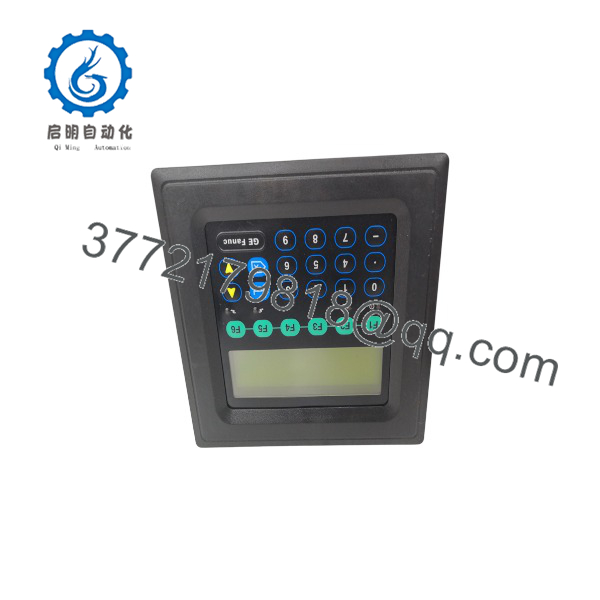
IC752DFT000-AA
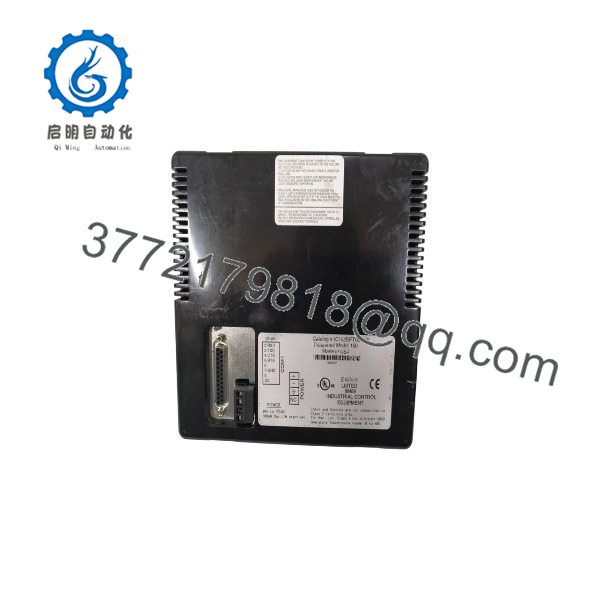
IC752DFT000-AA
6. Frequently Asked Questions (FAQ)
Q: Is the IC752DFT000-AA a touch-screen HMI? A: No. It is a text-based DataPanel 150 with a physical integrated keypad. It does not have a touch screen.
Q: What controllers does it communicate with? A: It is commonly used with GE Series 90-30, Series 90-70, VersaMax, and other controllers that support SNP/SNP-X or Modbus over serial links.
Q: What software is required to configure it? A: DataDesigner software (catalog reference IC752DDZ000 or later compatible version). Projects are downloaded via serial cable.
Q: What is the power requirement? A: Typically 12–35 VDC. Confirm exact voltage range on the unit label and in the installation documentation before connecting power.
Q: Is this product still in production? A: No. The DataPanel series is obsolete. Remaining units are new surplus or refurbished. For new designs, consider current Emerson/Proficy HMI offerings.
Q: Why is a new-surplus IC752DFT000-AA often priced lower than modern HMIs? A: It is an end-of-life text panel. New-surplus stock comes from project overstock, is tested, and is sold at a reduced price while still carrying warranty. Condition is clearly stated as New Original / New Surplus.
Q: Can it display graphics or trends? A: It supports text in various sizes and limited simple elements. It does not offer full graphic objects, color displays, or advanced trending found on later QuickPanel or PACSystems HMI products.



