
 WhatsApp: +86 16626708626
 Email:
  Phone: +86 16626708626
Description
3. Key Technical Specifications
- Processor Architecture: 32-bit industrial CPU (VersaMax CPUE platform)
- User Memory: 64 KB configurable (program + data allocation)
- Program Storage: Flash memory + battery-backed RAM
- Communication Interfaces:
- 1 × Ethernet 10BaseT (RJ45)
- 1 × RS-232
- 1 × RS-485
- Ethernet Protocols: SRTP, EGD, Modbus TCP/IP (configuration dependent)
- Max I/O Capacity: Up to 64 modules / 2048 I/O points
- Boolean Execution Speed: ~0.8 ms/K instruction
- Ethernet Speed: 10 Mbps (half/full duplex)
- Power Consumption: ~5 VDC backplane powered (CPU dependent current draw ~200–260 mA class)
- RTC Accuracy: ~100 ppm (±9 sec/day typical)
- Operating Temperature: 0°C to 60°C
- Storage Temperature: -40°C to 85°C
- Mounting: VersaMax DIN-rail rack insertion (slot-based CPU placement)
- Diagnostics: RUN / STOP switch + LED status (PWR, OK, FAULT, PORT indicators)
- Firmware Upgrade: Serial download via CPU port (Port 1 RS-232)
4. Product Introduction
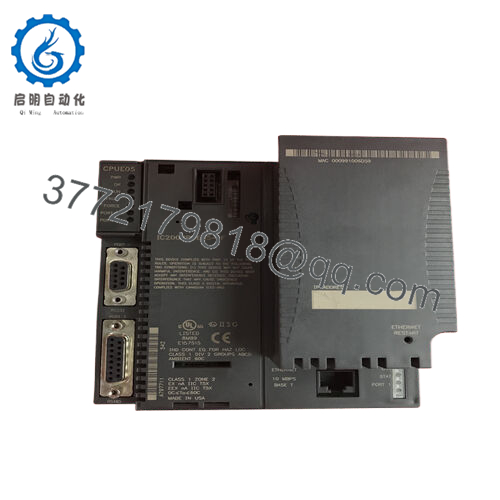
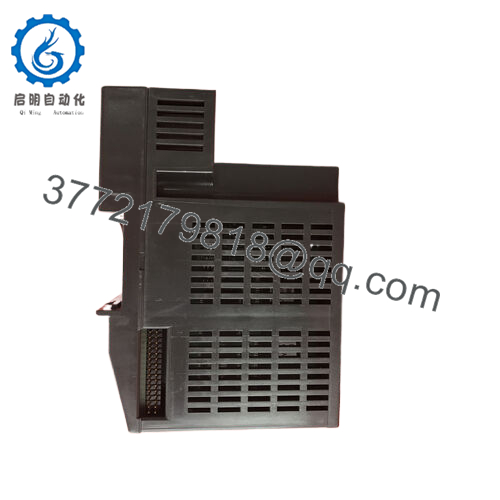
The GE IC200CPUE05-LT is a VersaMax series PLC CPU module used in distributed industrial automation systems for logic execution, I/O scanning, and Ethernet-based communication. It operates as the central controller in modular VersaMax racks, supporting both legacy serial networks and modern Ethernet integration.
This CPU combines 64 KB configurable memory with dual serial ports and a 10 Mbps Ethernet interface. It is commonly deployed in brownfield systems where stable operation and compatibility with existing VersaMax I/O infrastructure matter more than modernization.

- IC200CPUE05-LT
5. Installation & Configuration Guide
Stage 1: Pre-Installation Preparation
⚠️ Safety First: Shut down PLC system completely. Apply LOTO. Verify zero voltage on backplane and PSU output rails. Wait minimum 5 minutes for full capacitor discharge.
Tools Required: ESD wrist strap, PH1 screwdriver, multimeter, labeling tape, smartphone for documentation.
Data Backup:
- Upload PLC program via Proficy Machine Edition
- Record hardware configuration (rack layout, slot mapping)
- Capture Ethernet IP settings and serial communication parameters
Stage 2: Removing the Old Module
- Disconnect Ethernet cable and serial wiring (Port 1 / Port 2)
- Label all connectors before removal
- Release rack locking tab on VersaMax base
- Pull CPU straight out of backplane (no twisting motion)
- Inspect backplane pins for corrosion or deformation
- Confirm rack power supply is stable before replacement
⚠️ Note: Do not apply lateral force. VersaMax backplane alignment pins are mechanically sensitive.
Stage 3: Installing the New Module
- Verify exact model match: IC200CPUE05-LT
- Apply ESD grounding protection
- Insert CPU into designated controller slot (CPU slot position)
- Push until latch fully engages with audible click
- Reconnect Ethernet and serial interfaces
- Confirm power supply health before energizing system
Self-Checklist:
- CPU fully seated in rack
- Ethernet link LED active
- Serial port wiring verified
- Rack power supply within spec
Stage 4: Power-On & Testing
- Power rack only (keep field devices isolated)
- Observe LED indicators (PWR / OK / RUN / FAULT)
- Verify CPU boot sequence completes without fault
- Connect Proficy Machine Edition engineering station
- Confirm IP address and Ethernet connectivity (ping test / SRTP session)
- Download backup program if required
- Run dry I/O scan test across modules
⚠️ Troubleshooting Note:
- Solid FAULT LED → firmware mismatch or corrupted memory
- No Ethernet communication → IP reset or cable/link issue
- Port 1 inactive → Station Manager mode or configuration lock
Estimated commissioning time: 20–30 minutes (documented system)
6. Frequently Asked Questions (FAQ)
Is the IC200CPUE05-LT hot-swappable?
No. VersaMax CPUs are not designed for hot swapping. Removing the module under power can corrupt backplane communication and halt the entire system.
What does the “-LT” suffix mean?
In most field stock contexts, “-LT” indicates a revision or lot-trace variant. Functionally it is aligned with CPUE05 hardware but may differ in firmware or manufacturing batch origin. Always verify firmware compatibility.
Can this CPU run without a rack?
No. The IC200CPUE05-LT requires a VersaMax backplane and compatible power supply module. It cannot operate as a standalone controller.
Will I lose my program when replacing it?
Yes, unless the program is backed up in flash or uploaded prior to removal. Battery-backed RAM is not guaranteed after long storage.
What is the main limitation of this CPU?
Its 10 Mbps Ethernet interface and 64 KB memory are restrictive compared to RX3i systems. It is best suited for legacy expansions, not new high-throughput applications.
What is the direct upgrade path?
The typical migration path is GE RX3i PACSystems. However, conversion requires hardware replacement and software porting in Proficy Machine Edition.
Why do these CPUs fail in the field?
Common causes include:
- Battery depletion causing memory loss
- Backplane contact oxidation
- Incorrect firmware after replacement
- Ethernet IP conflicts after reset



