
 WhatsApp: +86 16626708626
 Email:
  Phone: +86 16626708626
Description
3. Key Technical Specifications
| Parameter | Value |
|---|---|
| Model Number | IC4501A100B |
| Manufacturer | General Electric |
| Product Category | Isolation Module |
| Primary Function | Signal isolation and conditioning |
| Installation Type | Cabinet-mounted module |
| Application | Industrial automation and control systems |
| Input Signal Type | Verify against OEM documentation |
| Isolation Type | Electrical signal isolation |
| Supply Rating | Verify installation documentation |
| Operating Environment | Industrial control cabinets |
| Product Lifecycle | Obsolete |
| Availability | New Surplus / Refurbished (tested) |
| Replacement Status | Exact revision match recommended |
GE documentation available through surplus channels identifies IC4501A100B as an isolation module used in industrial control environments. Current market inventory consists mainly of surplus and used inventory.
4. Product Introduction
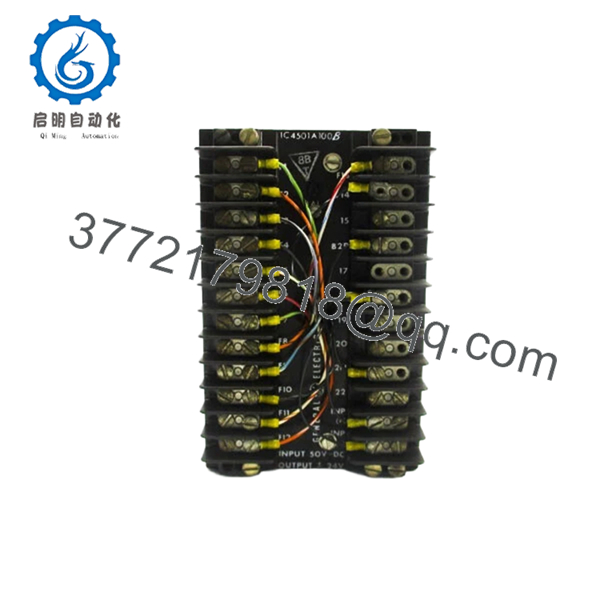
GE IC4501A100B is an isolation module designed for industrial control applications where signal separation and electrical isolation are required between interconnected control circuits. These modules commonly appear in legacy GE automation installations where stable signal integrity is critical for maintaining reliable operation.
In field work, isolation modules rarely attract attention until intermittent faults begin appearing. Strange analog drift, nuisance alarms, or unstable communication can point back to isolation hardware. With legacy GE systems, exact revision control matters. Small hardware differences create larger commissioning problems than many teams expect.

- IC4501A100B
5. Installation & Configuration Guide
Stage 1: Pre-Installation Preparation (Estimated: 10 minutes)
⚠️ Safety First: Notify operations before downtime. Verify process equipment is in a safe state. Apply lockout/tagout procedures and isolate power. Wait 5 minutes for capacitor discharge.
Tools Required:
- ESD wrist strap
- PH1 screwdriver
- Fluke 115 multimeter
- Wire labels
- Smartphone camera
- ESD work surface
Data Backup
- Export controller settings where applicable.
- Record active alarm conditions.
- Photograph field wiring.
- Photograph switch positions and connector orientation.
- Record module revision labels.
I’ve worked outages where crews skipped photographs because connector locations looked obvious. Thirty minutes later everyone started tracing cables manually.
Stage 2: Removing the Old Module (Estimated: 5 minutes)
- Remove cabinet covers.
- Label all field wiring.
- Disconnect terminals carefully.
- Release retention hardware.
- Pull module straight outward.
⚠️ Do not twist during removal.
Legacy connectors develop brittle plastic and weak retention points.
⚠️ Keep the removed module nearby until startup succeeds.
Stage 3: Installing the New Module (Estimated: 10 minutes)
- Connect ESD protection first.
- Verify exact part number: IC4501A100B
- Configuration Clone (Crucial): Match all jumper settings and hardware configurations exactly.
- Install module fully and verify seating.
- Reconnect wiring.
Self-Checklist:
- Model confirmed
- Wiring secure
- Connectors seated
- Locking tabs secured
- ESD protection used
⚠️ This is the most common rookie mistake, but it happens constantly. Take a picture before you pull it. I can’t stress this enough.
Stage 4: Power-On & Testing (Estimated: 10 minutes)
Pre-Power Check
Use a Fluke meter and verify no short exists on supply rails.
Power sequence:
- Apply cabinet power only.
- Observe startup indications.
- Verify communications.
- Check signal stability.
- Perform dry-run I/O verification.
⚠️ Troubleshooting Note: If communication faults appear immediately, suspect revision mismatch before replacing another module.
I’ve watched teams spend two days replacing healthy parts because one hardware revision changed unexpectedly.
Technical Pitfall & Survival Guide
❗ Firmware Revision Mismatch
Issue: Older systems occasionally reject newer revisions.
Avoidance: Record revision labels before removal.
I’ve seen “Communication Timeout” faults continue for two days because replacement hardware carried a different revision.
❗ DIP Switch / Jumper Misconfiguration
Issue: Factory settings rarely match plant settings.
Avoidance: Photograph all positions before removal.
Night-shift outages generate these calls constantly.
❗ Terminal Block / Wiring Incompatibility
Issue: Similar modules occasionally route pins differently.
Avoidance: Verify drawings before reconnection.
Never wire from memory.
❗ Power Draw Specifications
Issue: Cabinet supplies may already operate near limits.
Avoidance: Keep 20% power margin available.
Loaded cabinets quietly exceed limits more often than people think.
❗ Electrostatic Discharge (ESD)
Issue: Static damage before installation.
Avoidance: Use grounded straps and ESD mats.
I once watched a technician unpack hardware in winter without protection. Smoke came immediately after startup. Expensive lesson.
Keep these checks in mind and you’ll save yourself 90% of typical rework time.
6. Frequently Asked Questions (FAQ)
Q1: Can I hot-swap this module?
No.
Kill power first. Legacy GE isolation hardware was not intended for live replacement. Pulling modules under power can damage connectors and create unpredictable faults.
Q2: Is IC4501A100B obsolete?
Yes.
Current inventory mainly comes from surplus markets and used stock rather than active OEM production.
Q3: Is this genuinely new?
Usually “New Original” means unused surplus inventory.
Factory packaging may not remain intact after long-term warehouse storage. Request serial numbers and actual product photographs.
Q4: What is the direct replacement if inventory becomes unavailable?
Verify exact OEM cross-reference information before substitution.
Field experience says isolation modules often appear interchangeable until startup begins.
Q5: Will replacing this module affect controller programming?
Normally no.
Isolation modules process and separate signals rather than store controller logic. Still perform backups before shutdown.
Q6: Why does pricing vary so much?
Because inventory comes from surplus channels and remaining stock levels are limited. Current market listings range from used inventory to new-surplus stock.
Q7: How do you verify surplus inventory quality?
Our SOP follows a documented engineering workflow:
- OEM source verification and traceability
- Anti-counterfeit inspection and serial review
- Visual inspection for corrosion, UV yellowing, and rework marks
- Functional testing on compatible hardware where available
- Communication verification
- 500 V Megger insulation test (>10 MΩ)
- Hardware revision documentation
- QC sign-off with ESD packaging
Test videos and photos are available upon request.



