
 WhatsApp: +86 16626708626
 Email:
  Phone: +86 16626708626
Description
3. Key Technical Specifications
| Parameter | Value |
|---|---|
| Model Number | IC660ELB921J |
| Manufacturer | GE Fanuc (Emerson) |
| Product Type | Genius LAN Interface PCIM |
| Series | Genius I/O |
| Interface Type | Single-slot PC Interface Module (PCIM) |
| Bus Protocol | Genius Bus |
| Host Interface | IBM PC/XT/AT Compatible ISA Slot |
| Communication | Genius LAN |
| Installation | Internal PC Expansion Card |
| Typical Applications | Genius I/O configuration, monitoring, diagnostics, and host communication |
| Product Status | Legacy / Discontinued |
*The suffix “J” identifies a hardware revision while maintaining functional compatibility within the IC660ELB921 family.
4. Product Introduction
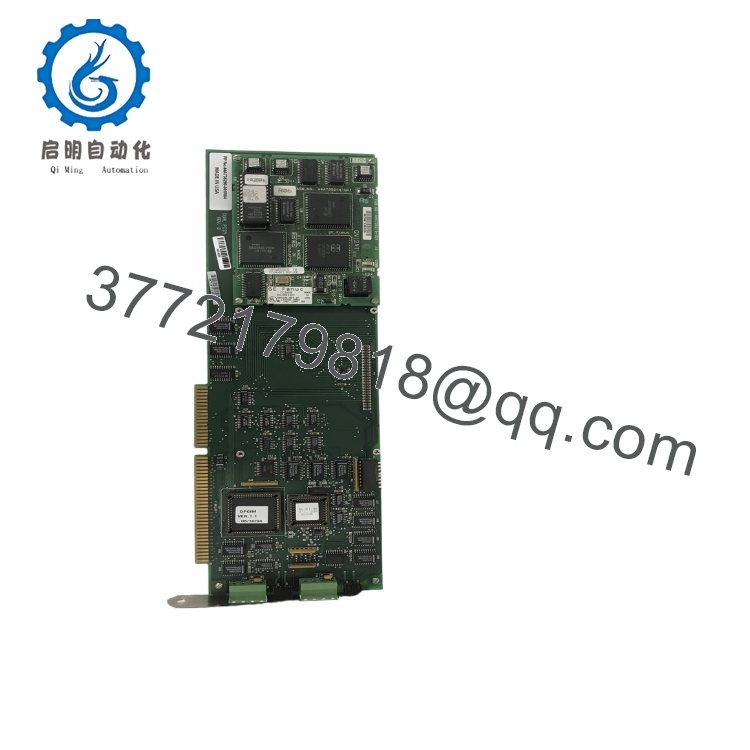
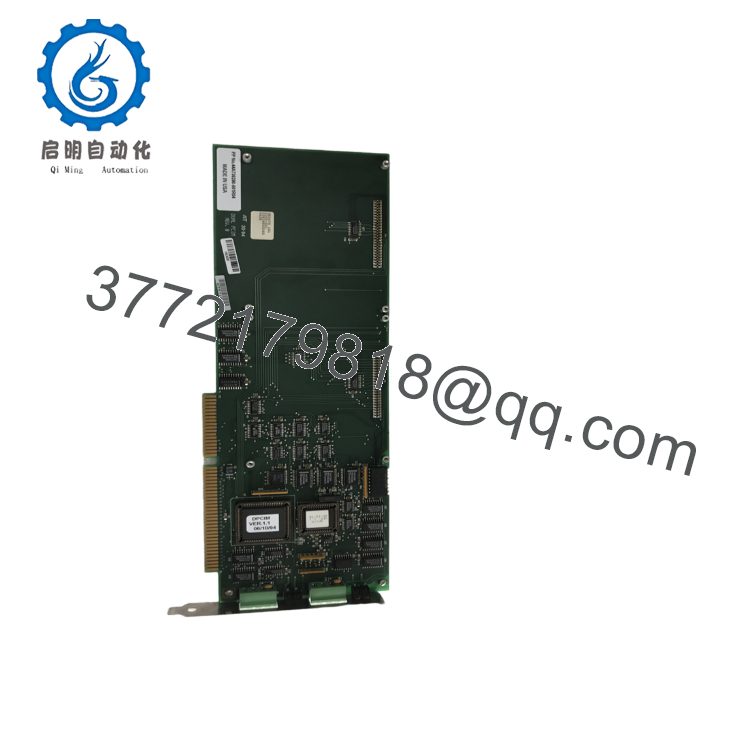
The GE IC660ELB921J is a Genius LAN Interface PCIM (PC Interface Module) developed for GE Fanuc Genius I/O systems. Installed in an ISA expansion slot of an IBM PC/XT/AT-compatible computer, it provides a communication interface between the host computer and the Genius Bus network, enabling system configuration, diagnostics, monitoring, and maintenance.
The module is commonly used in industrial automation systems employing Genius I/O blocks and legacy GE PLC platforms. It allows engineering workstations to access field devices over the Genius LAN for commissioning, troubleshooting, and system management. Although discontinued, the IC660ELB921J remains widely used in existing installations where Genius networks continue to operate.

- IC660ELB921J
- IC660ELB921J
5. Installation & Configuration Guide
Stage 1 – Pre-Installation Preparation (10 Minutes)
⚠️ Safety First
- Shut down the host computer.
- Disconnect AC power.
- Follow Lock-Out/Tag-Out (LOTO) procedures where applicable.
- Wear an ESD wrist strap.
- Verify the PC contains a compatible ISA expansion slot.
Required Tools
- Phillips screwdriver
- ESD wrist strap
- Digital multimeter
- ISA slot documentation
- Genius configuration software
Backup Tasks
- Back up the existing Genius network configuration.
- Record network addresses.
- Document interrupt (IRQ) and I/O address settings if applicable.
- Photograph existing cable connections.
Stage 2 – Removing the Existing Module
- Turn off the computer.
- Disconnect the Genius network cable.
- Remove the PC cover.
- Unscrew the retaining bracket.
- Carefully remove the interface card.
- Inspect the ISA connector for damage or contamination.
⚠️ Handle the module only by its edges to prevent electrostatic damage.
Stage 3 – Installing the Replacement Module
- Verify the model number IC660ELB921J.
- Insert the module firmly into the ISA expansion slot.
- Secure the retaining bracket.
- Connect the Genius LAN cable.
- Configure the required hardware resources if applicable.
- Install or verify the appropriate communication driver.
Installation Checklist
- ✔ Correct module installed
- ✔ ISA connector fully seated
- ✔ Genius cable connected
- ✔ Hardware resources verified
- ✔ Driver installed
Stage 4 – Startup & Functional Test
Before Applying Power
- Verify all connectors.
- Inspect cable integrity.
- Confirm proper grounding.
Startup Procedure
- Power on the computer.
- Verify the operating system detects the interface.
- Launch the Genius configuration software.
- Confirm communication with the Genius LAN.
- Verify connected Genius devices are detected.
- Perform a network diagnostic scan.
⚠️ Troubleshooting
- No communication: Verify Genius network termination and cable integrity.
- Card not recognized: Check ISA slot seating and hardware resource configuration.
- Network errors: Confirm Genius node addresses and baud rate settings.
- Intermittent communication: Inspect grounding and shield continuity.
6. Frequently Asked Questions (FAQ)
Q1. What is the primary purpose of the IC660ELB921J?
The IC660ELB921J provides an interface between an IBM-compatible PC and a GE Genius LAN, allowing engineering software to configure, monitor, and diagnose Genius I/O devices.
Q2. What computer interface does this module use?
The module is designed as a single-slot ISA (PCIM) expansion card for IBM PC/XT/AT-compatible computers.
Q3. What does the “J” suffix indicate?
The “J” suffix represents a hardware revision level within the IC660ELB921 product family. Functionality remains compatible with other approved revisions unless otherwise specified by the system documentation.
Q4. Which applications typically use this module?
Typical applications include:
- Genius I/O network configuration
- PLC communication
- System diagnostics
- Industrial automation maintenance
- Legacy GE Fanuc control systems
Q5. Is the IC660ELB921J still manufactured?
No. The IC660ELB921J is a legacy Genius I/O component. It is no longer in active production, but New Surplus and professionally refurbished units remain available for maintaining existing systems.
Q6. What is the most common installation issue?
The most common issue is installing the module in a system without a compatible ISA slot or using incorrect hardware resource settings (such as IRQ or I/O address assignments), which can prevent the PC from communicating with the Genius network.
Q7. What should be verified before returning the system to service?
A commissioning engineer should verify:
- Correct module model (IC660ELB921J)
- Proper ISA slot installation
- Secure Genius LAN connection
- Correct hardware resource configuration
- Successful communication with Genius devices
- Network diagnostics completed without errors
- Stable operation of the engineering workstation
- Proper recognition by Genius configuration software
Completing these checks helps ensure reliable communication between the host computer and the Genius network while minimizing commissioning and maintenance downtime.



