
 WhatsApp: +86 16626708626
 Email:
  Phone: +86 16626708626
Description
Key Technical Specifications
- Product Type: Genius Communications Gateway Module
- Platform: GE PACSystems RX3i
- Part Number: IC695GCG001
- Primary Function: Interfaces Genius I/O devices on a Genius Serial Bus with a PROFINET IO Controller
- Ethernet Interface: Two RJ-45 10/100BASE-TX Ethernet ports
- Genius Serial Interface: Two Genius serial bus ports
- Maximum Genius Devices: Up to 31 Genius I/O devices on one serial bus
- Input Power: 24 V DC ±10% external power supply
- Current Consumption: 0.2 A maximum at 24 V DC
- Genius Bus Speed: 153.6 Kbps standard / 153.6 Kbps extended
- Maximum I/O Data: 1,024 bytes input and 1,024 bytes output per station
- Production Rate: 2 ms, 4 ms, 8 ms, 16 ms, 32 ms, 128 ms, 256 ms, 512 ms configurable
- Supported Protocols: PROFINET RTC, RTA, DCP, LLDP, MRP, SNMP, CL-RPC
- Media Redundancy: Supports Ethernet Media Redundancy Protocol (MRP)
- Operating Temperature: 0 °C to 60 °C
- Hot Swap Capability: Supported
- Compatible Controllers: RX3i CPE330, CPE302, CPE305, CPE310, CPU315, CPU320, CRU320
- Mounting: RX3i Universal Backplane mounting or panel mounting
- Weight: Approximately 5.44 kg (12 lb)
Product Introduction
The GE Fanuc IC695GCG001 is a PACSystems RX3i Genius Communications Gateway designed to connect existing Genius I/O devices with a GE PROFINET IO Controller. The module operates as a Genius Bus Controller, collecting I/O data from Genius devices and transferring the data through its Ethernet interfaces.
The GCG001 is commonly used in modernization projects where plants retain existing Genius I/O installations while upgrading the control network to PROFINET. Before replacement, verify RX3i CPU firmware, Proficy Machine Edition version, GSDML configuration files, and Genius bus parameters.
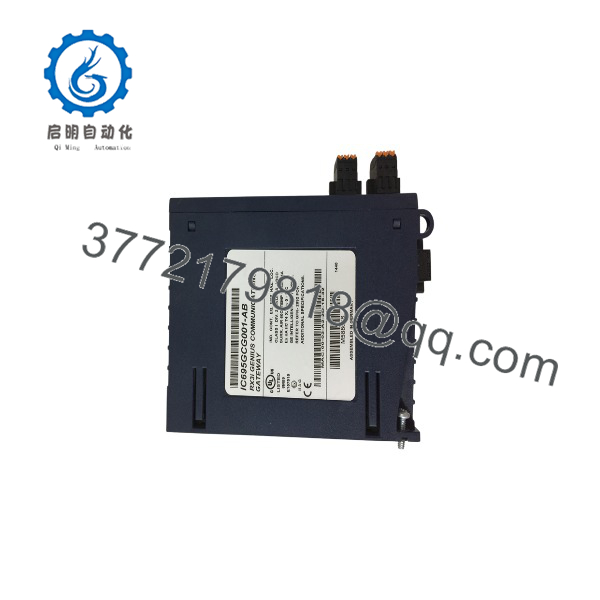
IC695GCG001
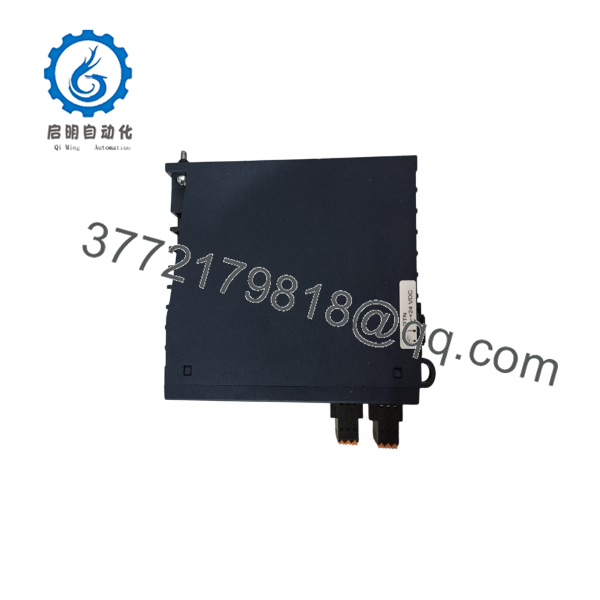
IC695GCG001
Installation & Configuration Guide
Stage 1: Pre-Installation Preparation (15–20 minutes)
⚠️ Safety First:
- Notify operations before interrupting the control network.
- Place the process into an approved safe condition.
- Apply lockout/tagout procedures before removing power.
- Wait at least 5 minutes after shutdown before handling wiring.
Tools Required:
- ESD wrist strap
- PH1 screwdriver
- Digital multimeter
- Wire labels
- Smartphone/camera for configuration records
Data Backup:
- Export the PACSystems RX3i project from Proficy Machine Edition.
- Record CPU firmware version.
- Save PROFINET configuration parameters.
- Photograph Genius bus wiring and termination settings.
- Document Ethernet switch ports and IP addresses.
- Confirm GCG001 GSDML file availability.
⚠️ Compatibility Check:
Confirm the existing system uses PACSystems RX3i hardware and a supported PROFINET IO Controller. The GCG001 requires proper hardware configuration before exchanging Genius I/O data.
Stage 2: Removing the Old Module (10 minutes)
Steps:
- Disconnect external 24 V DC power supply.
- Label Ethernet cables and Genius serial wiring.
- Remove communication connectors carefully.
- Release mounting screws or backplane retaining hardware.
- Remove the module straight outward.
- Inspect connectors for contamination or mechanical damage.
⚠️ Important:
Keep the original module until the replacement completes communication testing. Genius bus parameters and network settings may be required for troubleshooting.
Stage 3: Installing the New Module (15 minutes)
Steps:
- Wear an ESD wrist strap before handling the module.
- Verify the nameplate shows IC695GCG001.
- Mount the module on the RX3i Universal Backplane or approved panel location.
- Secure mounting screws.
- Connect external 24 V DC power.
- Reconnect Ethernet communication cables.
- Reconnect Genius Serial Bus wiring.
Configuration Clone Checklist:
☐ IP address restored
☐ PROFINET device name configured
☐ Genius bus baud rate verified
☐ Genius device addresses checked
☐ Bus termination resistor confirmed
☐ GSDML configuration loaded
Stage 4: Power-On & Testing (20–30 minutes)
Pre-Power Check:
- Verify 24 V DC supply polarity.
- Confirm wiring insulation.
- Check Genius bus shield grounding.
- Verify Ethernet connections.
Power-On Steps:
- Energize the GCG001 power supply.
- Check module LED status.
- Connect Proficy Machine Edition.
- Verify hardware configuration.
- Confirm PROFINET communication.
- Verify Genius device scanning.
- Check input data updates.
- Test output commands with a controlled load.
⚠️ Troubleshooting Notes:
- No Genius devices detected: Check Genius bus wiring, termination, and baud rate.
- PROFINET communication fault: Verify device name, IP address, and GSDML configuration.
- I/O data mismatch: Confirm Genius block addresses match the original configuration.
- Module fault LED: Review RX3i diagnostics and firmware compatibility.
Frequently Asked Questions (FAQ)
Q1: Can the GE IC695GCG001 be hot-swapped?
Yes, the module supports hot swap capability. However, site procedures should determine whether removing the gateway during operation is acceptable. Always verify the impact on Genius I/O communications before removal.
Q2: What does the IC695GCG001 actually do?
The module acts as a communication bridge between Genius Serial Bus I/O devices and a PACSystems RX3i PROFINET controller. It collects Genius I/O data and exchanges that data through Ethernet communication.
Q3: How many Genius I/O devices can one IC695GCG001 handle?
One GCG001 can manage up to 31 Genius I/O devices on a single Genius Serial Bus.
Q4: Is obsolete?
The belongs to the PACSystems RX3i product family and is commonly encountered in installed legacy systems. Availability is usually through existing inventory, New Original/New Surplus stock, or tested refurbished units.
Q5: Can I replace without changing the PLC program?
Usually, the replacement requires restoring the RX3i hardware configuration and PROFINET parameters. The PLC logic may remain unchanged if the hardware configuration and network identity are preserved.
Always back up the project before replacement.
Q6: What should I check before ordering ?
Verify:
- Existing module catalog number
- RX3i CPU model
- CPU firmware version
- PROFINET controller compatibility
- Genius bus wiring
- Genius device count
- GSDML configuration file
A communication gateway replacement failure is often caused by configuration mismatch rather than hardware failure.
Q7: Why is priced below a new OEM module?
Legacy automation parts are frequently sourced from surplus inventory, plant upgrades, and discontinued project stock. The actual value depends on condition, testing records, firmware status, and traceability documentation.
For critical applications, request functional test records and confirm whether the unit is New Original, New Surplus, or Refurbished before installation.



