
 WhatsApp: +86 16626708626
 Email:
  Phone: +86 16626708626
Description
3. Key Technical Specifications
| Parameter | Value |
|---|---|
| Model Number | H4893P4677 |
| Alternate Marking | 24ER150/X008 |
| Manufacturer | Harland Simon (UK) |
| Product Category | PLC Power Supply Module |
| Series | Intella Series / H4893 Series |
| Compatible Models | H4893P4676, H4893P4670, H4893P4882 |
| Function | Rack power supply for Intella control systems |
| Application | Industrial automation, Process control, Machine control |
| Mounting Type | Rack-mounted / Chassis insertion |
| Operating Temperature | 0°C to +55°C (industrial standard) |
| Storage Temperature | -20°C to +70°C |
| Humidity | 5% to 95% RH (non-condensing) |
| Input Voltage | Standard industrial AC input (verify with datasheet) |
| Output Voltage | 24 V DC (typical for PLC racks) |
| Power Rating | 150 W (inferred from 24ER150 marking) |
| Dimensions | Standard rack-mount format |
| Weight | Approx. 0.5 kg |
| Status | Obsolete / Legacy (End-of-Life) |
4. Product Introduction
The Harland Simon H4893P4677 is a rack-mounted power supply module designed for the Intella series of industrial control systems. Manufactured by Harland Simon—a UK-based specialist in industrial automation—this power supply provides regulated DC power to Intella PLC racks and their associated I/O modules. It is commonly deployed in manufacturing plants, process industries, and utility operations where Harland Simon’s Intella control platforms were implemented.This power supply module ensures stable, reliable power delivery for legacy installations requiring spare parts to maintain operational continuity. While Harland Simon has transitioned to newer control platforms, the H4893P4677 remains critical for facilities running established Intella infrastructure. The alternate marking 24ER150/X008 indicates the power rating and revision level. Engineers select this module for its proven field reliability, direct compatibility with existing Intella rack configurations, and its essential role in keeping control systems operational without costly full-system replacement.
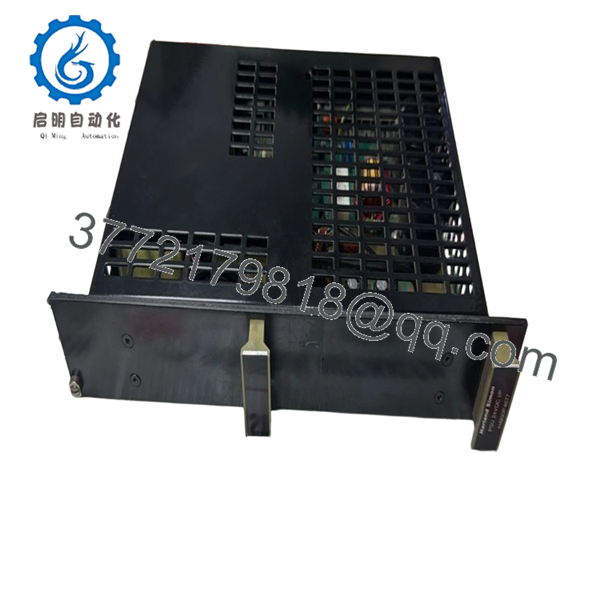
- H4893P4677
5. Installation & Configuration Guide
Stage 1: Pre-Installation Preparation (10 minutes)
⚠️ Safety First: Notify operations of planned downtime. Verify the control system is in a safe state. Lock out/tag out (LOTO) all power sources to the rack—including the main AC input to this power supply. Wait 5 minutes for capacitor discharge before handling any modules.Tools Required:
- ESD wrist strap (grounded)
- PH1 Phillips screwdriver
- Digital multimeter (Fluke 115 or equivalent)
- Wire labeling tape or markers
- Smartphone/camera (for documentation)
Data Backup:
- Document current voltage readings at the rack backplane
- Record any diagnostic LED patterns from the existing power supply
- Photograph all wiring connections, DIP switches, and jumper settings before removal
Stage 2: Removing the Old Power Supply (5 minutes)
- Remove the front bezel or protective cover if present.
- Label and disconnect all wiring from the terminal block—line input, ground, and DC output connections. Do not force connectors.
- Release the rack locking tabs (typically top and bottom) and pull the module straight out to protect backplane pins.
- Inspect the rack slot for bent pins, dust accumulation, or corrosion. Clean with compressed air if necessary.
- ⚠️ Note: Keep the old power supply for reference until the new unit is fully operational. Do not discard until commissioning is complete.
Stage 3: Installing the New Power Supply (8 minutes)
- ESD prep: Verify your wrist strap is properly grounded to the rack chassis.
- Configuration Clone (Critical): Replicate all DIP switches and jumpers from your reference photo. Pay special attention to:
- Voltage selection switches (if applicable)
- Current limiting settings
- Diagnostic output configuration
- Insert the H4893P4677 into the rack slot. Push firmly until both locking tabs engage with an audible click. Ensure proper seating—no gaps between module and backplane.
- Reattach wiring using torque-appropriate screwdriver. Do not overtighten terminal screws. Verify ground connection is secure.
Self-Checklist:
- [ ] Input voltage matches site requirements
- [ ] All wiring secured and labeled correctly
- [ ] Ground connection verified with multimeter
- [ ] Rack locking tabs fully engaged
- [ ] No loose hardware inside the chassis
Stage 4: Power-On & Testing (7 minutes)
Pre-Power Check: Use your multimeter to verify:
- No shorts between line and ground
- Proper input voltage at the terminal block
- Correct polarity on DC output connections
Power-On Steps:
- Apply AC input power only (keep field devices isolated initially).
- Observe LED indicators on the H4893P4677:
- Green PWR/OK = Normal operation, output regulated
- Red FLT/FAULT = Fault condition (overcurrent, overvoltage, thermal)
- No LEDs = Input power issue or internal failure
- Measure DC output voltage at the backplane with your multimeter. Verify it matches system requirements (typically 24 V DC ±5%).
- Power up the rack modules one at a time, monitoring for voltage sag or fault indicators.
- Once all modules are powered, run a full system diagnostic.
⚠️ Troubleshooting Note: If the fault LED illuminates, check for:
- Excessive load current (remove modules one at a time to isolate)
- Input voltage outside acceptable range
- Thermal overload (verify ventilation and ambient temperature)
6. Frequently Asked Questions (FAQ)
Q: Can I hot-swap the H4893P4677 while the system is powered?
A: Absolutely not. This is a power supply module—not a hot-swappable component. Removing it while power is applied will drop power to the entire rack, potentially corrupting processor memory and causing I/O faults. Always shut down the entire control system and lock out AC input power before servicing. I’ve seen technicians attempt “live” power supply swaps thinking they were being efficient—resulting in blown processors and hours of recovery work.
Q: Is the H4893P4677 obsolete, and is your stock genuinely new?
A: Yes, this model is officially obsolete from Harland Simon. Our inventory consists of new surplus stock—units manufactured during the original production run but never deployed. These are factory-sealed or tested units stored in climate-controlled conditions. We also offer refurbished units that have undergone full load testing. Each unit ships with a detailed test report and 1-year warranty.
Q: What does the alternate marking “24ER150/X008” mean?
A: The 24ER150/X008 marking indicates the power supply specifications: 24V DC output, 150W power rating, with X008 being a revision or batch code. When ordering, either part number (H4893P4677 or 24ER150/X008) will identify the same unit. Always verify the output voltage and power rating match your rack requirements.
Q: What is the direct replacement if the H4893P4677 is out of stock?
A: The H4893P4676 is a closely related power supply in the same series. The H4893P4670 (Speed Monitor) and H4893P4882 are other modules in this product family, though they serve different functions. For power supply specifically, verify compatibility with H4893P4676 or contact us for cross-reference verification. Using an incompatible power supply can damage your rack backplane and I/O modules.
Q: Will I lose my programming logic when I replace the power supply?
A: Not if you do it correctly. Unlike processor modules, the power supply itself does not store program logic. However, power interruption will cause the processor to lose its runtime data if it lacks battery backup. Before replacing the power supply:
- Verify your processor has a functional backup battery
- Document the current state of all critical processes
- Plan for a controlled restart sequence
If the processor battery is dead or missing, you will lose volatile memory contents when power is removed.
Q: Why is your price lower than the OEM factory list price?
A: Harland Simon no longer manufactures this part, so “factory list price” is largely academic. Our pricing reflects the new surplus market reality—unused inventory acquired from plant closures, system upgrades, and distributor liquidations. We test every unit under load conditions and pass the savings from bypassing traditional distribution channels directly to you. You’re buying proven hardware at market rates, not paying inflated prices for obsolete catalog listings.
Q: How do I verify this power supply is compatible with my Intella rack?
A: Check your rack’s power requirements: voltage (typically 24 V DC), current draw (sum all module ratings plus 20% margin), and physical mounting. The H4893P4677 is designed for standard Intella rack configurations. If your rack uses non-standard voltages or has unusual power demands, consult your system documentation or contact us with your rack model number for verification.



