
 WhatsApp: +86 16626708626
 Email:
  Phone: +86 16626708626
Description
3. Key Technical Specifications
| Parameter | Value |
|---|---|
| Manufacturer | HIMA Paul Hildebrandt GmbH |
| Model | F2DO1601 |
| Product Type | Safety-related digital output module |
| Series | HIMatrix |
| Digital Outputs | 16 channels |
| Output Type | 24 VDC digital outputs |
| Output Current | 8 channels: up to 2 A; 8 channels: up to 0.5 A |
| Communication Interface | 2 × RJ45 Ethernet, 10BASE-T / 100BASE-TX |
| Protocol Support | SafeEthernet, industrial Ethernet communication |
| Operating Voltage | 24 VDC (-15 % to +20 %) |
| Response Time | ≥ 20 ms |
| Operating Temperature | 0 °C to +60 °C |
| Storage Temperature | -40 °C to +85 °C |
| Protection Class | IP20 |
| Mounting | Cabinet / DIN rail installation |
| Safety Standard Application | IEC 61508 / IEC 61511 SIL 3 applications |
| Dimensions | Approx. 207 × 114 × 66 mm |
| Weight | Approx. 0.9 kg |
4. Product Introduction
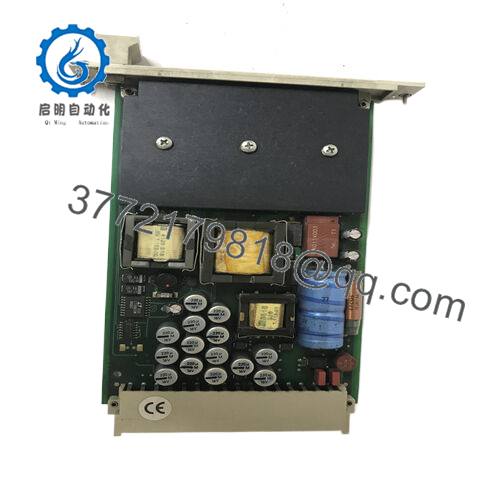
The HIMA F2DO1601 is a HIMatrix safety-related remote I/O module providing 16 digital output channels for safety automation applications. It connects to HIMA safety controllers through SafeEthernet and is used for output control in systems such as emergency shutdown (ESD), fire and gas protection, and industrial safety interlocks.
The module provides different output current capacities across channels, allowing connection to various field actuators. Before replacement, verify the existing HIMatrix configuration, firmware compatibility, and output wiring because safety outputs directly affect the final control layer.

- F2DO1601
5. Installation & Configuration Guide
Stage 1: Pre-Installation Preparation (Approx. 15 minutes)
⚠️ Safety First
- Notify operations before SIS maintenance.
- Place the process in a safe state.
- Apply lockout/tagout (LOTO).
- Remove 24 VDC power supply.
- Verify voltage is absent before handling wiring.
Tools Required
- ESD wrist strap
- PH1 screwdriver
- Digital multimeter
- Wire labels
- Smartphone for wiring photos
Data Backup
- Export the current HIMatrix project configuration.
- Record Ethernet IP settings.
- Photograph all terminal wiring.
- Record current diagnostic messages.
- Verify the installed firmware version.
Stage 2: Removing the Old Module (Approx. 10 minutes)
- Open the control cabinet.
- Identify the F2DO1601 module.
- Label each output channel wiring.
- Disconnect field terminals carefully.
- Disconnect Ethernet cables.
- Release mounting clips.
- Remove the module straight from the mounting position.
Inspect:
- Terminal blocks
- Ethernet connectors
- Power wiring
- Grounding connection
⚠️ Note: Keep the removed module until the replacement completes functional testing.
Stage 3: Installing the New F2DO1601 (Approx. 15 minutes)
- Verify:
- HIMA F2DO1601 marking
- Correct hardware revision
- Matching HIMatrix configuration
- Perform ESD protection.
- Install the module:
- Mount on the correct rail/location.
- Secure the fixing mechanism.
- Connect 24 VDC supply.
- Restore:
- Digital output wiring
- Ethernet communication
- Shielding/ground connections
Checklist:
- Correct module installed
- Power wiring verified
- Ethernet connected
- Output terminals secured
Stage 4: Power-On & Testing (Approx. 20 minutes)
- Power the HIMatrix system.
- Check module LED diagnostics.
- Connect engineering software.
- Verify communication.
- Confirm output channel status.
- Perform approved safety function testing.
⚠️ Troubleshooting Notes
- No Ethernet communication:
- Check IP configuration.
- Verify switch port and cable.
- Output fault:
- Check field wiring.
- Verify actuator load current.
- Channel shutdown:
- Confirm output current limits.
6. Frequently Asked Questions (FAQ)
Q1: Is HIMA F2DO1601 a CPU module?
No. The F2DO1601 is a safety digital output remote I/O module. It provides output channels but does not replace the main HIMatrix controller.
Q2: How many outputs does F2DO1601 have?
The module provides 16 digital outputs. The HIMA technical data lists 8 outputs rated up to 2 A and 8 outputs rated up to 0.5 A.
Q3: Can I hot-swap the HIMA F2DO1601?
Do not assume live replacement is permitted. Safety output modules are connected to shutdown and actuator circuits. Follow the approved maintenance procedure and isolate power before removal.
Q4: Will replacing F2DO1601 delete the safety program?
No. The safety application normally resides in the controller configuration. However, restore and verify the approved project configuration before returning the system to service.
Q5: Which software is used for configuration?
HIMatrix systems are configured using HIMA engineering tools such as SILworX or compatible HIMA engineering environments depending on system generation.
Q6: Is HIMA F2DO1601 obsolete?
The F2DO1601 belongs to the HIMatrix product family and remains used as a spare component in existing installations. Availability depends on current production status and industrial inventory.
Q7: What should I confirm before ordering?
Verify:
- Exact model: HIMA F2DO1601
- HIMatrix system compatibility
- Output load requirements
- Existing firmware/software environment
- Condition:
- New Original
- New Surplus
- Refurbished (tested)



