
 WhatsApp: +86 16626708626
 Email:
  Phone: +86 16626708626
Description
3. Key Technical Specifications
- Manufacturer: HIMA Paul Hildebrandt GmbH
- Model Number: F7601
- Product Type: HIQuad system module
- System Platform: HIMA HIQuad / H51q safety PLC family
- Application: Safety Instrumented Systems (SIS), ESD, industrial protection systems
- Rack Type: 19-inch safety controller rack architecture
- Supply Environment: 24 VDC safety control system
- Communication: HIMA proprietary internal system bus
- Safety Standard Application: IEC 61508 / IEC 61511 safety-related systems
- Mounting: Plug-in rack module
- Operating Environment: Industrial cabinet installation
- Configuration: Dependent on installed HIQuad system software and rack design
HIMA HIQuad systems use modular 19-inch rack architectures with dedicated CPU, I/O, power, and interface modules. Exact module function should be verified against the installed hardware documentation before replacement.
4. Product Introduction
The HIMA F7601 is a safety system module used in HIMA HIQuad safety automation platforms. It is installed in modular safety racks for applications such as emergency shutdown (ESD), burner management, and process protection systems.
This legacy HIMA component is typically sourced as a spare for existing installations. Before replacement, verify the rack position, firmware compatibility, and complete hardware configuration because HIQuad systems depend on matched module combinations and system bus arrangements.
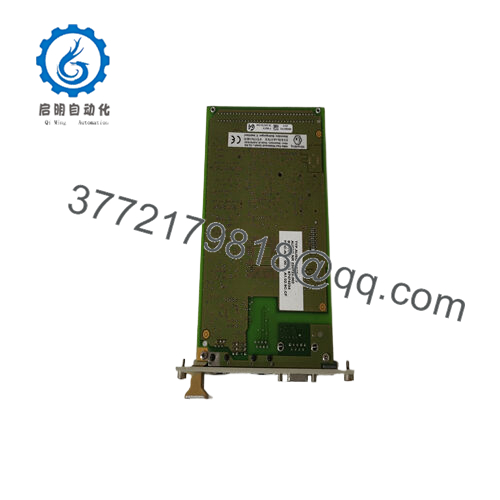
- F7601
5. Installation & Configuration Guide
Stage 1: Pre-Installation Preparation (Approx. 15 minutes)
⚠️ Safety First
- Notify operations before SIS maintenance.
- Place the process in a safe condition.
- Apply lockout/tagout (LOTO).
- Remove cabinet power and wait for discharge time.
Tools Required
- ESD wrist strap
- PH1 screwdriver
- Digital multimeter
- Wire labels
- Smartphone/camera for documentation
Data Backup
- Record current HIMA rack layout.
- Photograph F7601 position.
- Document adjacent modules.
- Record diagnostic information before removal.
- Verify current configuration files.
Stage 2: Removing the Old Module (Approx. 10 minutes)
- Open the safety cabinet access panel.
- Identify the F7601 module location.
- Remove any locking mechanism.
- Pull the module straight outward.
- Inspect:
- Backplane contacts
- Rack connector
- Dust or oxidation
⚠️ Note: Keep the removed module until the replacement completes testing.
Stage 3: Installing the New Module (Approx. 10 minutes)
- Verify the replacement label:
- HIMA F7601
- Correct system family
- Matching hardware revision
- ESD preparation:
- Wear grounded wrist strap.
- Handle PCB surfaces only by edges.
- Install:
- Align module guides.
- Insert evenly.
- Lock the module into position.
- Verify:
- Correct slot location
- Module fully seated
- Locking mechanism secured
- No damaged connectors
Stage 4: Power-On & Testing (Approx. 15 minutes)
- Restore cabinet power.
- Observe system diagnostics.
- Check CPU/system communication status.
- Confirm no rack or bus alarms.
- Perform functional verification according to SIS maintenance procedure.
⚠️ Troubleshooting Notes
- Module not recognized:
- Check rack position.
- Verify module compatibility.
- System communication fault:
- Inspect backplane connection.
- Check configuration database.
- Repeated diagnostic fault:
- Compare firmware and hardware revision.
6. Frequently Asked Questions (FAQ)
Q1: Is HIMA F7601 a CPU module?
No. The F7601 is a HIQuad system module, not a standard PLC processor. The exact role depends on the HIQuad rack configuration and documentation.
Q2: Which HIMA systems use F7601?
The F7601 belongs to the legacy HIQuad safety system family. HIMA safety platforms use modular racks containing dedicated CPU, I/O, communication, and power modules.
Q3: Can I hot-swap HIMA F7601?
Do not assume hot replacement is allowed. Safety system maintenance normally requires controlled shutdown procedures unless the specific HIMA configuration supports live replacement.
Q4: Will removing F7601 delete the safety program?
No, the application logic is normally stored in the system configuration/CPU environment, not inside a simple rack module. However, always verify backups before removing any safety hardware.
Q5: Why is F7601 cheaper than an OEM new part?
Legacy automation components are often supplied from surplus inventory, cancelled projects, or tested industrial stock. Confirm whether the unit is New Original, New Surplus, or Refurbished (tested) before purchase.
Q6: Is HIMA F7601 obsolete?
The F7601 is a legacy HIMA component and availability is usually limited compared with current HIMA platforms. Existing plants often maintain these parts as critical spare inventory.
Q7: What should I confirm before ordering?
Check:
- Exact part number: HIMA F7601
- Existing HIQuad system type
- Rack slot position
- Firmware/configuration compatibility
- Spare part condition
- Test report availability



