
 WhatsApp: +86 16626708626
 Email:
  Phone: +86 16626708626
Description
Key Technical Specifications
| Parameter | Value |
| Model Number | HIMV-134D |
| Board Part Number | CP5001201ABG42 / AP-5000 (Revision e332) |
| Manufacturer | Hitachi Zosen / Hitachi |
| Bus Architecture | VMEbus Standard |
| Processor Type | Real-Time Embedded Microprocessor |
| Memory Interface | Onboard RAM and Non-Volatile Flash/EPROM configuration |
| Backup Battery | Integrated 3 V Lithium cell for SRAM / RTC retention |
| Interface Connections | DIN 41612 standard high-density backplane connectors |
| Communication Channels | Multi-channel Serial RS-232C / High-Speed Host Handshake |
| Form Factor | Standard Eurocard VME Module Width |
| Operating Temperature | 0 to +60°C (32 to 140°F) in cabinet environments |
Product Introduction & Supply Chain Strategy
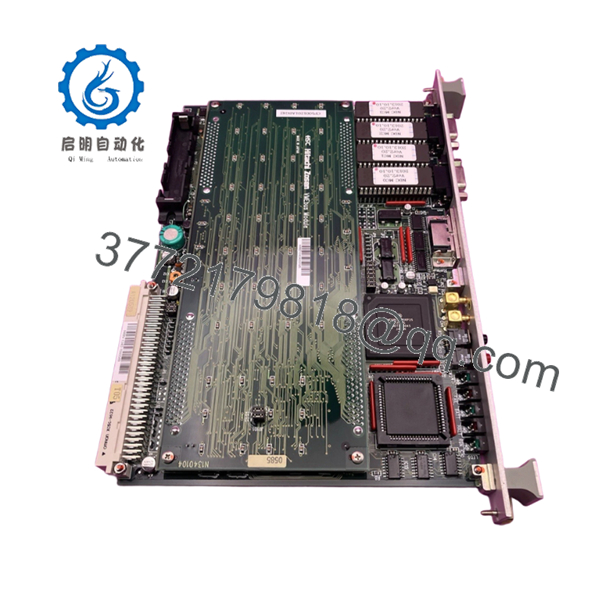
The Hitachi Zosen HIMV-134D (part identification CP5001201ABG42, AP-5000 e332) is a specialized VMEbus processor module deployed in real-time, deterministic control systems for large-scale industrial machinery, factory automation networks, and specialized heavy-engineering systems. Serving as the primary computational hub within the VME rack, this CPU card coordinates high-speed communication across backplane peripheral I/O modules, runs complex control loop logic, and interfaces directly with supervisory networks. Its design features robust noise immunity and highly reliable timing components necessary for continuous-duty manufacturing environments.
Because this hardware belongs to an legacy architectural class, it has reached End-of-Life (EOL) status at the factory level, which creates massive logistical liabilities for plants that rely on it. Acquiring this component as a New Surplus asset represents a strategic approach to Total Cost of Ownership (TCO). This strategy completely eliminates the extended lead times of specialty sourcing channels and protects operations against the vulnerabilities of refurbished hardware—such as weakened timing crystals or degraded backup batteries. Retaining a factory-sealed, uninstalled CPU card on-site provides a vital insurance policy, allowing your engineering staff to restore full plant functionality instantly in the event of an unexpected central processor crash.

- HIMV-134D CP5001201ABG42
Installation & Configuration Guide
Stage 1: Pre-Installation (Prep & Safety)
- Initiate a full lock-out/tag-out (LOTO) procedure on the main power supply feeding the entire VME chassis subrack. Confirm that the rack cooling fans and power indicator LEDs are fully deactivated.
- Secure a grounded, static-dissipative wrist strap around your wrist and connect its termination clamp directly to an unpainted structural member of the equipment enclosure frame.
- Prior to removing the old module, take high-resolution reference photographs of all onboard jumpers, dip switch blocks, socketed EEPROMs, and external front-panel connection cables.
Stage 2: Removal
- Disconnect any serial communication cables or diagnostic interfaces hooked into the front panel of the HIMV-134D.
- Back out the upper and lower retaining thumbscrews that fix the module front panel plate to the VME rack frame.
- Unlatch the injection/ejection levers on the card face. Push the levers outward simultaneously to unlock the high-density DIN connectors from the backplane slots.
- Draw the card straight out along its guide rails, taking care to handle the hardware strictly by the front plate and the edges of the PCB to avoid transferring static charges to components. Put the card directly into an ESD-shielded bag.
Stage 3: Installation (Clone & Seat)
- Carefully remove the New Surplus HIMV-134D CP5001201ABG42 board from its protective anti-static pouch within your designated clean zone.
- Cross-reference the onboard jumper matrices and configuration switch arrays against your reference photographs to ensure the hardware maps identically to your system’s memory address space and interrupt vectors.
- Slide the card smoothly into the designated slot along the upper and lower subrack guide channels.
- Push the module forward until the card-edge connectors make contact with the VME backplane, then swing the injector levers inward to snap the module completely home. Lock down the top and bottom panel screws.
- Reconnect all front-panel interface cables according to your previous connection labels.
Stage 4: Power-On & Testing
- Ensure the immediate slot area is clear of all loose tools, unclip your ESD wrist strap, and secure the enclosure housing.
- Restore power to the VME subrack by switching the primary isolation breaker back on.
- Monitor the front-panel indicator LEDs during the initialization cycle. The system must clear its Power-On Self-Test (POST), bringing a green RUN or Power light to a solid status, while error or fault LEDs must stay entirely dark.
- Check the master HMI console or terminal bus to verify that the system completes its boot sequence and establishes clean data communication handshakes across the VME backplane network.
Firmware/Software Versions & Upgrade Notes
The Hitachi Zosen HIMV-134D relies heavily on non-volatile memory chips that contain specific, machine-dependent system microcode and communication drivers. When introducing a new replacement processor card into a legacy rack, matching the exact firmware version of the original module is mandatory.
Running incompatible system versions across the VME backplane can prompt immediate bus errors, cause system memory address conflicts, or block communications with downstream I/O subassemblies. If your industrial application stores its operating program on socketed EPROM chips, those specialized integrated circuits must be transferred from the old board to the new board with extreme caution regarding pin direction. Never execute an unauthorized system software flash or firmware overwrite during a machine repair window, as any interruption to the power source while flashing memory chips will instantly ruin the processing logic, leaving the board entirely inoperable.
Frequently Asked Questions (FAQ)
Q: Is this board an authentic new component, and how does it differ from a refurbished module?
A: Yes, this Hitachi HIMV-134D is guaranteed to be a Brand New Surplus module. It has never been deployed in an active production environment, never run in a factory subrack, and does not contain repaired trace runs or re-soldered components. Refurbished parts are boards that failed in service and were repaired by swapping out damaged components, which often leaves old, thermal-stressed silicon on the board. Our New Surplus inventory provides the uncompromised reliability and expected service life of an original factory card.
Q: Why does New Surplus inventory cost more than refurbished parts but less than factory list prices?
A: The price reflects the immense strategic value of securing an authentic, unblemished, and immediately available central processor card for legacy industrial systems that are no longer supported by the OEM. Refurbished cards are cheap because they pose a significant operational gamble and could fail without warning. This module provides total system peace of mind and original performance metrics without the premium pricing or the long procurement cycles of factory-direct orders.
Q: Can this processor board be hot-swapped while the VME bus subrack is actively powered up?
A: Absolutely not. The standard VMEbus architecture deployed on the HIMV-134D board does not support hot-swapping. Unseating or inserting the module while the backplane is energized will generate immediate power arcs and massive voltage transients across the data and address lines. This will permanently destroy the onboard processing circuitry and can create a cascade of electrical failures across all adjacent cards in the rack.
Q: What is the purpose of the battery on this card, and is it operational?
A: The onboard 3 V lithium battery is designed to sustain the system’s volatile static RAM (SRAM) memory banks and power the Real-Time Clock (RTC) chip when the main rack power is shut down. Because these boards have been stored as surplus items, we check the battery status during our technical QA lifecycle audit. If a cell shows any voltage drop, it is replaced with a fresh, long-life industrial lithium cell to ensure your configuration retains data properly upon installation.
Q: What type of warranty protection do you provide with this specific Hitachi Zosen hardware?
A: This New Surplus board includes our full 1-year commercial replacement warranty, which begins the day the item ships from our facility. Because we maintain climate-controlled storage facilities and carry out strict physical and electrical verification checks on all incoming components, we guarantee this module will interface seamlessly and run flawlessly inside your machine assembly.



