
 WhatsApp: +86 16626708626
 Email:
  Phone: +86 16626708626
Description
Key Technical Specifications
- Product Type: Engineering Card, always installed in the right-hand slot of a System 57 rack
- Core Function: Provides full maintenance and setup facilities for each fitted channel card; self-validates its own circuit components, software operation, and backplane communications
- Power Routing: Routes the 24 V DC input from the rack’s DC Input Card to the backplane
- Communications: Backplane serial communications controller/monitor, plus an RS232 external engineering interface
- Physical Interface: Mini-DIN socket for connecting a serial printer, computer, or the System 57 Engineering Key
- Security: An Engineering Key is required to unlock functions that alter a channel card’s configuration
- Onboard Clock: Real-time clock provides calibration history logging and overdue-calibration reminders
- Expansion: Socket available for optional special modules that extend System 57 capabilities
- Power Consumption: 1.5 W typical
- DC Supply: 18 to 32 VDC
- Dimensions: 17 cm x 2.5 cm x 13.2 cm
Note: several online listings describe this same part number as an “Analytics Engineering Card for Experion PKS” — that’s a mismatch with an unrelated Honeywell DCS product line and doesn’t match the System 57 documentation or the more detailed distributor listings. Go by the System 57-specific description above.
Product Introduction
The Honeywell 05701-A-0361 Engineering Card is the commissioning and setup card for a System 57 gas detection rack. Fitted permanently in the rack’s right-hand slot, it routes 24 VDC power to the backplane, monitors backplane communications, and gives a technician the tools — via tactile front-panel push-buttons and an Engineering Key — to calibrate and configure every channel card installed elsewhere in the rack.
Because calibration history and overdue-calibration reminders live on this card’s onboard clock, and because reconfiguring any channel requires the physical Engineering Key inserted here, a failed Engineering Card doesn’t just affect one channel — it can leave the whole rack unable to be serviced or recalibrated even while the channel cards themselves keep reporting normally.
Troubleshooting Quick Reference
| Symptom | Possible Cause | Relevance to this Part | Quick Check Method | Recommendation |
|---|---|---|---|---|
| Rack won’t power up at all | Engineering Card not routing 24 VDC to the backplane — could be the card or the DC Input Card feeding it | ✅ High | Measure DC voltage at the DC Input Card output versus at backplane test points | Isolate whether the fault is upstream at the DC Input Card or on the Engineering Card itself |
| Can’t calibrate or reconfigure any channel | Engineering Key not recognized, or a card-level fault | ✅ High | Confirm the Engineering Key is fully seated in the mini-DIN socket; try a known-good key | If a known-good key still fails, the fault is on the Engineering Card |
| Calibration due-date reminders missing or wrong | Onboard clock or its backup power has failed | ⚠️ Medium | Check the displayed date/time against actual current date/time | A drifted or reset clock points to a clock/backup fault on the card |
| RS232 external interface won’t communicate with a laptop or printer | Cable fault, wrong terminal settings, or a card-level communications fault | ❌ Low | Verify cable wiring and terminal software settings first | Rule out cabling and settings before replacing the card |
| Rack reports a backplane communications fault | Card not fully seated, or a backplane connector issue | ⚠️ Medium | Reseat the card fully and inspect backplane connector pins for damage | Reseat before assuming the card itself has failed |
If these checks don’t resolve the issue, contact technical support with the specific fault indication and confirm whether other channel cards in the rack are still reporting normally.
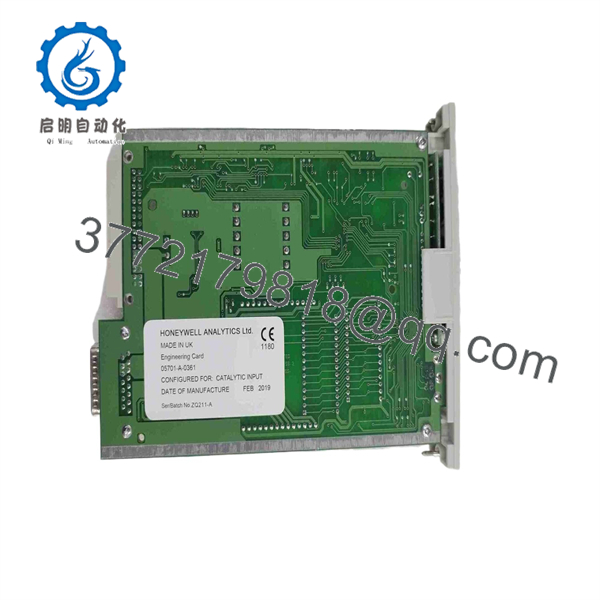
05701-A-0361
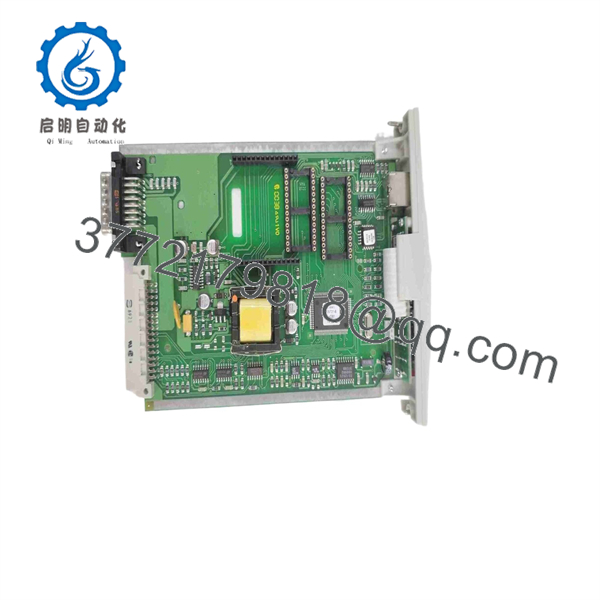
05701-A-0361
Frequently Asked Questions (FAQ)
If this card fails, does the rest of the rack stop working too?
Channel cards typically keep reporting and alarming normally even if the Engineering Card fails, since day-to-day monitoring runs independently. What you lose is the ability to calibrate, reconfigure, or service any channel until the Engineering Card is replaced — so treat a failure here as urgent even if nothing else looks obviously wrong.
Do I need the physical Engineering Key to use this card?
Yes, for any function that alters a channel card’s configuration or calibration. Day-to-day monitoring doesn’t require it, but commissioning, recalibration, and setup changes all need the key inserted.
Will my calibration history transfer if I swap in a replacement Engineering Card?
No. Calibration history and overdue-reminder tracking live on this card’s onboard clock and memory. Document your current calibration records separately before swapping, since a replacement card starts without that history.
Do I need one of these fitted for the rack to work at all?
Given that this card routes the 24 VDC supply to the backplane, a System 57 rack is generally not expected to power the rest of its cards without one fitted. Don’t run a rack without an Engineering Card installed and assume it’ll work — verify against your specific rack documentation.
Is this card specific to a particular rack size, like 8-way versus 16-way?
Confirm against your specific System 57 rack configuration before ordering — the Engineering Card function is generic across the platform, but rack sub-types vary, and it’s worth verifying compatibility rather than assuming.
Why do some sites describe this part number as an “Experion PKS Analytics Engineering Card”?
That description doesn’t match the System 57 platform this card actually belongs to — it appears to be a mismatch with a different, unrelated Honeywell product line. Go by the System 57-specific function described here.
What warranty should I expect?
Terms vary by seller — some offer standard one-year coverage, others extend further on tested surplus. Given how central this card is to servicing an entire rack, confirm what testing was done before it shipped, not just the warranty length.



