
 WhatsApp: +86 16626708626
 Email:
  Phone: +86 16626708626
Description
Key Technical Specifications
| Parameter | Value |
|---|---|
| Manufacturer | Honeywell |
| Part Number | 51402497-200 |
| Product Name | Enhanced Operator Keyboard / Operator Keyboard Assembly |
| System Family | Honeywell TDC 3000, OEP, UWS, GUS, PlantScape, and approved Experion PKS migrations |
| Primary Function | Operator command entry, process-interface navigation, and alarm annunciation |
| Assembly Type | Keyboard tray assembly |
| Keyboard Membrane | Honeywell 51401560-100 QWERTY membrane |
| Internal Electronics | Honeywell 51401952-200 |
| Alarm Device | 51196650 alarm module / beeper mounted inside tray |
| Connector 1 | 9-pin male connector |
| Connector 2 | PS/1 keyboard connector |
| Associated Keyboard Cable | Honeywell 51305418-100 OEP keyboard cable |
| Known Firmware Example | FW-03-14 shown on a Rev. F used unit listing |
| Known Revision Example | Rev. F shown on a used unit listing |
| Reported Assembly Weight | Approximately 4 kg to 5 kg, depending on listing and packaging |
| Adapter Compatibility | OEP/IKB adapter use with GUS, PlantScape, or Experion PKS systems |
| Software Requirement for OEP/IKB Adapter | PlantScape R500 or Experion PKS R100 and later |
| Compliance Variant | CE version listed as UWS Keyboard Tray-CE; confirm exact unit label before purchase |
Honeywell documentation identifies 51402497-200 as the Enhanced Operator Keyboard used with the OEP/IKB adapter arrangement. It specifies the 51305418-100 OEP keyboard cable and states adapter compatibility with OEPs used on GUS, PlantScape, and Experion PKS systems, subject to the stated software-release requirements.
Product Introduction
The Honeywell 51402497-200 is an Enhanced Operator Keyboard assembly for Honeywell TDC 3000 operator environments. It provides the physical operator interface for command entry, display navigation, alarm acknowledgement, and process-control interaction. The assembly includes a QWERTY membrane, internal keyboard electronics, and an alarm module or beeper.
This keyboard is normally purchased as an exact replacement for a failed, worn, or contaminated operator-station keyboard. It matters because legacy TDC 3000 consoles often depend on the correct keyboard electronics, cable type, and software interface—not just a mechanically similar QWERTY device. Verify the installed connector arrangement, firmware, keyboard cable, and console architecture before ordering.
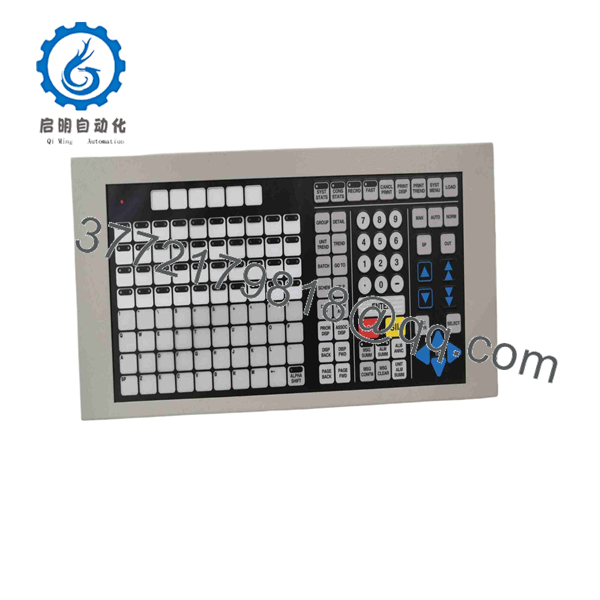
51402497-200
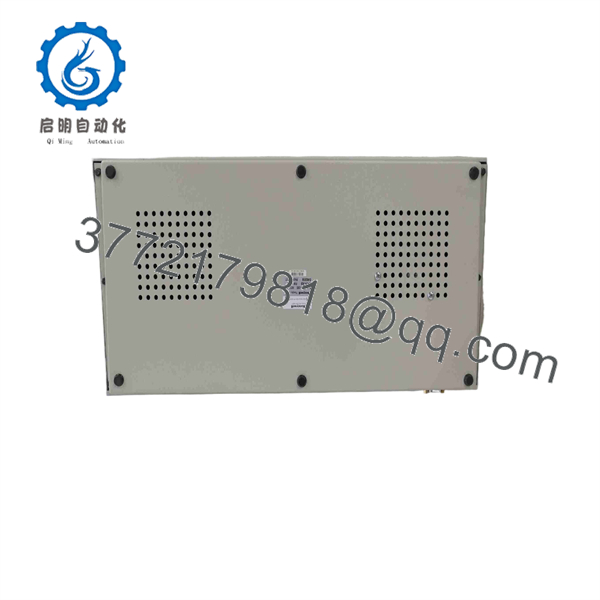
51402497-200
Troubleshooting Quick Reference
| Symptom | Possible Cause | Relevance to This Part | Quick Check Method | Recommendation |
|---|---|---|---|---|
| No keys respond | Disconnected keyboard cable, failed keyboard electronics, damaged membrane, incorrect workstation interface | ✅ High | Power down according to the approved console procedure; inspect the 9-pin and PS/1 connectors, cable retention, and visible cable damage | Reseat or replace the keyboard cable before replacing the keyboard assembly |
| Only certain keys fail | Worn or damaged membrane trace, contamination, liquid ingress, damaged overlay | ✅ High | Use a controlled keyboard test or approved operator-station diagnostic; document every non-responsive key | Replace the keyboard assembly if repeated tests confirm localized membrane failure |
| Alarm beeper does not sound | Failed alarm module, disabled workstation alarm setting, damaged speaker connection, software configuration issue | ⚠️ Medium | Confirm that active alarms exist and verify operator-station alarm settings; inspect the internal 51196650 alarm-module connection during approved maintenance | Check configuration first; replace the assembly only if hardware failure is confirmed |
| Keyboard enters wrong characters | Incorrect keyboard mapping, failing membrane matrix, damaged electronics, interface communication issue | ✅ High | Compare entered keys with the configured keyboard map; test with a known-good compatible keyboard assembly if available | Verify workstation configuration and replace the keyboard if incorrect mapping persists |
| Intermittent key response | Loose cable, damaged connector contact, membrane wear, vibration, cracked solder joint | ✅ High | Inspect cable ends, connector pins, strain relief, and keyboard response while gently moving the cable during an approved outage | Replace damaged cable or keyboard assembly after confirming intermittent behavior |
| Keyboard fails after workstation upgrade | Unsupported adapter, unsupported software release, incorrect cable, incompatible console architecture | ⚠️ Medium | Confirm OEP/IKB adapter hardware and software compatibility; verify PlantScape or Experion release level | Use the approved adapter and supported software release before replacing hardware |
| Console responds slowly but keys work | Workstation performance, network delay, server issue, display process, application fault | ❌ Low | Check workstation CPU load, network status, display behavior, and system diagnostics | Do not replace the keyboard; troubleshoot the operator station and network |
| Keyboard is physically damaged | Worn membrane, cracked housing, missing keys, corroded connector, liquid contamination | ✅ High | Inspect the keyboard tray, membrane, connectors, cable entry point, and alarm-module area | Replace the assembly and correct the contamination or handling cause |
Field warning: If the operator station is slow, frozen, or intermittently disconnects from the process-control network, the keyboard is usually not the root cause. A working keyboard can appear dead when the console, workstation interface, cable, network path, or application process is faulted. Confirm the workstation status before ordering a keyboard.
❗ Cable mismatch causes false failures: Honeywell identifies 51305418-100 as the OEP keyboard cable associated with the 51402497-200 Enhanced Operator Keyboard. Check the cable end types, connector retention, pin condition, and console interface before condemning the keyboard itself.
❗ Do not substitute a standard PC keyboard: The 51402497-200 is an operator keyboard assembly with specific internal electronics, alarm functionality, and industrial-console connections. A consumer USB or PS/2 keyboard may not provide the required interface, alarm behavior, mechanical mounting, or key mapping.
❗ Membrane wear is usually mechanical: Operators may report a “system problem” when the actual issue is one worn acknowledgement, enter, cursor, or function key. Test every key. Record failed keys before removal. Do not replace the whole workstation when a keyboard membrane is the failed item.
❗ Firmware and revision control: A used listing identifies a Rev. F keyboard with FW-03-14. That does not establish universal compatibility, but it confirms that revision and firmware labels exist and should be documented before replacement.
❗ Adapter compatibility is not automatic: The OEP/IKB adapter documentation lists support for GUS, PlantScape, and Experion PKS systems, with PlantScape R500 and Experion PKS R100 or later specified for software compatibility. Confirm the installed environment before planning a migration or interface change.
❗ No live connector work: Do not plug or unplug keyboard interfaces casually while the console is in operation. Follow the site-approved operator-station maintenance procedure. A loose or damaged connector can create intermittent commands, nuisance alarms, or a temporary loss of operator input.
Keep these checks in mind and you will save yourself 90% of typical rework time. If the fault remains unclear, provide technical support with photos of the full keyboard label, connector ends, keyboard cable, failed-key list, console model, software version, and any operator-station diagnostic message.
Frequently Asked Questions
What is Honeywell 51402497-200?
Honeywell 51402497-200 is an Enhanced Operator Keyboard assembly used with Honeywell TDC 3000 operator environments. The assembly includes the 51401560-100 QWERTY membrane, 51401952-200 electronics, and a 51196650 alarm module or beeper inside the keyboard tray.
Is 51402497-200 a standard PC keyboard?
No. It is an industrial operator keyboard assembly for Honeywell DCS applications. It includes application-specific electronics, alarm annunciation hardware, and legacy connectors. A regular consumer keyboard may physically resemble its QWERTY layout but is not a direct electrical, mechanical, or functional replacement.
Which cable works with the 51402497-200 keyboard?
Honeywell’s OEP/IKB adapter documentation identifies 51305418-100 as the OEP keyboard cable used with the 51402497-200 Enhanced Operator Keyboard. Confirm the actual console-side adapter, cable length, connector type, and pin condition before ordering.
Can I use this keyboard with Experion PKS?
Potentially, but not as a blind direct connection. Honeywell documents OEP/IKB adapter compatibility for OEPs used on GUS, PlantScape, and Experion PKS systems. The same documentation specifies PlantScape R500 and Experion PKS R100 or later for the adapter’s software compatibility. Verify the installed adapter hardware and workstation architecture first.
Can I hot-swap the 51402497-200 keyboard?
Do not assume it is hot-swappable. The keyboard itself does not control the process, but disconnecting it during console operation can interrupt operator commands and may cause the workstation to require an interface reset. Follow the site maintenance procedure, place the operator station in an appropriate maintenance state, and coordinate with the control-room team before replacement.
Why is the alarm beeper not working?
First confirm the alarm is configured to sound at that workstation. Then check the keyboard cable, connector seating, operator-station audio or alarm configuration, and the internal alarm-module connection. The 51402497-200 assembly includes a 51196650 alarm module or beeper, but a missing sound can also result from configuration or console-side faults.
Will replacing the keyboard affect the TDC 3000 configuration?
Normally, the keyboard replacement should not alter controller strategies, process database configuration, or field I/O programming. However, you should record workstation settings, keyboard mapping, software revision, and alarm configuration before replacement. If the station requires an adapter or interface driver, confirm the installed software version and compatibility first.
Is Honeywell 51402497-200 obsolete?
Yes. Treat it as a legacy TDC 3000 operator-interface spare. Current availability is generally through surplus, refurbished, or used inventory. Listings show condition differences, including new-in-box, new surplus, and used hardware with revision and firmware labels, so confirm the exact offered unit before purchase.
Why is a New Surplus keyboard cheaper than a factory replacement?
New Surplus inventory can come from unused maintenance stock, a cancelled upgrade project, warehouse liquidation, or decommissioned-system spares. It may be unused but not factory sealed. With an operator keyboard, inspect the membrane carefully. Storage age, UV exposure, adhesive deterioration, connector oxidation, and beeper condition matter as much as external appearance.
What testing should a supplier perform before shipment?
Request a test record tied to the actual Honeywell 51402497-200 unit:
- Verify the exact 51402497-200 label, revision, firmware label, and CE or non-CE identification
- Photograph the membrane, function keys, housing, tray, 9-pin male connector, PS/1 connector, and cable interface
- Inspect for membrane cracking, worn legends, liquid damage, UV yellowing, connector corrosion, bent pins, and missing hardware
- Test every key, including alphabetic, numeric, cursor, function, alarm acknowledgement, and command keys
- Confirm correct key mapping on a compatible Honeywell OEP, workstation interface, or approved test fixture
- Verify alarm-beeper operation and internal 51196650 alarm-module connection
- Test the 9-pin and PS/1 interface connections for stable response during an extended run
- Pack the keyboard in an ESD-safe bag with foam protection around the membrane and connectors
- Provide test photos or video, QC sign-off, actual-unit photographs, and written warranty terms
Test photos and videos should be available upon request. A keyboard that merely powers up is not fully tested; every operator command key and the alarm annunciator should be verified before shipment.



