
 WhatsApp: +86 16626708626
 Email:
  Phone: +86 16626708626
Description
Key Technical Specifications
| Parameter | Value / Specification |
| Manufacturer | Honeywell (Experion PKS Series C) |
| Part Number | CC-TCNT01 / 51305907-175 |
| Module Type | ControlNet Interface Module |
| Communication Rate | 5.0 Mbd |
| Physical Interface | Dual BNC Coaxial (Channel A & Channel B Redundancy) |
| Backplane Input Power | 24 V DC nominal (via I/O Termination Assembly) |
| Power Dissipation | 4.8 W maximum |
| Operating Temperature | 0°C to +60°C (32°F to 140°F) |
| Storage Temperature | −40°C to +85°C (−40°F to 185°F) |
| Relative Humidity | 5% to 95% non-condensing |
| Mounting Hardware | Plugs into C300 Series C Input/Output Termination Assembly (IOTA) |
| Conformal Coating | Standard (ISA S71.04 Class G3 compliant) |
Product Introduction
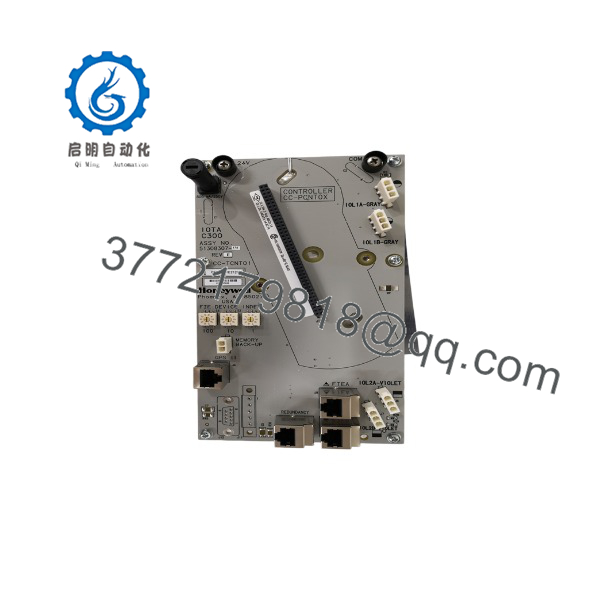
The Honeywell CC-TCNT01 (51305907-175) is a high-speed ControlNet communication module engineered for Experion PKS Series C automation systems. It installs directly onto the Series C Input/Output Termination Assembly (IOTA), providing a deterministic 5 Mbd interface between C300 controllers, remote I/O blocks, and plant-wide network infrastructure.
Designed for high-availability process plants, the unit integrates dual BNC coaxial connectors to execute seamless, redundant physical layer communications. The board features standard conformal coating to protect internal circuitry against corrosive industrial environments up to ISA S71.04 Class G3 levels, making it the preferred standard for oil, gas, and chemical processing facilities.
Troubleshooting Quick Reference
| Symptom | Possible Cause | Relevance to this Part | Quick Check Method | Recommendation |
| Channel A/B LED Off | No network activity or disconnected BNC cable | ❌ Low | Check RG-6 coaxial cable tension; measure signal attenuation with a ControlNet tap meter. | Verify cable segment length and 75-ohm terminating resistor health before replacing module. |
| Red Status LED Solid | Hardware memory fault or POST failure | ✅ High | Read C300 system diagnostic logs in System Administration. Run a soft reset via software. | If red light persists after power cycle, internal hardware failure occurred; replace module. |
| Intermittent Packet Loss | Loose IOTA connection or faulty BNC tap connector | 🟡 Medium | Inspect physical mounting screws; inspect BNC pins for oxidation or bending. | Reseat module into IOTA slot and re-torque mounting screws. Clean connectors with contact cleaner. |
| Fault LED Flashing (1 Hz) | Firmware incompatibility or unconfigured node address | 🟡 Medium | Check MAC ID address assignment against software project tree in Experion Builder. | Flash correct firmware revision or match the node address in the project configuration. |
Note: If system diagnostic logs indicate physical channel dropouts, verify your 75-ohm end-of-line terminators before swapping the module. If software fails to recognize the card slot entirely, contact technical support with screenshot captures of your C300 error logs and module status LEDs.
CC-TCNT01
CC-TCNT01
Frequently Asked Questions (FAQ)
Can I hot-swap the CC-TCNT01 module while the C300 controller is running under load?
Yes. The CC-TCNT01 supports Live Insertion and Removal (LIR) on compatible Series C IOTAs. However, if your ControlNet network is non-redundant and actively communicating process control variables, removing the module breaks that specific link immediately. Always confirm your network redundancy status in Experion Diagnostics before pulling the module. Wear a grounded wrist strap during removal.
What is the difference between CC-TCNT01 and older Series A/B ControlNet modules?
The CC-TCNT01 is built specifically for Series C form-factor hardware, featuring vertical mounting, reduced panel footprint, integrated tilt-up design, and factory-applied conformal coating as standard. Older Series A/B modules use standard rack mount chassis with different backplane connectors and are physically non-interchangeable with Series C IOTAs.
Does this replacement card require firmware flashing before deployment?
It depends on your current Experion PKS software release. We ship units with standard factory firmware (typically corresponding to common base releases). If your C300 controller runs a specific control processor software load, you must use Honeywell Experion Controlbuilder to flash the CC- to match your system revision. Running mismatched firmware revisions often causes “Configuration Mismatch” system alarms.
Why is this unit priced lower than ordering directly through factory channels?
This unit is New Surplus stock. It comes from cancelled project inventories, system upgrades, or excess OEM spare allotments. The hardware is 100% genuine Honeywell original equipment, fully inspected, and functional, but it bypasses standard OEM supply chain markups. We back every surplus unit with our own 1-Year replacement warranty.
What is the single most common installation mistake technicians make with this card?
Failing to verify network termination. Engineers frequently replace a CC- card, reconnect the BNC taps, and still see channel errors because a 75-ohm terminating resistor on the local tap assembly was bumped or corroded. Always check that your ControlNet coaxial segment ends are correctly terminated with 75-ohm loads using a multimeter before declaring the replacement fixed.



