
 WhatsApp: +86 16626708626
 Email:
  Phone: +86 16626708626
Description
Key Technical Specifications
| Parameter | Value |
|---|---|
| Manufacturer | Honeywell |
| Series | DC1000 |
| Base Model | DC1020CL |
| Product Type | Microprocessor-based PID temperature/process controller |
| Mounting Format | 1/16 DIN panel mount |
| Front Dimensions | 48 × 48 mm |
| Display | Dual display with bar-graph indication, option/configuration dependent |
| Control Modes | Automatic and manual |
| Control Functions | PID control, auto-tuning, setpoint programming, alarm handling |
| Supported Process Variables | Temperature, humidity, pressure, flow, and other scaled process signals |
| Input/Output Options | Depend on the complete ordering code; models may use thermocouple, RTD, linear voltage, or 4–20 mA inputs and relay, SSR-drive, analog, or other outputs |
| Communications | Optional RS-232 or RS-485; ASCII and Modbus RTU listed for applicable configurations |
| Front-Panel Protection | IP65 front face listed for the DC1000 family |
| Approvals | CE and cUL listed for the family |
| Full Model Requirement | Confirm the complete suffix, such as DC1020CL-102-000-E or DC1020CL-302-000-E, before ordering |
Honeywell identifies DC1020CL as part of its DC1000 microprocessor-based controller family, which supports PID control, auto-tuning, manual/automatic operation, setpoint programming, alarms, and optional RS-232 or RS-485 communications using ASCII or Modbus RTU on applicable versions. The DC1020CL base designation alone does not establish the input type, control-output type, alarms, supply voltage, or communication hardware; those are encoded in the full part number.
For example, reseller data for DC1020CL-302-000-E lists a 48 × 96 mm form factor, 4–20 mA linear input, 4–20 mA output, two alarms, and 100–240 V AC or 15–50 V DC power options. That configuration must not be assumed for every controller carrying the shorter DC1020CL marking.
Product Introduction
Honeywell DC1020CL is a DC1000 Series microprocessor-based PID controller used for panel-mounted temperature and general process control. Depending on the complete ordering code, it can accept temperature or linear process signals and control heaters, cooling circuits, valves, drives, or other final elements through configured discrete or analog outputs.
The important detail is the full suffix. A -102-000-E, -302-000-E, and -701000-E can have different input, output, alarm, power, and communication combinations. Match the complete label before buying a replacement.
Troubleshooting Quick Reference
| Symptom | Possible Cause | Relevance to This Part | Quick Check Method | Recommendation |
|---|---|---|---|---|
| Display is completely blank | Missing supply voltage, blown fuse, loose panel wiring, failed power supply, or failed controller | ✅ High | Measure the supply directly at the controller power terminals using the wiring diagram. Confirm the voltage matches the full model’s rated AC or DC supply requirement. | Check upstream fuses, disconnects, and terminal torque before replacing the controller. |
| Display powers up but shows sensor error | Open thermocouple, reversed thermocouple polarity, open RTD lead, wrong input type, broken 4–20 mA loop, or failed input circuit | ✅ Medium | Verify the configured input type against the sensor installed. Measure sensor continuity or loop current at the input terminals with the process safely isolated. | Correct sensor wiring and input configuration first. Replace the controller only if a known-good simulated signal still produces an error. |
| Temperature reading is inaccurate | Wrong sensor type, incorrect decimal/scaling setting, poor thermocouple extension wire, RTD lead-resistance error, ground loop, or calibration drift | ✅ Medium | Compare the displayed process value with a calibrated reference thermometer or process calibrator. Check the configured sensor/input parameter. | Verify configuration before calibration or replacement. A Type K controller configured for Pt100 will never read correctly. |
| Controller reads correctly but does not heat | Output disabled, low setpoint, alarm/interlock active, failed SSR, relay, contactor, heater fuse, broken heater, or failed control output | ✅ Medium | Raise the setpoint within an approved test range. Check output indication, then measure the controller output and downstream power circuit. | Trace from controller output to final element. Do not replace until the SSR, contactor, fuse, and heater have been checked. |
| Process overheats | Output wired incorrectly, relay contacts welded, SSR shorted, wrong heat/cool action, incorrect PID parameters, sensor installed in the wrong location, or failed controller output | ✅ High | Put the process in a safe state. Remove the command if permitted and check whether output voltage remains active. Verify control action and wiring against the application drawing. | Investigate the power-switching device first. A shorted SSR is a common cause of continuous heating even when the controller output is off. |
| Output cycles rapidly | PID tuning too aggressive, sensor noise, short cycle time, undersized heater, incorrect control mode, or poor sensor location | ❌ Low to Medium | Trend PV, setpoint, and output percentage. Run auto-tune only when the process is stable and within safe operating limits. | Adjust PID parameters or use the approved auto-tune procedure. Do not replace the controller for a tuning problem. |
| “Manual” operation appears stuck | Controller remains in manual mode, manual output percentage set incorrectly, key lock enabled, or external remote setpoint/control source active | ❌ Low | Review mode indicator, manual output value, parameter lock status, and any remote-control wiring/configuration. | Return to automatic mode only after confirming the commanded output is safe for the process. |
| Communication fails | Wrong RS-232/RS-485 hardware option, incorrect address, baud rate mismatch, A/B polarity reversed, termination issue, or Modbus register mismatch | ✅ Low to Medium | Confirm the controller’s complete part number includes the required communication option. Check baud rate, parity, slave address, wiring polarity, and bus termination. | Do not assume communications are installed on all models. Verify the option code first. |
| Front keys do not change settings | Parameter lock active, engineering-level access required, local setpoint disabled, remote setpoint selected, or keypad fault | ❌ Low | Check lock parameters and operator-level access settings. Review whether remote setpoint mode is enabled. | Unlock only under site authorization. Do not bypass locked limits on a safety-critical thermal process. |
❗ Do not order from “” alone. This is the most common procurement error with DC1000 controllers. The complete suffix determines the electrical configuration. A replacement can fit the 1/16 DIN cutout and still be wrong for the sensor, control output, alarm wiring, supply voltage, or communications.
❗ Verify the input before powering up. A thermocouple, RTD, 0–10 V, and 4–20 mA signal are not interchangeable. Applying external loop power or the wrong signal type to the wrong terminals can damage the input stage.
❗ Check the final control element before blaming the controller. A controller that shows “output off” while a heater stays energized usually has a welded contactor or failed-short SSR downstream. Replacing the panel controller will not fix that fault.
If you need help identifying the exact unit, provide clear photos of the full front label, side label, terminal diagram, installed sensor wiring, supply terminals, and the current parameter screens.
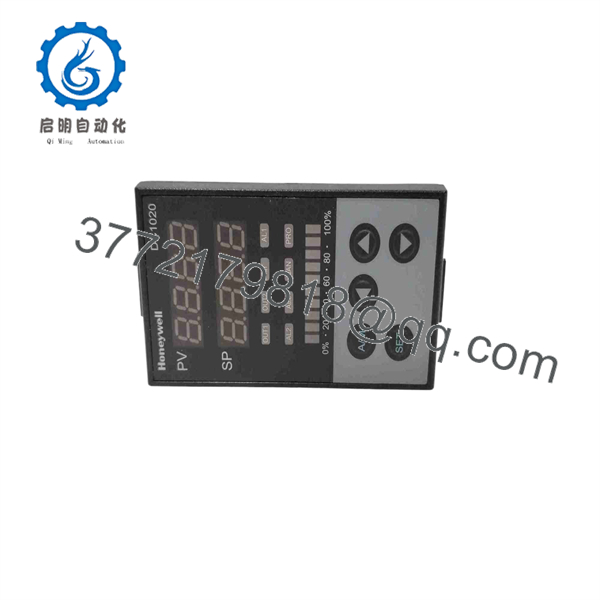
DC1020CL
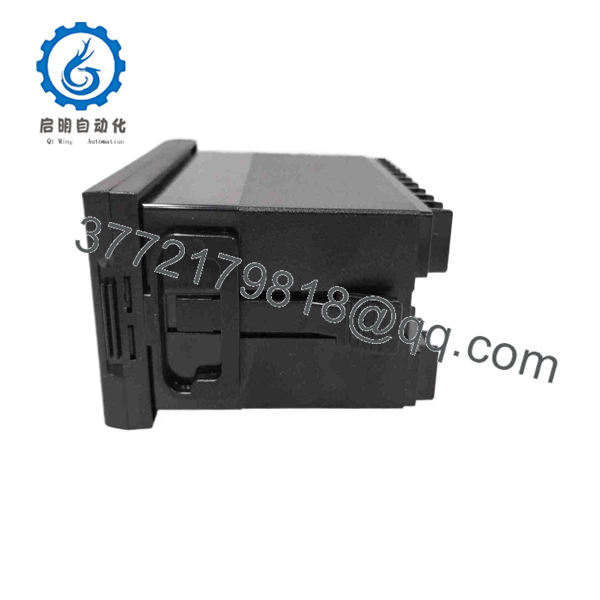
DC1020CL
Frequently Asked Questions (FAQ)
What is Honeywell ?
Honeywell is a base-model designation for a DC1000 Series digital PID controller. The family is intended for temperature and general process applications, including temperature, humidity, pressure, flow, and other scaled process variables. It provides configurable PID control, auto-tuning, alarms, setpoint functions, and manual or automatic operation.
Is a complete orderable part number?
No. is not enough to guarantee a compatible replacement. Honeywell controllers use a longer ordering code that defines their hardware configuration. Listings show examples such as -101000-E, -102-000-E, -111-000-E, -302-000-E, and -312-000-E.
Before ordering, match the full code exactly from the side or rear label.
What input types can a use?
The family can be configured for temperature and linear process signals, but the installed input depends on the full model code. For example, a reseller listing for -302-000-E identifies a linear 4–20 mA input. Other configurations may be intended for thermocouple, RTD, voltage, or different linear-current signals.
Do not move field wires to a replacement until you confirm its input specification. A 4–20 mA loop controller cannot be substituted for a thermocouple controller without engineering changes.
Does support Modbus RTU?
Some configurations provide RS-232 or RS-485 communication and support ASCII and Modbus RTU protocols. Communication is option-dependent. Check the complete part number, terminal layout, and setup menu; a standard unit without the communications hardware cannot be converted with a parameter change.
Can I replace a with another 1/16 DIN controller?
Physically, another 48 × 48 mm controller may fit the panel opening. Electrically and functionally, it may not be a replacement. You must compare:
- Sensor or analog input type and sensor range
- AC or DC supply requirement
- Control-output type: relay, SSR drive, 4–20 mA, voltage pulse, or other
- Alarm count and alarm contact ratings
- Heat/cool action and PID behavior
- Remote setpoint requirement
- RS-232 or RS-485 and Modbus RTU needs
- Terminal assignment and wiring
- Panel cutout and depth
A unit that fits the hole but has a different output type can cause an extended outage. Verify the terminal diagram, not just the front-panel size.
Will I lose PID settings when replacing the controller?
Yes, unless you document and restore them. Record the setpoint, input range, control direction, PID values, cycle time, alarm values, output limits, manual output setting, communication address, baud rate, and any lock parameters before removal.
Auto-tune can help establish initial values, but it should not be treated as a substitute for the plant’s proven tuning. On thermal systems with slow response, an uncontrolled auto-tune can take hours and may push the process outside its preferred operating range.
Can I hot-swap a Honeywell ?
No. It is a panel-mounted process controller with live supply and field wiring. Isolate the controller supply and place heaters, cooling valves, drives, or other final elements in a safe state before disconnecting it.
It is a common rookie mistake to pull a controller while the heater circuit is still live. That can cause exposed terminals, unexpected output behavior, blown fuses, or process upset. Lock out the supply, verify absence of voltage, and label every wire.
Why is a New Surplus less expensive than factory supply?
New Surplus usually means unused inventory from a distributor, project, OEM panel shop, or warehouse liquidation. It may have a lower price because it is older inventory, lacks current OEM support, or is sold through a secondary-market channel. It is not automatically equivalent to factory-sealed current production.
Request clear evidence of condition:
- New Original / New Surplus: Actual photos of the full label, front bezel, terminals, packaging, and accessories
- Factory Sealed: Original unopened package; request seal and date-code photos
- Refurbished (tested): Previously installed unit that has passed functional testing
- Used, untested: No demonstrated functional verification; highest procurement risk
What testing should a supplier perform before shipping?
For the exact full model, request a documented test that includes:
- Label verification for the complete ordering code
- Visual inspection of display, keypad, terminals, case, seals, and mounting hardware
- Power-up test using the correct rated supply
- Keypad, display, alarm, and parameter-access verification
- Input simulation using the correct signal type, such as thermocouple simulator, RTD simulator, or 4–20 mA loop calibrator
- Output test at programmed setpoint conditions
- Alarm-output test and relay-contact verification where fitted
- Communication test using the installed RS-232 or RS-485 option, if applicable
- ESD-safe packaging, final QC sign-off, and dated photos or video on request
Ask the supplier to state the exact part number tested. A generic “DC1020 tested” claim does not confirm that your input and output configuration was tested.



