
 WhatsApp: +86 16626708626
 Email:
  Phone: +86 16626708626
Description
Key Technical Specifications
| Parameter | Specification |
| Part Number | 00-104-196 (00104196) |
| Communication Protocol | DeviceNet (Master/Scanner and Slave capability) |
| Channels | 2 Independent LPDN Channels (Dual Port) |
| Controller Compatibility | KUKA KR C1, KR C1A, KR C2, and KR C2 Edition2005 |
| Baud Rates | 125 kbps, 250 kbps, 500 kbps (software selectable) |
| Interface Slot | ISA / PCI Controller Rack Expansion Slot |
| Connector Type | Dual 5-pin open style / Phoenix-style DeviceNet connectors |
| Operating Temperature | 0°C to +55°C |
| Status Indication | Onboard Diagnostic LEDs (Power, Module Status, Network Status) |
Product Introduction & Supply Chain Strategy
The KUKA 00-104-196 is a 2-channel LPDN DeviceNet scanner board designed for integration into KUKA KRC1 and KRC2 robot controllers. It manages real-time fieldbus communication between the robot CPU and external automation devices, including weld controllers, end-of-arm tooling (EOAT), I/O blocks, and safety interlocks.
Procuring this module as New Surplus ensures immediate system recovery during unscheduled robot cell outages, bypassing extended factory lead times for discontinued legacy parts. Selecting genuine New Surplus over high-risk refurbished boards eliminates hidden component degradation and connector solder fatigue, maintaining high robot cell availability and optimizing Total Cost of Ownership (TCO).
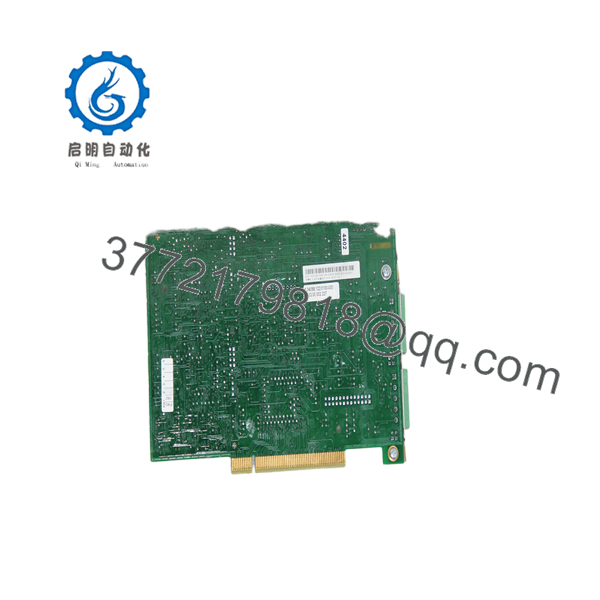
00-104-196
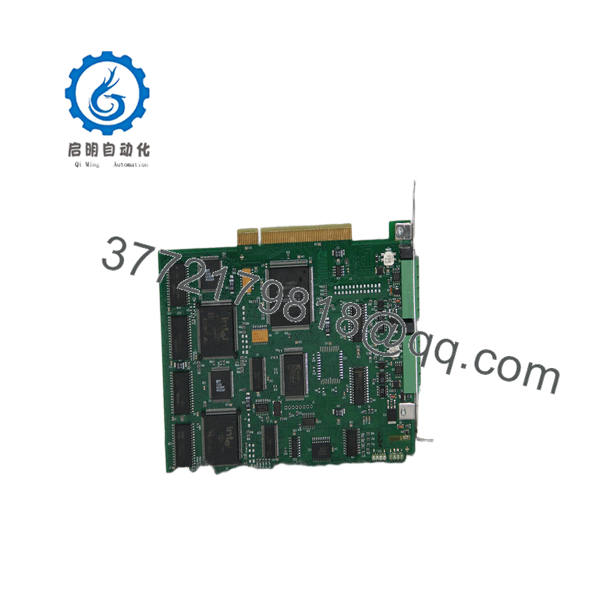
00-104-196
Installation & Configuration Guide
Stage 1: Pre-Installation (Prep & Safety)
- De-energize the KUKA KRC controller and perform Lock-Out/Tag-Out (LOTO) on the primary power disconnect switch.
- Put on a grounded ESD wrist strap connected to the metal chassis of the controller cabinet.
- Record the node addresses (MAC IDs), baud rates, and bus termination settings configured in the
iosys.inianddevnet.inifiles.
Stage 2: Removal
- Disconnect the 5-pin DeviceNet channel connectors from the front bracket of the board.
- Remove the retaining screw holding the card bracket to the controller slot frame.
- Carefully pull the 00-104-196 card straight out from the backplane slot to prevent bending edge connector contacts.
Stage 3: Installation (Clone & Seat)
- Inspect the new 00-104-196 card to ensure jumper or switch settings match the original hardware revision.
- Align the card with the card guide rails and seat it firmly into the slot socket.
- Tighten the bracket retaining screw and reattach the 5-pin DeviceNet field wiring plugs.
Stage 4: Power-On & Testing
- Power up the KRC controller and observe the boot sequence on the KUKA Control Panel (KCP).
- Verify that the Module Status (MS) and Network Status (NS) LEDs on the card display solid green.
- Perform a cold start or driver re-initialization to confirm zero driver errors (e.g., “DeviceNet driver error”) appear on the KCP display.
Firmware/Software Versions & Upgrade Notes
- Driver Configuration: Ensure the
[DEVICENET]section iniosys.inicorrectly targets the driver path (dnw32.iniordnw32.sys) corresponding to your KUKA System Software (KSS) version. - Compatibility Notice: Running KSS version 4.x or 5.x requires matching driver files for 2-channel LPDN boards. Mismatched driver DLLs can prevent the card from initializing on controller boot.
- Replacement Warning: Do not alter the bus termination resistors (120 Ω) at the physical ends of the trunk line when replacing the card. Missing or double termination will cause intermittent network dropouts and bus-off conditions.
Frequently Asked Questions (FAQ)
Q: Is this KUKA 00-104-196 DeviceNet board brand new?
A: Yes. This module is 100% New Surplus / Original New stock. It has never been deployed in active robotic manufacturing, pulled from a scrap line, or refurbished. It remains in immaculate condition with clean connector gold fingers.
Q: Why pay a slight premium for New Surplus instead of a refurbished card?
A: Industrial robots operate under severe electrical noise and vibration environments. Refurbished PCI/ISA cards frequently carry heat-stressed logic ICs and weakened trace solder joints that lead to erratic “Bus Off” shutdowns. New Surplus guarantees original OEM reliability and eliminates multi-thousand-dollar downtime events.
Q: How is this legacy KUKA board verified before shipment?
A: Every 00-104-196 board undergoes visual connector inspection, backplane continuity verification, and power-on handshake testing in a live test rack before ESD-safe sealing and shipment.
Q: Can I hot-swap the 00-104-196 card while the KRC cabinet is powered?
A: No. Standard ISA/PCI slots inside KRC1 and KRC2 cabinets do not support hot-swapping. Extracting or inserting the card under power will damage the controller motherboard and corrupt the card’s onboard communication processor.
Q: What warranty is provided with this New Surplus board?
A: All New Surplus parts come with a 1-year functional replacement warranty. If any functional defect arises under normal operation, we provide an immediate direct replacement or process a full credit.



