
 WhatsApp: +86 16626708626
 Email:
  Phone: +86 16626708626
Description
Key Technical Specifications
- Manufacturer: LAM Research
- Manufacturer Part Number: 810-102361-222
- Associated Assembly Number: 855-102361-222
- Product Identification: PCB Assembly, Chamber MUX
- Product Type: Semiconductor equipment chamber multiplexer/interface board
- Primary Function: Routes and multiplexes chamber-related control, status, monitoring, and interlock signals within compatible LAM equipment
- Typical Application: LAM Research etch or deposition process-tool chamber-control architecture
- Installation Type: Internal PCB assembly; confirm mechanical mounting, connector keying, and mating harness positions against the removed board
- Communication Architecture: Not confirmed as an Ethernet, Profibus DP, Modbus, or EtherNet/IP field device; treat it as a tool-specific internal interface board unless the LAM schematic states otherwise
- Voltage Rating: Not publicly verified; confirm all supply rails and test points from the applicable LAM equipment electrical drawings before energizing
- Firmware/Revision Control: Revision-sensitive; record the complete board label, any FPGA/EPROM labels, jumper positions, and connector identifiers before replacement
- Lifecycle Status: Legacy semiconductor-tool spare; inventory generally comes from surplus, recovered equipment, or tested used stock
Multiple surplus-market records consistently identify 810-102361-222 as a LAM Research Chamber MUX board or PCB assembly, and several also associate it with assembly number 855-102361-222. Public listings do not provide a complete OEM electrical datasheet, so do not infer voltage, I/O count, protocol, or tool compatibility from the part number alone.
Product Introduction
The LAM Research 810-102361-222 is a Chamber MUX PCB Assembly used in compatible LAM semiconductor manufacturing equipment. The board supports internal routing and multiplexing of chamber control, status, monitoring, and interlock signals used by the tool’s etch or deposition process-control system.
This part is normally purchased as an exact-number replacement for a failed or intermittent Chamber MUX board. The 810-102361-222 and associated 855-102361-222 markings must match the installed unit. Confirm the board revision, connectors, harness labels, and tool documentation before ordering; similar LAM boards can look nearly identical while serving different signal paths.
Troubleshooting Quick Reference
| Symptom | Possible Cause | Relevance to this Part | Quick Check Method | Recommendation |
|---|---|---|---|---|
| Chamber alarms appear immediately after tool power-up | Missing control supply, failed cabinet PSU, loose board seating, backplane issue | ❌ Low to medium | Verify the applicable cabinet DC rails at documented test points using a calibrated Fluke 115 or equivalent meter. Inspect board seating and retaining hardware with power isolated. | Check power supply output, fuses, rack connectors, and system interlocks before replacing the Chamber MUX board. |
| Several chamber sensors or devices fail together | Failed common supply, broken harness, connector contamination, Chamber MUX signal-path failure | ✅ High | Compare failed points against the tool wiring diagram. If multiple affected signals share one board connector, inspect that connector and continuity-test the harness with the system de-energized. | If healthy signals enter the board but do not appear at the expected output path, replacement is justified. |
| One chamber signal is missing or unstable | Failed sensor, field device failure, damaged cable, poor terminal contact, individual MUX channel fault | ✅ Medium | Test the sensor or actuator locally first. Check supply, signal, and return at the field device and at the Chamber MUX connector. | Do not replace the board until field wiring and the device itself pass inspection. |
| Intermittent process aborts during chamber operation | Loose harness, vibration-related connector fault, contamination, thermal drift, board component degradation | ✅ Medium | Review alarm timestamps, then gently inspect and reseat connectors under approved maintenance conditions. Look for heat discoloration, bent pins, or unsupported cable strain. | Correct connector and harness problems first. Replace the board only if the fault follows the assembly. |
| Chamber MUX-related diagnostic repeats after power cycle | Board logic fault, corrupted configuration, damaged onboard circuitry, external supply instability | ✅ High | Capture the exact diagnostic code before cycling power. Verify stable supply rails during startup and compare the board’s labels and jumpers with the original configuration. | If diagnostics return with verified power and wiring, replace with the exact 810-102361-222 revision. |
| Replacement board introduces new alarms | Incorrect revision, jumper mismatch, connector installed in wrong position, incompatible tool configuration | ✅ High | Photograph all connectors, labels, switch positions, and jumpers before removing the original. Confirm each keyed plug and connector identifier during installation. | Stop and verify the part number and configuration. Reinstall the original if safe and use the LAM schematic for confirmation. |
| No visible board damage but recurring I/O faults remain | External device fault, grounding issue, shield termination error, controller-side fault | ❌ Low to medium | Compare the signals at both sides of the board boundary. Inspect shield bonding and grounding points according to the LAM wiring documentation. | Do not use the Chamber MUX board as the first replacement guess. Prove the fault location with measurements. |
| Burn marks, corrosion, cracked components, or damaged connectors | Electrical overstress, contamination, liquid ingress, ESD, failed field device feeding back into board | ✅ High | De-energize under lockout/tagout. Inspect both PCB sides, connector housings, pins, and nearby harnesses under magnification. | Replace the damaged board and correct the underlying external fault before installing the replacement. |
❗ Revision mismatch can waste days: I have seen a technician install a nearly identical interface board and chase chamber faults for two shifts because a small revision difference changed a signal path. Match the entire label, not just “Chamber MUX.”
❗ Photograph everything first: Connector positions, jumper settings, labels, shielding, and harness routing should be documented before removal. This is the most common avoidable mistake in legacy tool repairs.
❗ Do not wire from memory: Chamber-control boards often carry mixed low-level sensor, interlock, and actuator signals. Similar connectors are not proof of identical pinouts. Use the current LAM electrical drawing.
❗ Verify power under load: A weak supply can cause multiplexed inputs to drop out or create random chamber alarms. Measure the rails during startup and under normal operating load, not only with the system idle.
❗ Control ESD exposure: Use a grounded wrist strap and ESD-safe work surface. I have watched an expensive control board fail after a wintertime handling event with no immediate external damage. Handle it correctly.
Keep these checks in mind and you will save yourself most of the typical rework time. If the failure point remains unclear, provide technical support with board photos, the full label, chamber alarm history, tool model, and diagnostic logs before ordering.
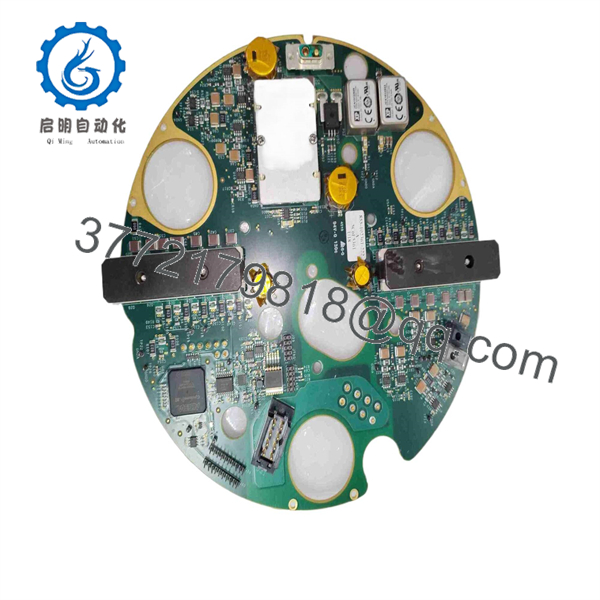
810-102361-222
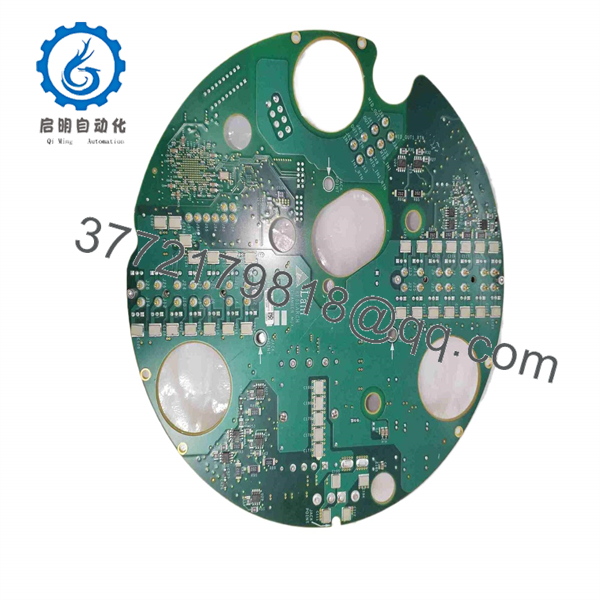
810-102361-222
Frequently Asked Questions
What is the LAM 810-102361-222 used for?
The 810-102361-222 is identified in multiple surplus and used-equipment records as a LAM Research Chamber MUX PCB Assembly. Its role is to multiplex or route chamber-related signals within compatible semiconductor process equipment. Public information does not provide a complete OEM pinout or confirmed I/O map, so the tool-specific electrical schematic remains the installation authority.
Is 855-102361-222 the same as 810-102361-222?
They are commonly shown together in surplus listings as associated markings for the same Chamber MUX PCB assembly. However, you should not treat them as automatically interchangeable without checking the physical label, board revision, connector population, and LAM tool documentation. Use the exact part number installed in your equipment as the procurement baseline.
Can I hot-swap the 810-102361-222 Chamber MUX board?
No. Do not hot-swap it unless the specific LAM tool manual explicitly permits that procedure. This board can sit in control, signal-routing, or interlock paths. Removing it while energized may generate false chamber faults, damage electronics, or create an unsafe process condition. Shut down the system using the approved LAM maintenance procedure and apply lockout/tagout before removal.
How do I know whether the board is actually bad?
Start by checking the power rails, tool interlocks, field sensors, valves, wiring harnesses, and connector condition. A Chamber MUX board becomes the likely fault when multiple related signals fail together, known-good signals reach the board input, and the expected output or controller feedback does not pass through it. Repeated board-specific diagnostics, visible component damage, or a fault that follows the board to a known-good setup are stronger evidence.
Will changing this board erase recipes or process programming?
Usually, the primary recipes and tool-control programming reside in the main controller, host computer, or other control hardware rather than in a Chamber MUX board. Still, document the original unit before removal. Record all jumpers, switch settings, labels, connector locations, and any installed memory-device identifiers. If your tool software allows diagnostic backups, save them before replacing hardware.
Is this part obsolete, and is stock dependable?
Treat 810-102361-222 as a legacy spare part. Listings show it available through used and surplus channels, but stock may be one unit at a time and can disappear without notice. Confirm live availability, condition, board photos, lead time, and the exact revision before issuing a purchase order.
Why is a surplus Chamber MUX board less expensive than an OEM replacement?
Surplus stock often comes from decommissioned tools, excess spares, canceled fab projects, or inventory liquidation. Lower cost can be reasonable, but the condition must be transparent. Ask whether the unit is New Original/New Surplus, used as removed, or Refurbished and tested. For a board in a chamber-control path, avoid vague descriptions such as “working pull” without photos, traceability, and a stated test scope.
What test documentation should I request before purchase?
Request high-resolution photos of both sides of the board, all labels, connector faces, and revision markings. Ask for an inspection report covering corrosion, connector damage, missing components, rework marks, and ESD-controlled packaging. If the supplier has a compatible LAM test rack, request power-up verification, I/O-path checks, continuous runtime results, and the recorded test report. If no live tool test is available, the supplier should state that clearly rather than claim a full functional test.



