
 WhatsApp: +86 16626708626
 Email:
  Phone: +86 16626708626
Description
Key Technical Specifications
| Parameter | Specification Value |
| Manufacturer | Mitsubishi Electric |
| Part Number | KCP-VGA2281A |
| System Compatibility | Mitsubishi Meldas CNC / Legacy Graphic Racks |
| Input Logic Voltage | 5 V DC / 24 V DC (from backplane rail) |
| Video Signal Format | Analog RGB / HV Sync (Standard VGA Output) |
| Max Resolution Support | 640 × 480 / 800 × 600 Industrial Graphics |
| Connector Interface | Multi-pin edge bus connector & high-density DB-15 video output |
| Signal Processing Rate | Real-time scan conversion |
| Mounting Style | Rack insertion slot |
| Operating Temperature | 0 to +55 °C (+32 to +131 °F) |
| Relative Humidity | 10% to 90% non-condensing |
Product Introduction & Supply Chain Strategy
The Mitsubishi KCP-VGA2281A serves as an essential video graphics processing board for legacy Mitsubishi Meldas CNC control units and industrial display systems. It translates raw controller memory data into standardized VGA video outputs, enabling real-time operation displays, axis coordinates, and system diagnostics to render accurately on operator screens.
Securing the KCP-VGA2281A as New Surplus allows machine tool operators to keep critical CNC equipment functional without incurring major capital costs associated with full control retrofits. Sourcing authentic New Surplus inventory eliminates the severe risks posed by second-hand video cards—such as degraded video output ICs, dried electrolytic capacitors, and cracked PCB traces—which frequently cause screen flicker or total display blackout during production runs.
Installation & Configuration Guide
Stage 1: Pre-Installation (Prep & Safety)
- Perform full Lock-Out/Tag-Out (LOTO) on the main CNC control cabinet power source and allow 5 minutes for bus discharge.
- Put on an ESD wrist strap connected to an unpainted metal chassis earth point.
- Record high-resolution photos of all onboard DIP switches, jumper positions, and cable routing attached to the original KCP-VGA2281A board.
Stage 2: Removal
- Unfasten the retaining screws located on the top and bottom of the module faceplate.
- Disconnect the DB-15 monitor output cable and internal video signal ribbon connectors by holding the plug body—do not pull directly on the wiring harness.
- Carefully slide the card straight outward along the enclosure guide rails to avoid damaging backplane edge pins.
Stage 3: Installation (Clone & Seat)
- Verify that all jumper pins and DIP switches on the new KCP-VGA2281A board match the original unit’s settings exactly.
- Align the board edges with the enclosure channel tracks and slide the card inward until it rests against the backplane connector.
- Apply firm, even pressure to seat the module, then tighten the faceplate retaining screws to 0.5 N·m torque and reconnect the video display cables.
Stage 4: Power-On & Testing
- Restore logic power to the controller cabinet and observe front-panel LED indicators.
- Verify that the connected industrial monitor displays a clear, stable signal without horizontal skew, color distortion, or image flicker.
- Run a diagnostic display routine or scroll through CNC control screens to ensure video refresh stability across all operating modes.
Firmware/Software Versions & Upgrade Notes
- Recommended Board Configuration: Ensure DIP switch resolution parameters match the native refresh rates of your connected industrial monitor (640 × 480 @ 60 Hz standard).
- Compatibility Notes: The KCP-VGA2281A is designed specifically for Mitsubishi backplane architectures. Installing incorrect hardware revisions can lead to video sync loss or unreadable screen displays.
- Upgrade/Downgrade Risks: Avoid changing onboard jumper sync settings (composite sync vs. separate horizontal/vertical sync) while powered. Mismatched video timing settings can overload older display monitors, resulting in black-screen faults.
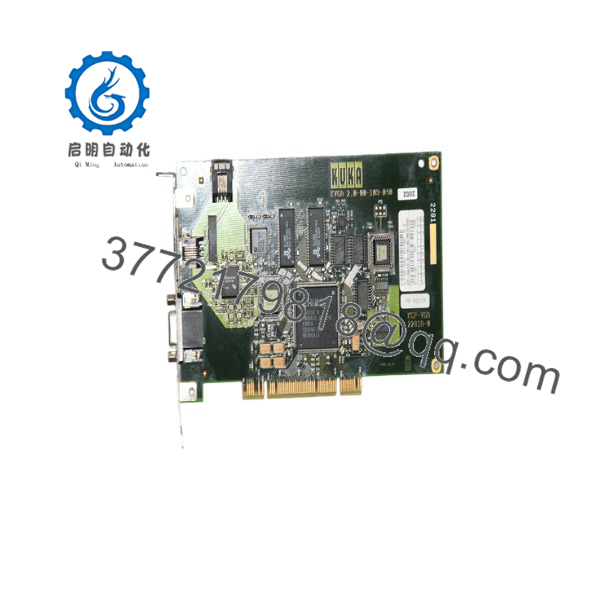
KCP-VGA2281A
Frequently Asked Questions (FAQ)
Why is this New Surplus unit priced higher than used display cards found online?
Used video boards pulled from old machine tools are subject to severe thermal stress and component degradation, often resulting in sudden display loss or garbled graphics. Our Mitsubishi stock consists exclusively of New Surplus—original, uninstalled units preserved in static-safe environments. Investing in New Surplus provides factory-level reliability and prevents machine downtime that can cost thousands of dollars per shift.
Are these boards guaranteed to be original Mitsubishi factory products?
Yes. We supply 100% original OEM hardware. These cards are original new surplus, never repaired, and never pulled from active service. Each board undergoes visual and electrical interface checks before shipment.
What is the current manufacturing lifecycle status for the Mitsubishi ?
This module has reached EOL (End-of-Life) status from the OEM, making direct replacement parts difficult to source through standard distribution channels. Keeping 1-2 spare cards on-site is a crucial buffer stock strategy to prevent extended CNC machine downtime.
Can I hot-swap the video board while the CNC controller is running?
No. Removing or inserting the board while the control rack is energized can cause static discharge, arc edge connectors, and permanently damage backplane driver ICs. Always isolate cabinet power before replacing components.
Do I need to re-program my CNC controller after installing a new card?
No parameter reloading or software programming is required. The acts as a hardware-level video translation interface; once jumpers are matched to the old board, it immediately renders the incoming display data stream.
What warranty is included with this New Surplus video board?
This New Surplus Mitsubishi board comes backed by a full 1-year operational replacement warranty, complete with a signed quality inspection report verifying physical and connector pin integrity.



