
 WhatsApp: +86 16626708626
 Email:
  Phone: +86 16626708626
Description
Key Technical Specifications
- Manufacturer: Molex, with Woodhead listed as the associated legacy brand.
- Model: DRL-DPM-BKF-B
- Base Model: DRL-DPM-BKF
- Product Category: Adapter card.
- Distributor Classification: PLC / machine-control module-rack category; this classification does not establish the electrical function.
- Associated Application Category: Machine vision cameras and sensors.
- Product Family: DevicePort-related adapter-card listing.
- Mechanical Format: Card-level accessory; confirm dimensions, mounting holes, host board, and connector orientation from exact-unit photos.
- Host Compatibility: Not reliably established from publicly verifiable documentation; compare the installed host interface and mating connector before purchase.
- Signal Interface: Not reliably established from authoritative product documentation found in available results.
- Supply Voltage: Not reliably established from authoritative product documentation found in available results.
- Firmware / Configuration: Verify whether the installed unit requires a matching firmware, driver, or host configuration before replacement.
- Lifecycle Status: Legacy / limited-market inventory likely; verify current Molex support status and availability directly before a shutdown-critical purchase.
- Weight: Distributor listings report 0.71 lb or 0.32 kg, which are broadly consistent; confirm shipping weight from the seller’s actual packaging.
The available web evidence reliably identifies DRL-DPM-BKF-B as a Molex adapter card and places it in a machine-vision-related product category. The broader base reference DRL-DPM-BKF has been assigned wildly conflicting descriptions by unverified aftermarket sites, including power-management, PROFIBUS, PC/104, data backup, and position-monitor products. Those claims are not consistent enough to support a technical specification or installation decision.
Product Introduction
The Molex Woodhead DRL-DPM-BKF-B is an industrial adapter card associated with a DevicePort machine-vision category. Its purpose is to provide the correct physical and electrical interface within the intended machine-vision host assembly. The product should be purchased as a like-for-like replacement only after matching the complete label, suffix, connector layout, host equipment, and installed cable assembly.
Do not classify DRL-DPM-BKF-B as a PLC, PROFIBUS module, DIN rail power supply, or general-purpose I/O card based on generic marketplace descriptions. The only technically defensible path is to verify the physical unit and the host-system documentation. This avoids buying a visually similar card that does not mate with the installed vision controller or camera interface.
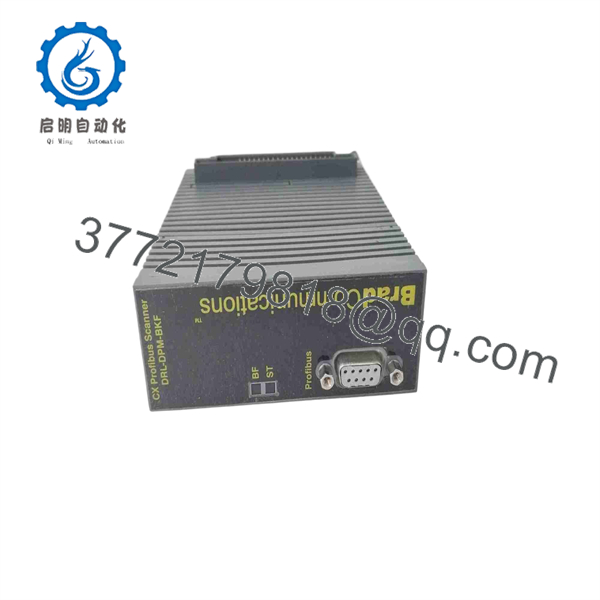
DRL-DPM-BKF-B
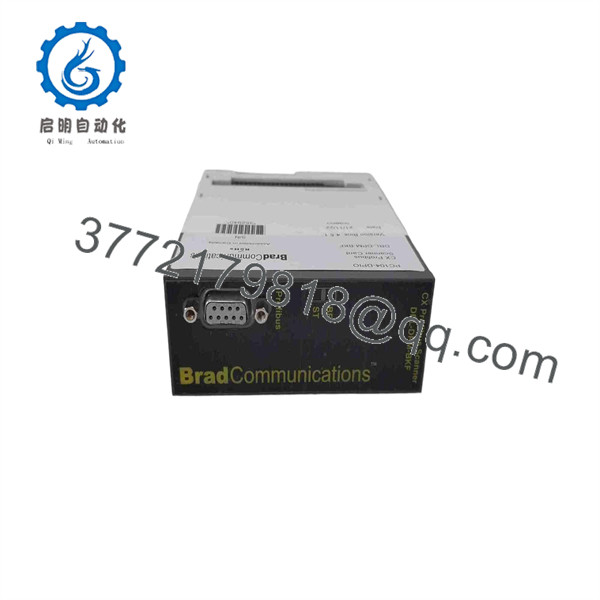
DRL-DPM-BKF-B
Troubleshooting Quick Reference
| Symptom | Possible Cause | Relevance to This Part | Quick Check Method | Recommendation |
|---|---|---|---|---|
| Vision camera is not detected by host system | Camera power missing, damaged cable, host driver issue, wrong port configuration, failed adapter card | ⚠️ Medium | Verify camera power at the source, inspect cable locking hardware, test with a known-good cable, and review host software device detection. | Check camera power, cable integrity, and host drivers before replacing DRL-DPM-BKF-B. |
| Intermittent image loss or communication errors | Loose connector, bent pin, cable flex damage, EMI, poor grounding, adapter card contact issue | ⚠️ Medium | Inspect all connectors under magnification. Flex-test external cables only with the machine in a safe state. Check whether errors correlate with machine motion or nearby VFD operation. | Replace damaged cables or connectors first. If errors remain with known-good external components, evaluate the adapter card. |
| Host software cannot initialize the interface | Wrong driver version, incorrect hardware profile, firmware mismatch, failed host bus interface, wrong adapter-card revision | ✅ Medium | Record driver and software versions. Compare card label, revision, and connector layout with the original card. Review host error logs. | Restore the original driver and configuration before declaring the card defective. |
| No visible physical damage, but interface still fails | Internal component failure, ESD damage, cracked solder joint, host system issue | ✅ Medium | Test the card in an approved compatible host assembly using known-good camera and cable hardware. Avoid probing unidentified signals. | Replace or send for qualified evaluation if failure follows the card in a controlled test. |
| Replacement card does not fit the host | Wrong base model, missing “-B” suffix, connector orientation mismatch, different bracket or mounting arrangement | ✅ High | Compare front, rear, and edge views of both cards. Verify every connector, keyway, mounting hole, label, and card profile before installation. | Order against the complete DRL-DPM-BKF-B label. Do not force connectors or modify the card to fit. |
| Replacement card fits but system remains offline | Incorrect revision, driver mismatch, retained host configuration, incompatible camera hardware, damaged host board | ⚠️ Medium | Reinstall the original card if it is still functional. Compare host settings and run a controlled hardware-detection test with the replacement. | Confirm firmware, driver, and host compatibility. Escalate with card photos and system logs if the replacement is not recognized. |
| Card becomes hot or shows discoloration | Incorrect supply connection, host-board fault, shorted cable, internal failure | ✅ High | Power down immediately. Inspect for burnt odor, discolored components, damaged traces, and connector overheating. Do not re-energize a visibly damaged unit. | Isolate the host and cable assembly. Replace the damaged card only after confirming the external fault will not damage the replacement. |
| Failure began after cabinet service or cable replacement | Connector cross-connection, ESD event, pin damage, wrong cable type, unsecured ground | ❌ Usually low | Compare cable part numbers, connector keying, cable routing, and grounding with pre-service photographs or drawings. | Correct service-related errors first. Take photos before swapping the card again. |
| Camera works locally but not through machine software | Software configuration, network/host setting, licensing, image-acquisition application fault | ❌ Low | Test camera access with the approved diagnostic utility, then compare application settings with a known working station. | Troubleshoot software and host configuration before replacing the adapter card. |
| Multiple interfaces fail at the same time | Host power failure, common network issue, damaged host bus, software crash | ❌ Low | Check host system power rails, operating-system logs, controller status, and all shared communications infrastructure. | Investigate the shared host system first. A single adapter card rarely causes every interface to fail simultaneously. |
❗ Critical warning: Do not connect unidentified power or signal wires to this card. Public descriptions of the base part number conflict badly, so guessing supply voltage, pinout, or communication protocol can destroy the adapter card, the host interface, or attached camera equipment.
❗ ESD warning: Treat the card as static-sensitive. Power down the host equipment, use a grounded wrist strap and ESD-safe work surface, hold the card by its edges, and avoid touching exposed connector pins.
If the fault remains unresolved, provide technical support with high-resolution photos of both sides of the original card, the full DRL-DPM-BKF-B label, connector close-ups, host-equipment model number, cable part numbers, software and driver versions, and system error logs.
Frequently Asked Questions
What is the Molex Woodhead DRL-DPM-BKF-B?
DRL-DPM-BKF-B is identified by a major distributor as a Molex adapter card associated with a machine-vision camera and sensor product category. It is also listed under the Woodhead legacy brand in industrial-parts databases.
Is DRL-DPM-BKF-B the same as DRL-DPM-BKF?
Do not assume so. The “-B” suffix can indicate a specific hardware version, connector arrangement, revision, or configuration. Buy and install only after matching the complete physical label, front and rear connector layout, card dimensions, and host-system documentation.
Is this a PROFIBUS DP or PC/104 module?
That cannot be verified from reliable evidence. Several unverified listings describe the base part number as a PROFIBUS or PC/104 product, but other listings assign unrelated functions and specifications to the same reference. Those conflicting descriptions are not suitable for engineering, wiring, or purchasing decisions. The trusted distributor listing identifies DRL-DPM-BKF-B only as an adapter card in a machine-vision category.
What voltage does DRL-DPM-BKF-B require?
Do not power it based on a public listing. An authoritative, part-specific voltage specification was not found in the available results. Identify the host device, retrieve its manual or wiring diagram, and verify the card’s supply pins and permitted voltage before installation.
Can I use DRL-DPM-BKF-B as a direct replacement for a generic adapter card?
No. Adapter cards are normally proprietary to a host platform, connector family, or equipment configuration. A card can look physically similar but use different pin assignments, supply levels, signaling, or driver requirements. Match the exact part number and suffix.
Can I hot-swap DRL-DPM-BKF-B?
No. Unless the exact OEM host manual explicitly permits live replacement, power down the host and connected equipment before removing or inserting the card. Hot swapping can damage host ports, corrupt communication, and expose the card to ESD or transient voltage.
Will I need software or drivers after replacing the card?
Possibly. The host system may require a specific driver, firmware level, device profile, camera configuration, or application setting. Back up the host configuration, capture software-version information, and document existing hardware settings before removing the original card.
Why is a New Surplus DRL-DPM-BKF-B cheaper than factory supply?
New Surplus inventory may originate from unused machine-builder stock, decommissioned vision systems, canceled projects, or distributor liquidation. Lower price does not prove that the board includes its host cable, bracket, driver media, or correct hardware revision. Request exact-unit photographs, condition confirmation, package contents, a written warranty, and a return policy.
What testing should a supplier perform before shipping a used or refurbished DRL-DPM-BKF-B?
At a minimum, request a visual inspection for corrosion, bent pins, cracked connectors, damaged components, rework marks, and missing hardware; high-resolution photos of both sides; continuity checks where appropriate; and a controlled functional test in an identified compatible host system with the correct cable and camera interface. A generic power-up test is not enough. The test must verify that the host recognizes the card and communicates through the intended interface.



