
 WhatsApp: +86 16626708626
 Email:
  Phone: +86 16626708626
Description
Key Technical Specifications
- Model: MVME 340B
- Part Numbers: 01-W3787B-01B, 84-W8787B01C
- Brand: Motorola
- Platform: VMEbus
- Board Type: Circuit board / controller module
- Application: Industrial embedded control systems
- Compatibility: Legacy Motorola MVME racks and related VME systems
- Availability: Limited, obsolete stock class
- Warranty: Often seller-provided; verify before purchase
- Condition: Used Tested Cleaned or New Surplus, depending on stock source
Product Introduction
Motorola MVME 340B 01-W3787B-01B 84-W8787B01C is a legacy VMEbus circuit board used in industrial embedded control environments. It is typically found in older Motorola MVME racks and OEM systems that still need exact-form-fit board replacement.
This part is usually sourced for downtime recovery, not platform upgrades. Buyers pick it when the existing rack architecture must stay intact and the replacement has to match the original board and part number exactly. Verify revision, connector layout, and system compatibility before installation.
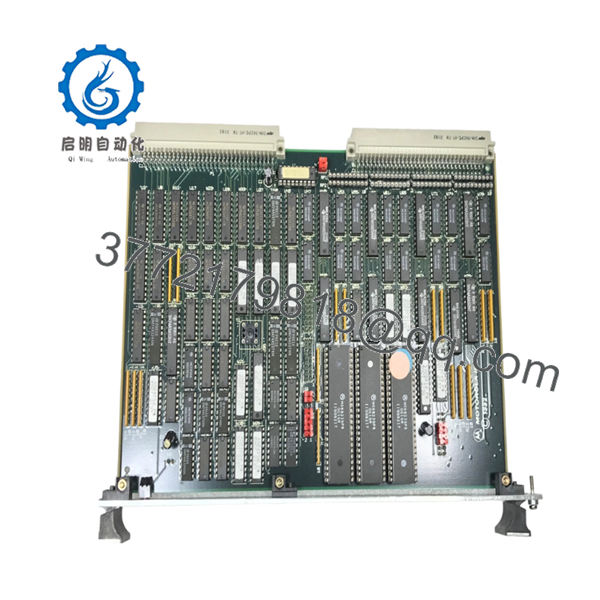
- MVME 340B 01-W3787B-01B 84-W8787B01C
Troubleshooting Quick Reference
| Symptom | Possible Cause | Relevance to This Part | Quick Check Method | Recommendation |
|---|---|---|---|---|
| Board does not boot | Bad seating, backplane issue, or incompatible revision | ✅ High | Reseat board, inspect edge connector, test in known-good slot | Check installation before condemning the board |
| No LEDs or status activity | Missing rack power or failed board power stage | ✅ Medium | Measure rack rails at the backplane with a multimeter | Verify power supply and fusing first |
| System hangs on startup | Board conflict, address decode issue, or memory fault | ✅ High | Review boot diagnostics and compare jumper settings | Match original configuration exactly |
| Intermittent resets | Aging components or thermal stress | ✅ Medium | Run a soak test and monitor board temperature | Replace if the fault repeats under load |
| Peripheral communication fails | Slot mapping or bus timing mismatch | ✅ Medium | Check system logs and confirm VME configuration | Confirm compatibility with the host system |
| Works cold, fails warm | Marginal component on an old board | ✅ High | Warm the unit during extended test and watch for faults | Replace if failures track temperature |
Contact technical support with photos of the board, rack slot, jumper settings, and diagnostic logs if the fault is still unclear.
Frequently Asked Questions
Q: Is this a direct replacement for all Motorola MVME 340B systems?A: No. It is only a direct replacement when the rack, backplane, and revision match the original setup. Legacy VME systems can be picky about board revision and configuration.
Q: Can I hot-swap this board?A: No. Power down the system first. Live removal risks damage to the board and the backplane, and on older VME hardware that risk is not worth it.
Q: Will my old settings carry over automatically?A: Not usually. If the board uses jumpers, switches, or board-level configuration, copy the original setup before removal.
Q: Why is this sold as surplus or used tested?A: Because the MVME 340B is an obsolete legacy part. Available stock usually comes from excess inventory, reclaimed hardware, or tested pull units.
Q: How do I confirm compatibility before ordering?A: Match the full part numbers, inspect the label, compare connector style, and confirm the exact host rack and slot requirements.
Q: Why is the price lower than a factory-new part?A: Factory-new production is generally unavailable for this class of Motorola hardware. Pricing reflects limited supply, condition, and seller warranty.
Q: What should I inspect before installing it?A: Check for bent pins, corrosion, rework marks, cracked solder joints, and heat damage. Also confirm jumper positions against the removed board.



