
 WhatsApp: +86 16626708626
 Email:
  Phone: +86 16626708626
Description
3. Key Technical Specifications
| Parameter | Value |
|---|---|
| Manufacturer | Motorola Computer Group |
| Model | MVME148V |
| Assembly Number | 01-W3577B-31C |
| Product Type | VMEbus Single Board Computer |
| Processor Family | Motorola MC68030 |
| CPU Frequency | 16 MHz (typical MVME148 configuration) |
| Bus Architecture | ANSI/VITA VMEbus |
| Form Factor | 6U VME Module |
| Memory | Configuration Dependent (commonly 4 MB DRAM) |
| Serial Interfaces | Multiple RS-232 Communication Ports |
| Ethernet Support | Available through system configuration |
| Front Panel Indicators | FAIL, STAT, RUN, SCON LEDs |
| Front Panel Controls | Abort and Reset Switches |
| Rear Connectivity | Standard Rear Transition Connectors |
| Application | Industrial Control, Telecommunications, Defense Systems |
| Status | Legacy / Obsolete Platform |
The MVME148 family is based on the Motorola MC68030 processor and was widely deployed in VMEbus-based industrial and embedded control systems. Documented MVME148 configurations include 16 MHz MC68030 processors with DRAM memory, front-panel diagnostics, and standard VME connectivity.
4. Product Introduction
The Motorola MVME148V (01-W3577B-31C) is a VMEbus single-board computer designed for real-time industrial control, telecommunications infrastructure, military electronics, and OEM embedded computing platforms. The board combines Motorola’s MC68030 processor architecture with VMEbus connectivity and integrated system management functions.
In long-life automation systems, MVME148 boards are often retained because application software, custom drivers, and field-certified control logic can be difficult and expensive to migrate to newer hardware. Many facilities maintain spare MVME148 inventory specifically to reduce downtime during critical shutdown events.
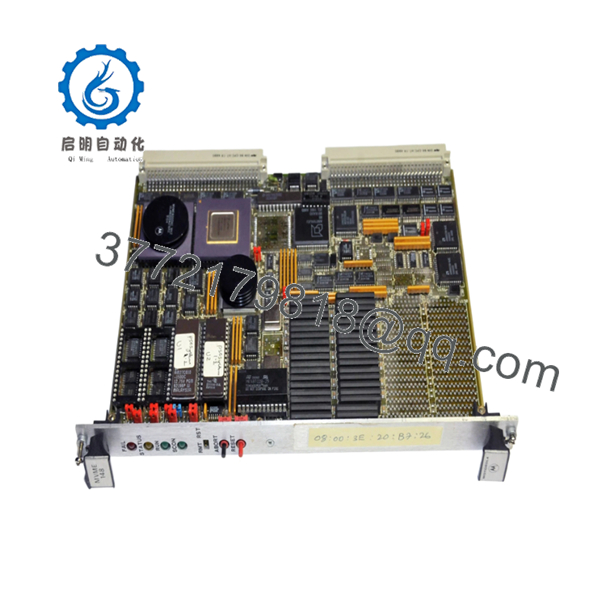
- MVME148V 01-W3577B-31C
5. Installation & Configuration Guide
Stage 1: Pre-Installation Preparation (10 Minutes)
⚠️ Safety First
- Notify operations personnel of planned maintenance.
- Place the controlled process in a safe operating state.
- Apply lockout/tagout procedures.
- Remove VME chassis power.
- Wait a minimum of 5 minutes for capacitor discharge.
Tools Required
- ESD wrist strap
- PH1 screwdriver
- Fluke 115 multimeter
- Wire markers
- Smartphone camera
- Flashlight
Data Backup
- Export operating system and application files.
- Record network configuration.
- Photograph all jumper settings.
- Document transition module connections.
- Record firmware and monitor revision information.
- Save startup diagnostic logs if available.
Stage 2: Removing the Old Module (5 Minutes)
- Open chassis access panels.
- Label all connected cables.
- Disconnect transition module wiring.
- Release retaining hardware.
- Operate both ejector handles evenly.
⚠️ Do not twist the board during extraction. VME connector damage can cause intermittent faults that are difficult to diagnose.
- Pull the board straight out.
- Inspect:
- P1 connector
- P2 connector
- Backplane contacts
- Dust contamination
- Corrosion
- Bent pins
⚠️ Keep the original board available until commissioning is complete.
Stage 3: Installing the New Module (10 Minutes)
- Connect grounded ESD protection.
- Verify exact model and assembly number.
Model Verification
- MVME148V
- 01-W3577B-31C
Configuration Clone (Crucial)
- Replicate all jumper positions exactly.
- Verify boot device selection.
- Verify system controller settings.
- Verify serial communication settings.
- Verify memory configuration jumpers.
❗ This is the most common rookie mistake, but it happens constantly. Take a picture before you pull it. I can’t stress this enough.
- Insert the board evenly into the VME slot.
- Fully engage ejector handles.
- Tighten retention screws.
- Reconnect all wiring and communication cables.
Self-Checklist
- Model verified
- Assembly number verified
- Jumpers duplicated
- Board fully seated
- Wiring secured
Stage 4: Power-On & Testing (15 Minutes)
Pre-Power Check
- Verify no shorts on the power rails.
- Confirm proper board seating.
- Verify transition module installation.
Power-On Procedure
- Energize the VME chassis.
- Observe front-panel LEDs.
- Verify RUN indicator activity.
- Access system monitor or console.
- Verify serial communications.
- Verify network communication if equipped.
- Verify application startup.
- Perform dry-run I/O testing.
LED Reference
| LED | Meaning |
|---|---|
| RUN | CPU operating normally |
| FAIL | Hardware or boot fault |
| STAT | System status indication |
| SCON | System Controller active |
The MVME148 family includes FAIL, STAT, RUN, and SCON indicators along with front-panel Abort and Reset switches for diagnostics and maintenance operations.
⚠️ If FAIL remains active after boot, verify firmware, memory configuration, and jumper settings before replacing hardware.
Common Replacement Risks from the Field
❗ Firmware Revision Mismatch
I’ve seen technicians replace an MVME148 during a shutdown and spend an entire weekend troubleshooting boot failures.
The replacement board worked perfectly. The issue was a different firmware revision and altered startup parameters.
Avoidance: Record firmware revisions before removal and request matching firmware whenever possible.
❗ Jumper Configuration Errors
Older Motorola VME boards rely heavily on hardware jumpers.
One incorrect setting can prevent system startup.
Avoidance: Photograph every jumper block before removal and duplicate the configuration exactly.
❗ Transition Module Compatibility
Many MVME148 systems rely on rear transition modules for serial, network, and field wiring access.
Avoidance: Verify transition module compatibility before installation.
Warning: Physical connector compatibility does not guarantee electrical compatibility.
❗ Power Supply Margin
Legacy VME systems frequently operate near power supply capacity.
Avoidance: Calculate total rack power consumption and maintain at least a 20% reserve margin.
❗ Electrostatic Discharge (ESD)
I once watched an engineer remove a 68030 board during a winter shutdown without a wrist strap.
The board powered up, but serial communications failed immediately afterward.
That’s an expensive lesson.
Avoidance: Always use a grounded wrist strap and ESD-safe work surface.
Keep these checks in mind and you’ll save yourself 90% of typical rework time.
6. Frequently Asked Questions (FAQ)
Q1. Can I hot-swap the MVME148V?
No.
The MVME148 platform was not designed for hot-swapping. Removing the board under power can interrupt VMEbus activity and potentially damage both the processor board and backplane.
Q2. What processor does the MVME148V use?
The MVME148 family is built around the Motorola MC68030 processor architecture. Common documented configurations utilize a 16 MHz MC68030 CPU.
Q3. Is the MVME148V obsolete?
Yes.
The MVME148 platform has been out of production for many years. Current availability is typically limited to surplus inventory, tested used hardware, and professionally refurbished stock.
Q4. What applications commonly used the MVME148?
Typical deployments included:
- Industrial automation
- Telecommunications infrastructure
- Military systems
- Aerospace testing
- OEM embedded equipment
- Process control platforms
The board’s VMEbus architecture made it common in long-life industrial installations.
Q5. Will replacing the board erase my application software?
Not necessarily.
Many MVME148 systems boot from external storage, EPROM devices, or network-based boot environments. However, always perform a complete backup before replacement.
Q6. Why is jumper documentation so important?
Older Motorola VME platforms use jumper-selectable settings for:
- Boot source selection
- System controller configuration
- Memory mapping
- Communication parameters
One incorrect jumper can prevent startup even when the hardware itself is fully functional.



