
 WhatsApp: +86 16626708626
 Email:
  Phone: +86 16626708626
Description
3. Key Technical Specifications
| Parameter | Specification Value |
| Manufacturer | Motorola (Embedded Computing Division) |
| Model Number | MVME162-22 (01-W3884B-10A) |
| Processor | MC68LC040 (32-bit architecture) running at 25 MHz |
| Memory | 4 MB Shared Dynamic RAM (DRAM) |
| Flash Memory | 512 KB to 1 MB onboard Flash (Configuration dependent) |
| SRAM | 128 KB Static RAM with battery backup |
| IP Slots | 4 Industry-Pack (IP) interfaces for modular I/O |
| Serial Ports | 4 RS-232-C ports (accessible via 175-pin I/O connector) |
| Ethernet | Intel 82596CA Local Area Network Controller |
| SCSI | Integrated WD33C93B SCSI interface |
| Counters/Timers | PCCC (Programmable Clock/Counter/Configuration) chips |
4. Product Introduction & Supply Chain Strategy
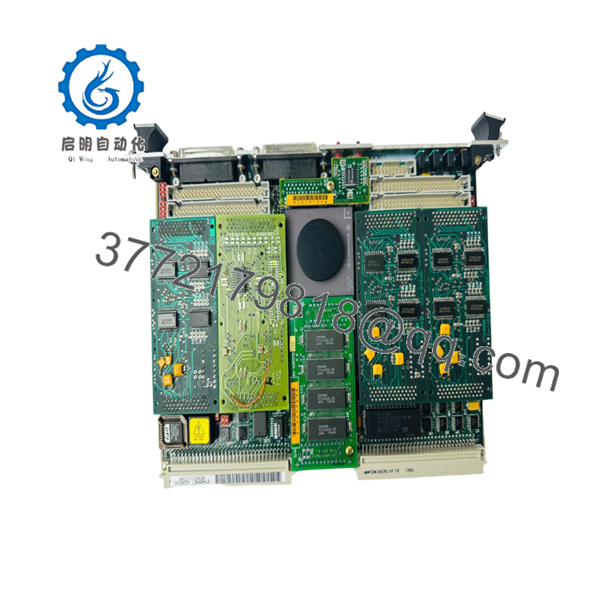
The Motorola MVME162-22 (01-W3884B-10A) is a highly versatile VMEbus single board computer based on the 32-bit MC68LC040 processor. A defining feature of the “162” series is its support for up to four Industry-Pack (IP) modules, allowing engineers to customize the board with specialized I/O—such as digital, analog, or serial interfaces—within a single VME slot. This makes it a critical component in robotics, defense simulation, and complex industrial process controllers where space and modularity are paramount.
Maintaining a supply chain for the MVME162-22 requires a focus on Total Cost of Ownership (TCO). Since this series is no longer manufactured, procuring “New Surplus” units is the only way to guarantee the mechanical and electrical integrity of the module. Refurbished boards in the MVME162 series often suffer from degraded battery-backed SRAM or damaged IP connector pins, which lead to intermittent data loss or I/O failure. Investing in new-original inventory eliminates these risks, ensuring a projected service life of 10+ years and avoiding the massive costs associated with unplanned plant outages or system redesigns.

- MVME162-22 01-W3884B-10A
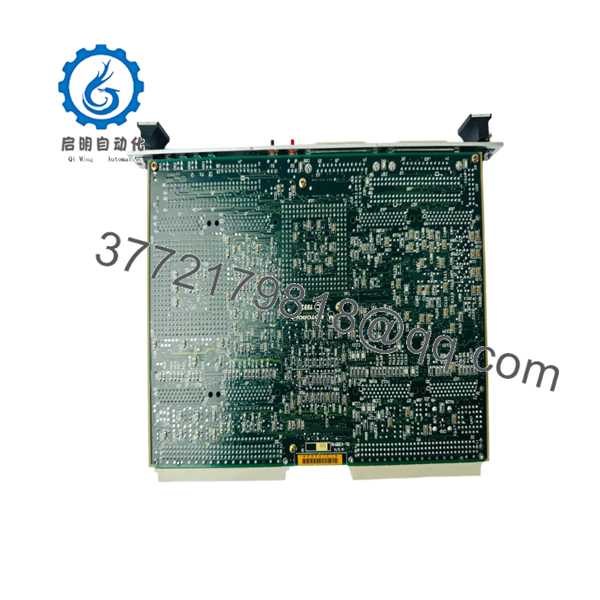
- MVME162-22 01-W3884B-10A
5. Installation & Configuration Guide
Stage 1: Pre-Installation (Prep & Safety)
- Follow all plant-standard lock-out/tag-out (LOTO) protocols for the VME chassis.
- Wear a grounded ESD wrist strap; the MC68LC040 and DRAM chips are highly sensitive to static.
- Before removal, document all jumper settings (J1–J20) and any installed IP modules on the old board.
Stage 2: Removal
- Unscrew the front panel fasteners.
- Disconnect all front-panel I/O cables (Serial, Ethernet, SCSI).
- Use the injector/ejector handles to unseat the module from the backplane.
- If IP modules are being transferred, carefully unscrew them from the motherboard using an ESD-safe screwdriver.
Stage 3: Installation (Clone & Seat)
- Transfer any IP modules to the new MVME162-22, ensuring they are seated and screwed down firmly to prevent vibration-induced disconnects.
- Set the jumpers on the new module to match the original system configuration.
- Slide the board into the VME slot and engage the handles to lock it into the backplane.
Stage 4: Power-On & Testing
- Power up the chassis and monitor the “FAIL” and “RUN” LEDs.
- Access the 162Bug (System Debugger) via a serial console to verify the board identifies the 4 MB of DRAM and all installed IP modules.
- Perform a loopback test on the serial and Ethernet ports to confirm full peripheral communication.
6. Firmware/Software Versions & Upgrade Notes
The MVME162-22 uses 162Bug firmware to manage boot sequences and hardware diagnostics. For seamless integration, the firmware version (EPROMs) on the replacement board should ideally match your existing system.
⚠️ CRITICAL WARNING: The MVME162 series has multiple sub-variants (e.g., -22 vs -24). The -22 variant specifically denotes a configuration with 4 MB of DRAM and 4 IP slots. Attempting to use a different variant (like an MVME162-24 or an MVME162-533) with the same software image may result in “Memory Out of Range” errors or I/O driver conflicts. Always verify that your software is compiled for the LC040 architecture and the specific memory map of the 01-W3884B-10A.
7. Frequently Asked Questions (FAQ)
What is the “New Surplus” status of this module?
This product is a Brand New Surplus unit. It is not used, not pulled from a decommissioned plant, and not refurbished. All modules undergo rigorous quality verification to ensure OEM-level reliability. It has never been used in a production environment and has zero operational hours. We source these from climate-controlled industrial reserves to ensure they meet original OEM specifications.
Can I transfer my IP modules from my old board to this new one?
Yes. The MVME162-22 is designed to host up to four Industry-Pack (IP) modules. Ensure that you mount them securely using the designated alignment pins and screws, and that the logic settings on the MVME162 motherboard (jumpers) correctly reflect the I/O requirements of those modules.
Does the board include a fresh battery for the SRAM?
As part of our QC process for New Surplus items, we verify the status of the onboard battery-backed SRAM. If a battery is nearing the end of its shelf-life due to age, it is replaced to ensure your configuration parameters are fully retained during power cycles.
Is the MC68LC040 compatible with software written for the MC68040?
The “LC” version of the 68040 does not include an internal Floating-Point Unit (FPU). If your legacy code relies heavily on hardware-based floating-point math, you must ensure your software has the appropriate math-emulation libraries or that it was specifically compiled for the LC040 processor to prevent runtime errors.
What is the warranty on the 01-W3884B-10A?
We provide a 1-year replacement warranty on this module. If any hardware defect occurs under normal operating conditions, we will provide a replacement or a full credit.



