WhatsApp: +86 16626708626
 Email:
 Phone: +86 16626708626
Description
3. Key Technical Specifications
- Processor: MC68060, 60 MHz, 32-bit, with integrated FPU, MMU, and 8 KB instruction + 4 KB data caches — the highest-performance 68K CPU Motorola shipped
- DRAM: 16 MB onboard parity-protected DRAM
- SRAM: Battery-backed SRAM (verify capacity per board revision — typically 128 KB to 1 MB depending on series)
- Flash Memory: Onboard Flash memory with 172Bug debug monitor installed
- NVRAM / Clock: Battery-backed TOD clock and configuration NVRAM
- VMEbus Interface: VMEchip2, local bus to VMEbus master/slave, A16/A24/A32, D8/D16/D32/D64, with system controller function
- Serial Ports: 2 serial ports, front-panel RJ45 connectors (EIA-232-D)
- Ethernet: 10BASE-T LAN interface with DMA
- SCSI: SCSI bus interface with DMA (NCR 53C710 class, sync 10 MB/s)
- IndustryPack: 2 IP mezzanine slots
- Timers: Tick timers with watchdog timer(s)
- I/O Routing: Front-panel I/O; 200/300 Series uses RJ45 connectors, no transition board required
- Power Requirements: +5 V DC from VMEbus backplane (budget per IP module load; verify against the MVME172 datasheet)
- Format: Double-high 6U VME card, single slot
4. Product Introduction
The Motorola MVME172-263 is a double-high VMEbus embedded controller built around the 60 MHz MC68060 — the fastest and last of the 68K workstation-class processors, with hardware FPU, MMU, and split instruction/data caches. This -263 configuration pairs it with 16 MB of parity-protected DRAM, onboard Flash running the 172Bug debug monitor, and both SCSI and Ethernet interfaces on a single slot, with two IndustryPack mezzanine slots for I/O expansion.
This is the board you buy when a qualified 68K system needs more headroom than an MVME162 can deliver, or when you’re replacing a failed unit in a system that was built on MVME172 architecture — industrial controllers, telecom test platforms, and late-90s embedded systems. Verify the exact ordering suffix against your installed board before ordering: the MVME172 ordering matrix differentiates CPU (68060 vs. 68LC060), DRAM size, serial configuration, and I/O set, and those differences are not freely interchangeable in a qualified system.
5. Troubleshooting Quick Reference
| Symptom | Possible Cause | Relevance to this Part | Quick Check Method | Recommendation |
|---|---|---|---|---|
| FAIL LED lit at power-up | DRAM/Flash test failure or VMEbus address conflict | ✅ High | Break into 172Bug and run full memory test on all 16 MB | Check for memory map conflicts with adjacent boards; if tests fail repeatedly on our board, we replace it — send us the console output |
| Software FPU exception / math crash | Board has MC68LC060 (no FPU) instead of full MC68060 | ✅ High | Check for “F-line” exception in 172Bug; verify the CPU marking on the board | The -263 should have a full 68060 — if a substitute variant was installed, that’s your problem |
| No Ethernet link | LAN configuration, patch cabling, or transceiver issue | ⚠️ Medium | Verify station address via 172Bug NIOT; check link light at the switch/hub |
LAN controller failure is rare; check the cable path first |
| SCSI devices not detected | SCSI ID conflict or bus termination | ⚠️ Medium | Confirm unique IDs; verify termination at both bus ends | Termination causes most “dead SCSI” complaints |
| Serial console garbage or dead | RJ45 serial pinout is Motorola-proprietary, not standard RS-232 | ⚠️ Medium | Use the correct Motorola serial breakout; verify baud in 172Bug NVRAM | The most common rookie error — check the pinout before condemning the port |
| Illegal access errors to IP modules | IP module interrupt vector or ID configuration mismatch | ⚠️ Medium | Re-seat IP modules; verify IP ID and vector settings against your application docs | Document IP configuration before swapping anything |
| Intermittent resets under load | Marginal +5 V backplane rail with IP modules installed | ❌ Low | Measure +5 V at P1 with a Fluke 115 under full chassis load | Budget total chassis draw with a 20% margin |
| RTC / NVRAM loses data on power-down | Dead lithium backup battery | ✅ High (common, minor) | Measure battery voltage (>2.8 V typical); inspect holder for corrosion | Replace the battery before it leaks — leakage destroys the PCB |
A note from the bench: the MVME172 is a mature, well-built board and most returns test fine. Real-world culprits are usually the proprietary RJ45 serial pinout, SCSI termination, IP module configuration, or a memory map conflict. Swap the suspect board into a known-good slot — if the fault follows the card, then call us. Stuck? Email technical support with photos of the front panel LEDs, the 172Bug power-up text, and your chassis configuration. We’ll tell you honestly whether it’s the board or your setup.
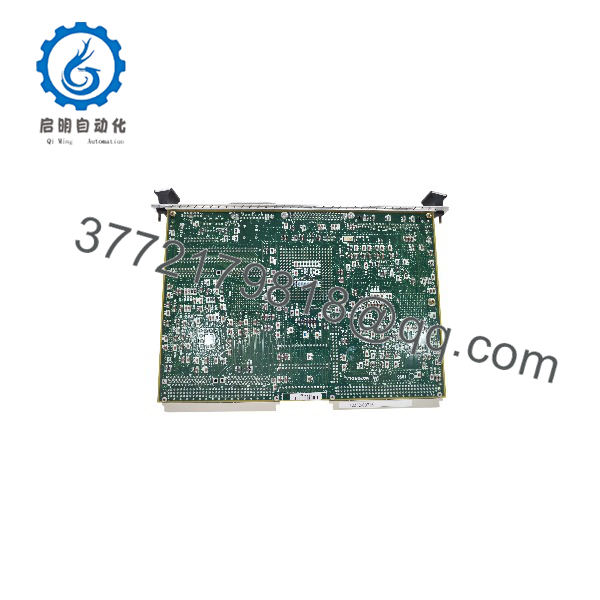
MVME172-263
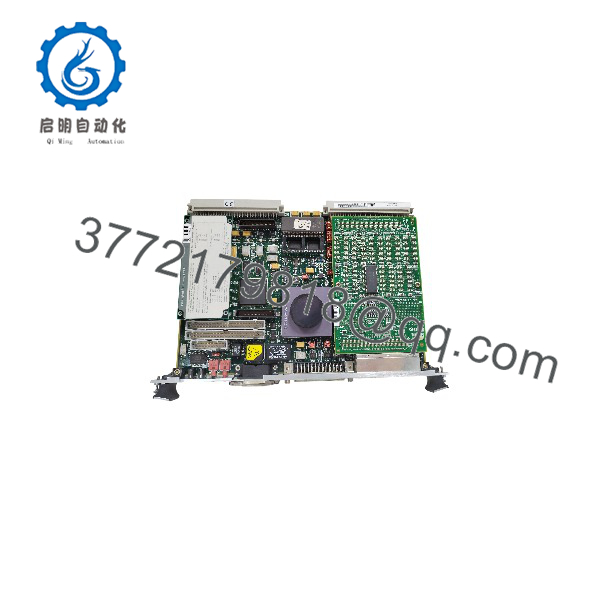
MVME172-263
6. Frequently Asked Questions
Q1: Is this board new, refurbished, or new surplus?
Stock is a mix of New Surplus (factory-original, never deployed, often sealed in Motorola packaging) and refurbished units pulled from decommissioned systems. The condition is stated plainly on every quote. Both tiers get the same QC: inbound traceability and anti-counterfeit checks, power-up on a genuine VME chassis, full 16 MB DRAM and Flash test via 172Bug, serial loop-back verification, Ethernet and SCSI interface checks, and a 24-hour burn-in with thermal monitoring. Test photos and video are available on request. True NOS MVME172 units are scarce — state your condition requirement at order time.
Q2: Why is this board so expensive for obsolete hardware?
Motorola discontinued the MVME172 line years ago (the family later passed to Force/Emerson before vanishing entirely). No factory, no new production. The 60 MHz MC68060 boards were built in smaller volumes than the MVME162s and demand from legacy system owners outstrips the shrinking supply — that’s what sets the price. If this board runs a qualified system, my advice is the same I give every plant engineer: buy the spare before the failure, not after.
Q3: Can I substitute an MVME162 or a different MVME172 variant?
Not without checking. The MVME172 and MVME162 share the 68K architecture but differ in CPU generation (68060 vs. 68040), VMEchip2 implementation, serial I/O layout, and firmware — 172Bug vs. 162Bug. Applications ported between them can hit timing differences and changed debug command sets. Within the MVME172 line, watch the CPU variant (MC68060 vs. MC68LC060, which lacks the FPU), DRAM size, and I/O set in the ordering matrix. Verify your full part number and suffix against the MVME172 datasheet before substituting anything.
Q4: Will my program and configuration survive a board swap?
Your application lives in Flash, EPROMs, or off-board storage, so the program survives if the firmware matches. But the battery-backed SRAM, TOD clock, and NVRAM lose their contents if the battery is dead during the swap — back up the 172Bug configuration (serial settings, memory map, network parameters) first. DRAM contents are volatile regardless. Photograph the board, jumpers, IP modules, and cabling before pulling the card. Ten minutes of documentation beats two days of reconfiguration — I’ve watched it go the other way.
Q5: Can I hot-swap this board?
No. The MVME172 has no hot-swap support — that’s a VME64x feature this board doesn’t implement. Pulling it live risks damaging the VMEchip2 bus drivers, corrupting other boards’ VMEbus cycles, or killing the board. Kill chassis power, wait for the backplane to discharge, wear a grounded ESD wrist strap, and handle the board by its edges. A static zap in a dry equipment room can take out a $4,000 board instantly. Use the strap, every time.
Q6: What about the onboard battery?
Check it before installation, not after the first power failure. The lithium cell backs up the SRAM, TOD clock, and NVRAM, and a cell that age is living on borrowed time. A leaking cell corrodes the PCB — the #1 killer of otherwise healthy MVME boards. Our units ship with battery voltage measured and documented; boards showing corrosion at inbound inspection are rejected, not resold. If calibration or configuration data lives in battery-backed memory, back it up before any swap.
Q7: What warranty and lead time do you offer?
Tested units ship with a 1-year replacement warranty covering functional failure under normal use — not physical damage, hot-swap damage, or battery leakage after receipt. In-stock boards ship within 1–2 business days via DHL/FedEx worldwide; out-of-stock units typically source in 2–4 weeks. Confirm stock and lead time before scheduling your maintenance window — a realistic “3 weeks” today beats a missed shutdown date later.