WhatsApp: +86 16626708626
 Email:
 Phone: +86 16626708626
Description
Key Technical Specifications
| Parameter | Value |
|---|---|
| Analog Input Channels | 16 single-ended / 8 differential |
| AI Resolution | 16-bit |
| Max AI Sample Rate | 1.25 MS/s (aggregate, multiplexed; not simultaneous sampling) |
| AI Input Range | ±0.1 V to ±10 V, programmable per channel |
| AI Triggering | Analog and digital triggering, up to 32 configurable PFI lines shared with DIO |
| Analog Output Channels | 2 |
| AO Resolution | 16-bit |
| Max AO Update Rate | 2.8 MS/s |
| AO Output Range | ±10 V |
| Digital I/O | 24 total: 8 static (P0.<0..7>), 16 PFI (P1/P2) |
| Counter/Timers | 2 × 32-bit, 80 MHz timebase |
| Bus Interface | PCI (32-bit, 33 MHz), RTSI<0..7> for multi-device sync |
| Driver Software | NI-DAQmx (Windows XP through current releases; verify version matrix) |
| Connector | 68-pin VHDCI (SHC68-68-EPM or SH68-68-D1 cable; SCB-68 breakout) |
| Warm-Up Time | 15 minutes to full rated accuracy |
| Operating Temperature | 0 to +55 °C, indoor use only |
| Calibration | External calibration interval 24 months |
| Signal Conditioning | Expandable with SCC or SCXI modules via cable/breakout |
Verify the exact assembly revision and calibration date on the board label before ordering. The 6251 family spans PCI, PCIe, PXI, PXIe, and USB packages — same measurement specs, different bus — so confirm the form factor matches your host, not just the number.
Product Introduction
The NI PCI-6251 is a 16-bit multifunction DAQ board for standard PCI slots. It provides 16 single-ended analog inputs sampling at up to 1.25 MS/s, two analog outputs updating at 2.8 MS/s, 24 digital lines, and two 32-bit counter/timers. Typical deployments: laboratory automation, design verification, manufacturing test, and research data acquisition where speed matters more than channel count.
The 6251 is the fast sibling in the M Series line. Five times the sample rate of the 6229 makes it the go-to card for transient capture and waveform generation on a budget. NI-DAQmx exposes the full API to LabVIEW, C/C++, and .NET, and the RTSI bus lets you synchronize it with other M Series boards for multi-card systems. Honest limits: AI is multiplexed, so 1.25 MS/s is aggregate, and settling time degrades with high source impedance — check the settling-error curves in the NI spec before promising accuracy at full rate.
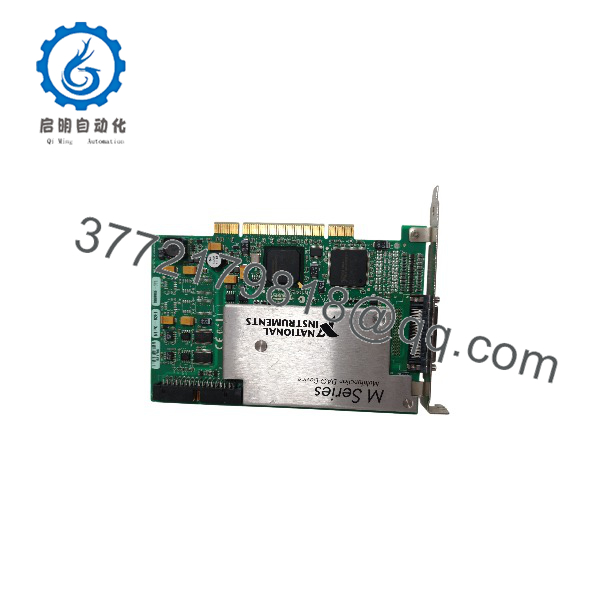
PCI-6251
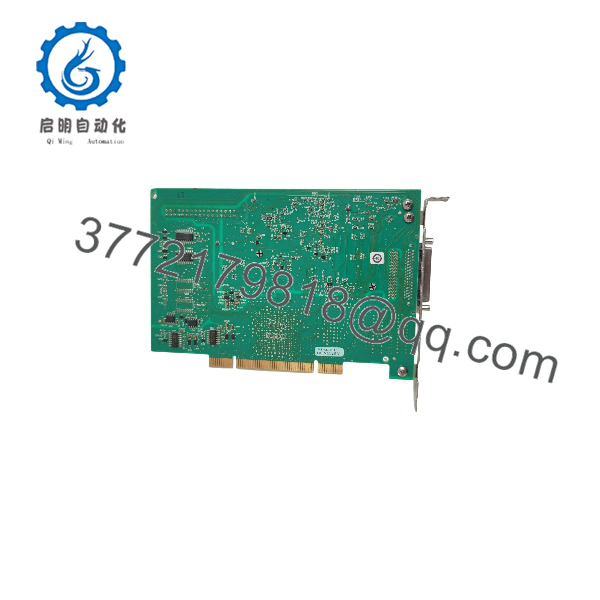
PCI-6251
Installation & Configuration Guide
Stage 1: Pre-Installation Preparation (Est. 10 minutes)
⚠️ Safety First: Notify operations of test-system downtime. Confirm a safe state, shut down the PC, lock out/tag out power, and wait 5 minutes for the power supply capacitors to discharge.
- Tools Required: ESD wrist strap, PH2 screwdriver, multimeter, cable labels, smartphone for photos.
- Data Backup: Export your NI-DAQmx task configuration from NI MAX. Photograph the 68-pin cable routing and breakout panel wiring. Document the DAQmx device name — your application code references it.
- Driver Check: NI-DAQmx 7.4 or later supports the 6251. Verify the installed driver version in MAX before touching hardware. Driver mismatches cause more “dead board” complaints than actual dead boards.
Stage 2: Removing the Old Card (Est. 5 minutes)
- Unscrew the PCI bracket retention screw.
- Disconnect the 68-pin VHDCI cable. Release the connector latch fully; pull straight out. Pulling at an angle bends pins — the most common self-inflicted injury on this family.
- Pull the card straight up from the slot. Don’t pry against adjacent cards.
- Inspect the slot and card edge connector for dust and bent pins.
⚠️ Keep the old card until the replacement passes a full functional test. Fallback and wiring reference in one.
Stage 3: Installing the New Card (Est. 5 minutes)
- Clip on the ESD wrist strap before the board leaves its anti-static bag.
- Verify the model and assembly revision on the label match your order.
- Align the card with the PCI slot and press evenly along the top edge until fully seated. Secure the bracket screw.
- Reconnect the 68-pin cable per your photos, and confirm the breakout accessory (SCB-68, BNC-2090, SCC carrier, or SCXI chassis link) is seated.
Self-Checklist: [ ] Model/revision matches, [ ] Card fully seated, [ ] Bracket screwed, [ ] 68-pin cable latched.
Stage 4: Power-On & Testing (Est. 10 minutes)
- Power on the PC. Windows detects the board and NI-DAQmx binds the driver.
- Open NI MAX — the 6251 appears under “NI-DAQmx Devices.” Confirm the device name and run Test Panels.
- Verify AI with a known source (calibrator or battery), check AO into a meter, toggle a DIO line.
- Reload your DAQmx tasks from backup and dry-run at reduced rates before committing to production.
- Allow the 15-minute warm-up before trusting absolute-accuracy numbers, especially on the ±0.1 V range.
⚠️ Troubleshooting Note: If MAX reports the device as unrecognized or throws a resource error, reseat the card and recheck the DAQmx version first. If AI readings jump between channels, suspect a settling-time problem — high source impedance at 1.25 MS/s will wreck multichannel scans; add signal conditioning or slow the scan. If your readings are doubled or halved, check differential vs. single-ended (RSE/NRSE) configuration against your actual wiring.
Frequently Asked Questions (FAQ)
Q1: Can I hot-swap this card under power?
No. PCI has no hot-swap provision. Pulling a live card can take out the slot, the motherboard, or the board’s analog front end. Shut down, wait 5 minutes for capacitor discharge, then swap. I’ve seen a board survive it once — I’ve also seen a motherboard that didn’t. Don’t gamble.
Q2: Is the PCI-6251 obsolete, and is your stock genuinely new?
Yes, discontinued. NI has moved DAQ to PCIe X Series and PXIe platforms, but the 6251 silicon lives on in the PCIe-6251, which uses the same 68-pin ecosystem. Our PCI stock is New Original / New Surplus — factory-sealed or uninstalled units with traceable sourcing, functionally tested before shipping. Test reports and photos of your exact unit are available on request. We never mix New Surplus and Refurbished (tested) grades in one listing.
Q3: What’s the direct replacement if this is out of stock?
The PCIe-6251 is the closest functional equivalent — same AI/AO/DIO specs on a PCIe interface, and the 6251 family spec sheet covers both. You need a free PCIe slot (×1 or wider), and your DAQmx code ports over with a device-name change. If you have no PCIe slots, the PXIe-6251 works but requires a PXIe chassis. For a full upgrade, the PCIe-6351 (X Series) offers simultaneous sampling and higher rates, but it’s a new pinout and a re-verification effort. Verify against current NI documentation before choosing.
Q4: Will I lose my tasks or calibration when I pull the old card?
DAQmx tasks live on the PC hard drive — back up the MAX configuration export and they’re safe. Calibration constants are stored on the board. If the replacement’s cal date (check the label) is stale, relative measurements still work, but absolute accuracy won’t meet the NI spec table until it’s recalibrated. For metrology or audit-bound applications, budget for recalibration; for engineering test, it’s usually fine.
Q5: Why is your price lower than the original OEM list price?
The card is discontinued, so surplus inventory trades below original list. We buy excess stock from OEM-authorized channels and test in-house instead of moving new production. You get a verified board at a surplus price. Straight talk: factory-sealed PCI-6251 units are getting scarce, so availability is mostly new-surplus and tested-refurb stock — the listing states exactly which one you’re buying.
Q6: Is the 1.25 MS/s rate per channel or shared?
Shared. The AI multiplexer scans across channels, so 1.25 MS/s is the aggregate rate. One channel can run at the full rate; sixteen channels scan at roughly 78 kS/s each. Also mind settling time — with high source impedance signals, multichannel scans at high rates will show cross-channel error. Check the settling-error-versus-source-impedance curves in the NI 6251 specifications before you promise accuracy numbers.
Q7: Do I need a breakout box, or can I wire directly?
You need an accessory — the 68-pin VHDCI connector on the bracket is not a field-wiring terminal. Standard setups: SHC68-68-EPM cable plus an SCB-68 screw-terminal block, or a BNC-2090 for BNC access. For thermocouples, strain gauges, or higher voltages, add SCC or SCXI conditioning. Direct cable-only wiring is fine for clean low-voltage signals in a bench environment. Match the accessory to your signal integrity requirements before blaming the card for noise.