WhatsApp: +86 16626708626
 Email:
 Phone: +86 16626708626
Description
Key Technical Specifications
| Parameter | Value |
|---|---|
| Analog Input Channels | 16 single-ended / 8 differential |
| AI Resolution | 16-bit |
| Max AI Sample Rate | 250 kS/s, aggregate, multiplexed |
| AI Input Range | ±0.2 V to ±10 V, programmable per channel |
| Analog Output Channels | 2 |
| AO Resolution | 16-bit |
| Max AO Update Rate | 900 kS/s single channel; 840 kS/s dual-channel |
| AO Output Range | ±10 V |
| Digital I/O | 24 lines, 5 V TTL: 8 hardware-timed up to 1 MHz (P0), 16 PFI (P1/P2) |
| Counter/Timers | 4 × 32-bit, 100 MHz timebase (PWM, encoder, frequency, event counting) |
| Timing Technology | NI-STC3: independent analog and digital timing engines, retriggerable tasks |
| Bus Interface | PCI Express x1 (fits any larger slot; note some motherboards reserve x16 slots for graphics) |
| Synchronization | RTSI/trigger routing; reference clock locking supported |
| Driver Software | NI-DAQmx (Windows support through current releases; multicore-optimized) |
| Connector | One 68-pin female VHDCI (SHC68-68-EPM cable, SCB-68/BNC-2090 breakout) |
| Warm-Up Time | 15 minutes to full warranted accuracy |
| Operating Temperature | Indoor use; per NI warranted operating conditions |
| Calibration | External calibration interval 24 months; warranted specs per NI spec document |
Verify the exact assembly revision and calibration date on the board label before ordering. The X Series spec sheet (374461E-01 revision, May 2026) is the authoritative source for warranted vs. typical values — check it before quoting accuracy figures to a customer.
Product Introduction
The NI PCIe-6321 is a 16-bit multifunction DAQ board for PCI Express x1 slots. It provides 16 single-ended analog inputs at 250 kS/s, two analog outputs at 900 kS/s, 24 digital lines, and four 100 MHz, 32-bit counter/timers. Typical uses: data logging, test automation, control, PWM and encoder measurement on desktop and industrial PCs.
The 6321 is the standard migration target from aging M Series PCI hardware — same DAQmx programming model, but on PCIe with the STC3 timing chip. That gives you four counters instead of two, independent analog and digital timing engines, and retriggerable measurement tasks that the old boards couldn’t do in hardware. Compared with the PCIe-6251, you trade peak AI speed (250 kS/s vs 1.25 MS/s) for counter density and newer timing features. Pick based on whether your bottleneck is sampling rate or event timing.
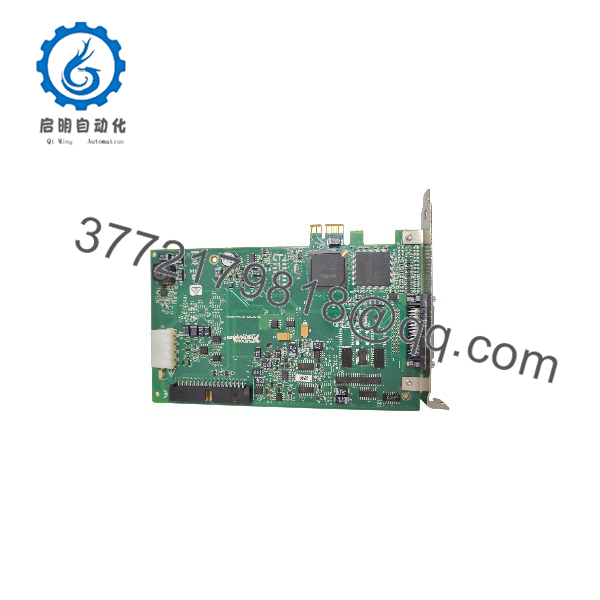
PCIe-6321
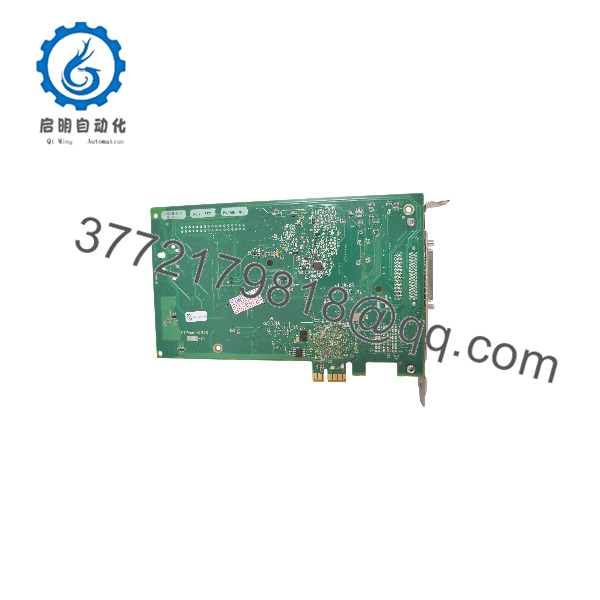
PCIe-6321
Installation & Configuration Guide
Stage 1: Pre-Installation Preparation (Est. 10 minutes)
⚠️ Safety First: Notify operations of test-system downtime. Confirm a safe state, shut down the PC, lock out/tag out power, and wait 5 minutes for the power supply capacitors to discharge.
- Tools Required: ESD wrist strap, PH2 screwdriver, multimeter, cable labels, smartphone for photos.
- Data Backup: Export your NI-DAQmx task configuration from NI MAX. Photograph the 68-pin VHDCI cable routing and breakout wiring. Document the DAQmx device name — application code references it.
- Slot Check: The card is PCIe x1 and fits any wider slot, but some motherboards reserve x16 slots exclusively for graphics. Confirm your target slot accepts a x1 link before you open the box.
- Driver Check: Install NI-DAQmx before powering up with the new board. Current DAQmx releases support the 6321 on Windows through current versions. Version mismatch is the top cause of first-boot failures.
Stage 2: Removing the Old Card (Est. 5 minutes)
- Unscrew the bracket retention screw.
- Disconnect the 68-pin cable — release the connector fully and pull straight out. Never yank at an angle.
- Release the PCIe slot latch (most have a small retention clip), then pull the card straight up. Don’t force a latched card.
- Inspect the slot and card edge for dust or damage.
⚠️ Keep the old card until the replacement passes a full functional test.
Stage 3: Installing the New Card (Est. 5 minutes)
- Clip on the ESD wrist strap before the board leaves its anti-static bag.
- Verify the part number (781044-01) and assembly revision on the label match your order.
- Open the PCIe slot latch, align the card, and press evenly until seated and latched. Secure the bracket screw.
- Reconnect the 68-pin cable and breakout accessory per your photos.
Self-Checklist: [ ] Slot accepts x1 card, [ ] Part number matches, [ ] Card latched and seated, [ ] 68-pin cable connected per photo.
Stage 4: Power-On & Testing (Est. 10 minutes)
- Power on the PC. Windows detects the board and NI-DAQmx binds the driver.
- Open NI MAX — the PCIe-6321 appears under “NI-DAQmx Devices.” Confirm the device name and run Test Panels.
- Verify AI with a known source, check both AO channels into a meter, toggle a DIO line, and run a counter test if your application uses them.
- Reload your DAQmx tasks and dry-run at reduced rates before returning the station to production.
- Allow the 15-minute warm-up before trusting warranted accuracy values.
⚠️ Troubleshooting Note: If the device isn’t detected, reseat the card and confirm the slot isn’t graphics-reserved, then recheck the DAQmx version. If AI readings jump between channels, suspect settling time with high source impedance — slow the scan or add conditioning. If counter measurements are unstable, check your encoder signal quality before blaming the board; STC3 counters are accurate, but garbage in means garbage out.
Frequently Asked Questions (FAQ)
Q1: Can I hot-swap this card under power?
No. Standard PCIe slots in desktop and industrial PCs are not hot-swap. Pulling a live card risks the slot, the motherboard, and the board’s front end — plus the PCIe slot latch often gets broken in the attempt. Shut down, wait 5 minutes for capacitor discharge, release the slot latch, then swap.
Q2: Is the PCIe-6321 obsolete, and is your stock genuinely new?
No — unlike the PCI M Series boards, the X Series remains a supported NI product line, and the 6321’s specification document was still being revised as of May 2026. That said, NI (now Emerson Test & Measurement) has been consolidating its DAQ lineup, so availability through normal channels fluctuates. Our stock is New Original / New Surplus: factory-sealed or uninstalled units with traceable sourcing, functionally tested before shipping, with test reports and photos of your exact unit available on request.
Q3: What’s the direct replacement if this is out of stock?
Same generation alternatives: the PXIe-6321 is the same measurement hardware in PXIe form (needs a chassis), and the USB-6321 offers similar specs as a standalone BNC/screw-terminal box — check bus throughput for high-rate streaming. If you’re migrating from an older PCI-6251, the PCIe-6321 is the standard destination, but note the AO rate (900 kS/s) is lower than the 6251’s 2.8 MS/s — verify your waveform generation requirements before assuming parity. If you need more AI speed on PCIe, look at the PCIe-6351/6353 (X Series, 1.25 MS/s+). Verify against NI’s current documentation before committing.
Q4: Will I lose my tasks or calibration when I pull the old card?
DAQmx tasks live on the PC hard drive — back up the MAX export and they’re safe. Calibration constants are stored on the board. If the replacement’s cal date on the label is stale, relative measurements still work, but absolute accuracy won’t meet warranted specs until recalibration. For metrology or audit-bound applications, budget for a cal cycle; for engineering test, check the AI absolute accuracy table against your tolerance needs first.
Q5: Why is your price lower than the original OEM list price?
We buy excess and surplus stock from OEM-authorized channels and test in-house rather than moving factory-fresh production. You get a verified board at below-list pricing. Because the X Series is still a supported line, sealed new units are more common here than on discontinued PCI models — but we state the condition of your exact unit on the listing, and New Surplus and Refurbished (tested) are never mixed grades.
Q6: Is the 250 kS/s AI rate per channel or shared?
Shared across the multiplexed AI scan — one channel can run the full 250 kS/s; sixteen channels scan at roughly 15.6 kS/s each. It’s also not simultaneous sampling. If you need simultaneous per-channel rates or megahertz-class throughput, look at X Series simultaneous models or NI SC Express. And mind settling time: high source-impedance signals scanned at high rates will show cross-channel error — check the settling-error curves in the NI spec document.
Q7: I’m replacing an old PCI M Series card. Will my code and cabling carry over?
Cabling: yes, mostly. The X Series uses the same 68-pin VHDCI connector and SHC68-68-EPM cable and works with SCB-68, BNC-2090, SCC, and SCXI accessories — but verify the pinout against the PCIe-6321 pinout diagram, as a few pin assignments differ from M Series. Code: DAQmx tasks port over with a device-name change in almost all cases, though counter tasks may map differently because you now have four counters instead of two. Budget an hour for verification instead of assuming zero-touch, and you won’t be surprised.