
 WhatsApp: +86 16626708626
 Email:
  Phone: +86 16626708626
Description
Key Technical Specifications
| Parameter | Value |
|---|---|
| Manufacturer | Pro-face / Digital Electronics Corporation |
| Part Number | 3620003-05 |
| Associated Front Module | APL3700-KFM |
| Compatible PL3000 Unit | APL3700-KA / APL3700-KD |
| Product Type | 15-inch LCD front display + keypad |
| Series | PL3000 |
| Display Size | 15 inches |
| Display Type | LCD front display |
| Input Interface | Keypad / operator interface |
| Built-in Computer | APL3000 series box unit |
| Related Registration Models | 3582302-01 / 3582302-11 |
| UL File | E220851 |
| Hazardous Location File | E210412 |
| Hazardous Location Rating | Class I, Division 2, Groups A, B, C and D |
Pro-face’s UL documentation lists 3620003-05 specifically as a 15-inch LCD front display + keypad unit. The PL3000 hardware manual further associates it with the APL3700-KA and APL3700-KD configurations.
A secondary equipment listing identifies the assembly as APL3700-KFM and gives the associated -KA configuration as 3582302-01. Treat those secondary identifiers as procurement cross-checks rather than substitutes for the physical nameplate.
Product Introduction
The Pro-face 3620003-05 is a 15-inch front display module with keypad for the PL3000 Series. Pro-face documentation identifies it as the front module used with the -KA and -KD industrial computer configurations. It is the operator-facing portion of the system rather than a complete industrial PC.
This distinction is important when sourcing a replacement. 3620003-05 is a front display unit, while the APL3000 box unit is a separate component. Pro-face’s certification documentation also lists 3620003-05 under its UL-certified front-display accessories.
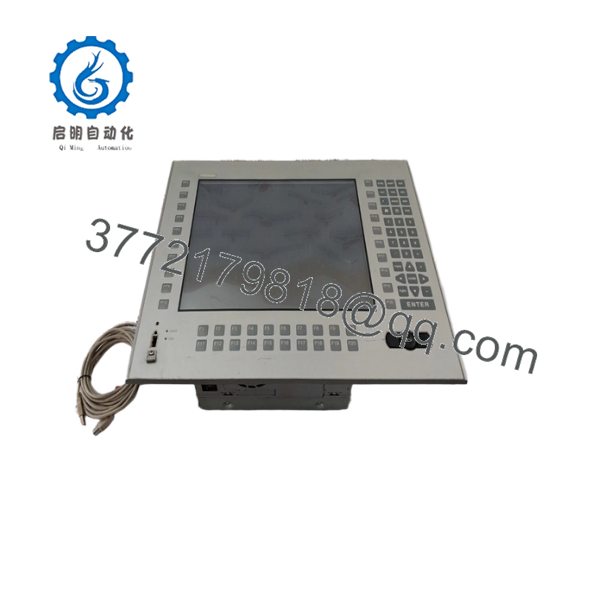
3620003-05
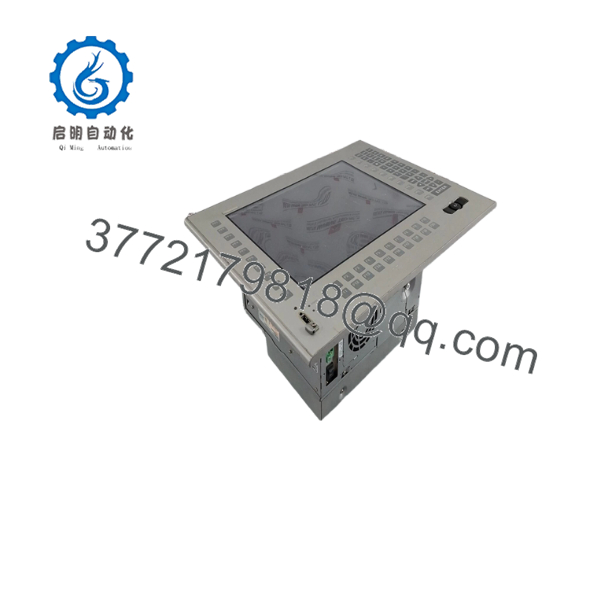
3620003-05
Installation & Configuration Guide
Stage 1: Pre-Installation Preparation — 5–10 Minutes
⚠️ Safety First: Disconnect the PL3000 system from power before removing the front module. Do not disconnect or reconnect internal or communication connections while energized unless the specific hardware documentation explicitly permits it.
Tools Required
- ESD wrist strap
- Phillips screwdriver
- Multimeter
- Cable labels
- Smartphone or camera
- Appropriate panel mounting tools
Before Removal
- Notify operations and place the machine in a safe state.
- Remove power from the PL3000 system.
- Verify the system is de-energized.
- Photograph the existing front module.
- Record the exact model and revision from the nameplate.
- Photograph keypad, display, and cable connections.
- Keep the old module until the replacement has passed commissioning.
Stage 2: Removing the Existing Module — Approximately 10 Minutes
- Remove the required protective covers.
- Label all cables before disconnecting them.
- Disconnect communication and interface cables carefully.
- Release the front-module mounting hardware.
- Support the display assembly while removing the final fasteners.
- Remove the old front module without damaging the panel or gasket.
- Inspect the panel opening for contamination or mechanical damage.
⚠️ Do not assume another 15-inch Pro-face display is mechanically interchangeable. The 3620003-05 identification matters, particularly where the keypad arrangement is part of the operator application.
Stage 3: Installing 3620003-05 — Approximately 10 Minutes
- Verify the replacement label: 3620003-05.
- Confirm the associated system is an -KA or -KD configuration.
- Inspect the LCD, keypad, connectors, and mounting hardware.
- Position the front module correctly in the panel.
- Reinstall the mounting hardware evenly.
- Reconnect the cables using the photographs taken during removal.
- Verify that connectors are completely seated.
- Confirm that no cable is pinched behind the module.
- Check protective grounding where applicable.
The hardware documentation explicitly maps -KA → front module 3620003-05 and -KD → front module 3620003-05.
Stage 4: Power-On & Testing — 5–15 Minutes
- Perform a final visual inspection.
- Confirm all mounting hardware is secure.
- Restore power.
- Observe the normal system startup.
- Confirm that the LCD initializes correctly.
- Test the complete keypad.
- Test the touch/operator input if fitted to the specific configuration.
- Verify the HMI application starts correctly.
- Check communication with the connected PLC or control system.
- Test several normal operator functions.
- Verify alarm and status displays.
- Return the machine to production only after the operator interface passes the site acceptance check.
⚠️ Critical: Do not treat the front module as a standalone replacement for the complete computer. If the existing box unit, storage device, or application software is also defective, replacing 3620003-05 alone will not restore the complete system.
Replacement Check
- Part number 3620003-05 verified
- /KD compatibility verified
- LCD inspected
- Keypad inspected
- Mounting hardware secured
- All connectors reseated
- Display startup verified
- Keypad operation verified
- HMI application verified
- PLC/control-system communication verified
Frequently Asked Questions (FAQ)
Q1. What is Pro-face 3620003-05?
3620003-05 is a 15-inch LCD front display + keypad unit for the Pro-face Series. Pro-face identifies it as the front module use and -KD configurations.
Q2. Is 3620003-05 a complete industrial computer?
No. It is the front display/interface assembly. The system uses a separate box computer. Pro-face’s certification documentation distinguishes the front display units from the built-in computer models.
Q3. What model is associated with 3620003-05?
The hardware documentation associates 3620003. A secondary equipment listing also identifies the front assembly as .
Q4. Does 3620003-05 have a keypad?
Yes. Pro-face’s UL certification categorizes model 3620003-05 as a 15-inch LCD front display + keypad unit.
Q5. Can I use 3620003-05 with an APL3900 system?
Do not assume compatibility. The Pro-face hardware documentation maps 3620003-05 /KD, while the APL3900 configurations use 3620003-03. Those are different front modules.
Q6. Is 3620003-05 suitable for hazardous-location applications?
Pro-face certification documentation lists the 3620003-05 front module under certification covering Class I, Division 2, Groups A, B, C and D when used within the specified certified system and installation conditions. The certification is system- and installation-dependent, so verify the complete assembly’s certification before installation in a classified area.
Q7. What should I verify before purchasing this part?
Verify these items against the existing equipment:
- Part number: 3620003-05
- Front-module designation: -KFM
- Host configuration:L3700-KD
- Box-unit model: 3582302-01 or 3582302-11, as applicable
- Display size and keypad arrangement
- Hardware revision
- Actual physical condition
- Required certification for the installation location
The safest approach is to provide the supplier with a clear photograph of the front label and complete nameplate before ordering. This avoids confusing a front-module part number with the complete panel-computer model.



