
 WhatsApp: +86 16626708626
 Email:
  Phone: +86 16626708626
Description
Key Technical Specifications
- Display Technology: High-brightness electroluminescent display
- Display Color: Amber monochrome
- Nominal Screen Size: 10 in class; 192 mm × 120 mm active display area
- Resolution: 640 × 400 dots
- Display Attributes: Blink and reverse video
- Brightness Adjustment: Two levels through the touch panel
- Touch Resolution: 32 × 20 keys per screen
- Touch Operation: One-point or two-point touch selection
- Power Input: AC 85–132 V, 50/60 Hz
- Power Consumption: 50 VA maximum
- Allowable Momentary Power Interruption: 20 ms maximum
- Serial Interface: RS-232C or RS-422
- Serial Settings: 2,400–38,400 bps; 7 or 8 data bits; 1 or 2 stop bits; none, odd, or even parity
- Auxiliary I/O: DC 24 V touch-switch, alarm, buzzer, RUN, and remote-reset signals
- Internal Screen Memory: 1 MB Flash EPROM; approximately 320 standard screens
- Backup Memory: 32 KB SRAM on equipped units; lithium battery backed
- Operating Temperature: 0 to 50°C
- Storage Temperature: −10 to 60°C
- Operating Humidity: 20–85% RH, non-condensing
- Dimensions: 274 mm W × 216 mm H × 56.5 mm D
- Weight: 2.5 kg maximum
- Panel Cutout: 259 mm W × 201 mm H
- Front Protection: Equivalent to IP65f and NEMA Type 4X/12 under specified panel-mounting conditions
- Cooling: Natural air cooling
- Grounding: D-class ground; ground resistance under 100 Ω.
Product Introduction
The PRO-FACE GP470-EG11 is a GP-470 Series monochrome touchscreen HMI for PLC operator control, alarm display, and machine-status monitoring. It uses an amber high-brightness EL display with 640 × 400 resolution, AC 100 V-class input, and RS-232C or RS-422 host communication.
This model stores screen data in 1 MB Flash EPROM and provides auxiliary DC 24 V signals for RUN, alarm, buzzer, remote reset, and touch-switch functions. It is obsolete, so confirm the installed communication protocol, screen-data software, voltage, and exact hardware revision before purchase.
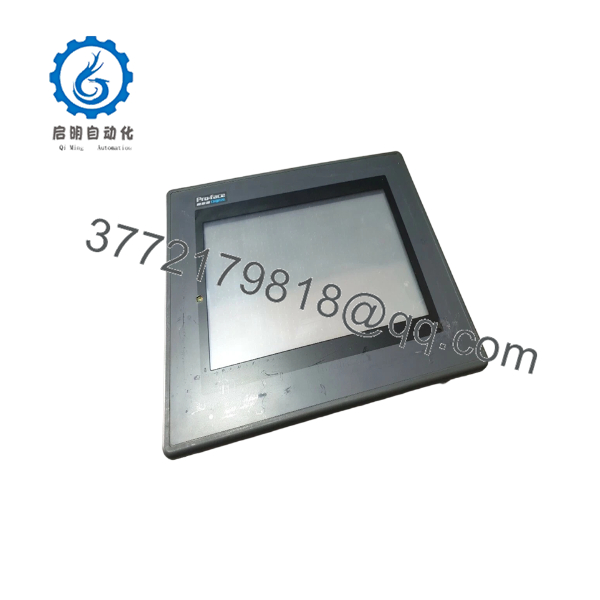
GP470-EG11
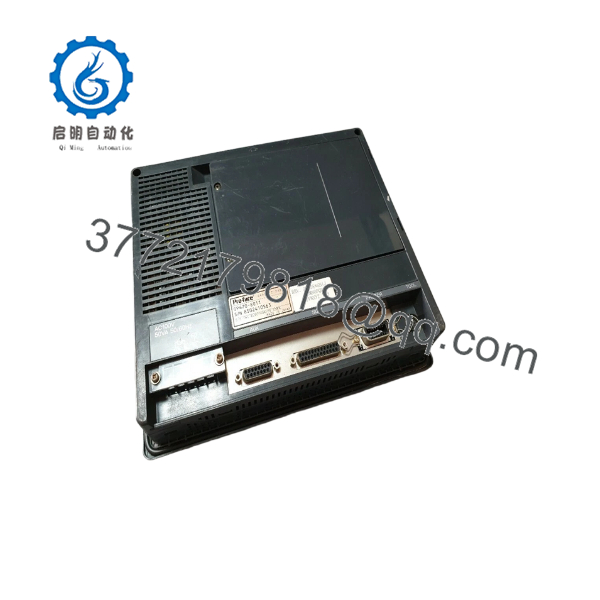
GP470-EG11
Troubleshooting Quick Reference
| Symptom | Possible Cause | Relevance to This Part | Quick Check Method | Recommendation |
|---|---|---|---|---|
| No power lamp or display | Missing AC supply, blown upstream fuse, or internal power fault | ✅ High | Measure AC voltage across the GP470-EG11 L and N terminals. Confirm AC 85–132 V before condemning the unit. | Check the branch circuit, fuse, terminal wiring, and FG connection first. |
| Amber screen remains completely blank | Internal power fault, display-drive fault, or failed EL display | ✅ High | Confirm the power lamp, measure input voltage during startup, and enter offline mode within 10 seconds of power-up if the display responds. | Replace the HMI if correct AC input is present but no display or offline response is available. |
| Display is dim | Aging EL display, low AC input, or brightness setting | ✅ High | Measure AC input under load and use the GP brightness-adjustment function. Compare brightness with a known-good unit. | Verify supply voltage and settings. A persistently dim display usually requires HMI replacement. |
| Screen shows characters but PLC data is missing | Wrong protocol, station number, cable wiring, or communication settings | ✅ High | Confirm the configured PLC driver, baud rate, parity, data length, and RS-232C/RS-422 selection. Check the communication error screen. | Match the GP settings to the PLC connection manual. Do not replace the HMI until the cable and protocol are verified. |
| Communication works intermittently | Loose D-sub connector, missing signal ground, noise, or non-isolated RS-422 circuit | ✅ High | Inspect the D-sub connector, verify the SG connection, and check RS-422 termination. Route signal cable away from motor and contactor wiring. | Correct wiring and grounding before replacing the panel. The RS-422 interface is not isolated. |
| Touch switches do not respond | Damaged touch surface, incorrect touch mode, or screen-data problem | ✅ High | Enter the self-diagnostic touch-panel test. Check whether the touch coordinates register across the full screen. | If self-diagnostics fail across multiple areas, replace the touch-panel assembly or complete HMI. |
| Touch coordinates are offset | Calibration or touch-layer degradation | ✅ Medium | Run the touch-panel self-diagnostic and compare the detected coordinates with the pressed locations. | Reconfigure or calibrate if supported. Replace the unit if the offset varies across the screen. |
| PLC communication stops after screen-data transfer | Incompatible system or protocol program | ✅ High | Record the original GP system version and protocol before transfer. Confirm that the project was created for GP470-EG11 and the connected PLC. | Restore the original project or transfer a verified GP-compatible system and protocol package. |
| Alarm messages disappear after power loss | No backup SRAM, exhausted lithium battery, or memory initialization | ✅ High | Inspect the rear nameplate. Copper-colored labeling indicates a backup-SRAM-equipped unit; silver labeling indicates a unit without that feature. | Back up alarm and recipe data before replacement. Do not assume every GP470-EG11 retains data without power. |
| Screen data is missing after replacement | The replacement was supplied without the customer project | ✅ High | Enter offline mode and verify whether the expected screen pages exist. Check for a backup made with GPW-CB02 or compatible transfer equipment. | Transfer the verified project from the original unit or an archived backup. |
| HMI resets during machine startup | Voltage dip, electrical noise, or inadequate power separation | ✅ Medium | Measure AC voltage during motor and contactor energization. Check whether the interruption exceeds the specified 20 ms tolerance. | Separate HMI power from high-current loads and correct voltage sag or surge problems. |
| Unit does not fit the existing panel | Incorrect cutout or substitute model | ✅ High | Measure the panel opening. GP470-EG11 uses an approximately 259 mm × 201 mm cutout. | Do not substitute a GP4000 model solely by screen size. Confirm cutout, power type, touch capability, and project conversion requirements. |
If the fault remains unclear, provide technical support with the nameplate photograph, hardware revision, power measurements, communication cable type, PLC model, screen photographs, error messages, and project or diagnostic logs.
Frequently Asked Questions (FAQ)
Is the PRO-FACE GP470-EG11 still manufactured?
No. Pro-face lists the model’s end of sales as December 26, 2002, and end of repair as March 26, 2008. Current purchases generally involve surplus, used, or refurbished inventory. Confirm the actual condition, display brightness, touch response, battery status, and test results for the specific unit.
What is the recommended replacement for ?
Pro-face lists GP4000 replacement options including PFXGP4501TAA and PFXGP4501TMA. These replacements use a TFT color LCD with monochrome display capability and the same panel cutout size. The replacement may still require project conversion, protocol review, and touch-function verification.
Can I replace with PFXGP4501TADW?
Not as a direct mechanical replacement without modification. Pro-face identifies PFXGP4501TADW as having a different panel cutout, DC-only power, and no two-point touch support. If the existing installation uses AC power or two-point touch, select the replacement carefully and plan for panel and application changes.
Does the use AC or DC power?
The standard model uses AC 85–132 V at 50/60 Hz and consumes up to 50 VA. Do not confuse it with GP470-EG21-24VP or GP470-EG31-24V variants, which use DC 24 V. Applying DC 24 V to the AC model, or AC voltage to a DC model, can damage the unit.
Will the PLC program or HMI screen project be retained during a swap?
The PLC program remains in the PLC, but the GP screen project must be present in the replacement HMI. Before removing the old unit, back up the screen data, system settings, protocol configuration, station number, communication mode, and any backup-SRAM data. The GP470 platform uses legacy transfer tools and software, so verify that the archived project can still be transferred.
Does every retain alarms and recipes when power is removed?
No. Backup operation applies only to units equipped with backup SRAM. Pro-face’s manual states that copper-colored rear nameplate labeling identifies backup-SRAM-equipped units, while silver labeling identifies units without it. Battery condition also matters, particularly on equipment that has operated for years at elevated temperature.
Why is this HMI cheaper than a current Pro-face unit?
The is an obsolete HMI with discontinued production and repair support. Lower pricing usually reflects surplus sourcing, used condition, or refurbishment rather than current factory supply. Confirm whether the unit is New Original, New Surplus, or Refurbished, and request a power-up video showing the display, touch test, communication test, and screen-data status.



