
 WhatsApp: +86 16626708626
 Email:
  Phone: +86 16626708626
Description
Key Technical Specifications
| Parameter | Specification Value |
| Manufacturer Model No. | QPL21100C2P |
| Display Type | Color TFT LCD |
| Display Size | 10.5 Inches Diagonal |
| Resolution | 640 × 480 pixels (VGA) |
| Input Voltage | 24 V DC (18 to 30 V DC range) |
| Power Consumption | 24 W max |
| Touchscreen Technology | Analog Resistive Touch Panel |
| Application Memory | 2 MB Flash EPROM |
| Communication Interface | RS-232C / RS-422 / RS-485 Configurable Serial Port |
| Download Port | RS-232C Serial Tool Port |
| Enclosure Rating | NEMA 4X / NEMA 12 / IP65 Front Panel (When correctly mounted) |
| Cutout Dimensions | 292 mm W × 222 mm H (11.5 in W × 8.75 in H approx.) |
Product Introduction & Supply Chain Strategy
The Pro-face / TCP QPL21100C2P is a 10.5-inch VGA color TFT QuickPanel operator interface engineered for machine-level visualization, multi-PLC protocol handshaking, and industrial panel mounting. Operating on standard 24V DC control power, it features an analog resistive matrix touchscreen and flexible serial communication hardware designed for legacy automated production lines.
Securing the QPL21100C2P as New Surplus delivers maximum Total Cost of Ownership (TCO) efficiency and protects plant operations against emergency downtime. Because this legacy QuickPanel series is phased out by the manufacturer, sourcing clean, unused original units eliminates the severe risks of worn touchscreen digitizers, degraded backlights, or failing power boards common in used components. It serves as an immediate drop-in replacement that avoids thousands of dollars in cabinet retrofits and software conversions.
Installation & Configuration Guide
Stage 1: Pre-Installation (Prep & Safety)
- Execute Lock-Out/Tag-Out (LOTO) procedures on the 24V DC power feed supplying the operator panel cabinet.
- Put on an ESD-grounded wrist strap connected to cabinet earth ground before handling internal terminals.
- Photograph all DIP switch positions, jumper settings, wire markers, and serial cable routing on the back of the old unit.
Stage 2: Removal
- Unplug the 24V DC power harness and protective earth grounding wire from the rear terminal block.
- Disconnect the serial communication cable and programming download cable from the interface ports.
- Loosen the panel-mounting screw clamps securing the unit bezel against the enclosure door.
- Carefully extract the old QuickPanel forward out of the panel cutout, taking care not to damage the cutout frame.
Stage 3: Installation (Clone & Seat)
- Verify the front sealing gasket on the new QPL21100C2P unit is clean and seated evenly to preserve NEMA 4X protection.
- Mirror all hardware DIP switch configurations and serial port jumpers from the original panel onto the new unit.
- Slide the new QPL21100C2P panel into the existing enclosure cutout from the front.
- Install and tighten the rear mounting clamps evenly in a cross pattern to ensure uniform seal compression.
Stage 4: Power-On & Testing
- Measure incoming DC supply lines with a multimeter to confirm a clean 24V DC input (18 to 30V DC).
- Reconnect the grounding wire, 24V DC power harness, and serial communication cables.
- Turn on power. Verify the display illuminates, passes initial self-diagnostics, and boots into the main system menu.
- Transfer the runtime project file (
.prj) using QuickDesigner software via serial cable, then test touchscreen responsiveness and PLC data handshaking.
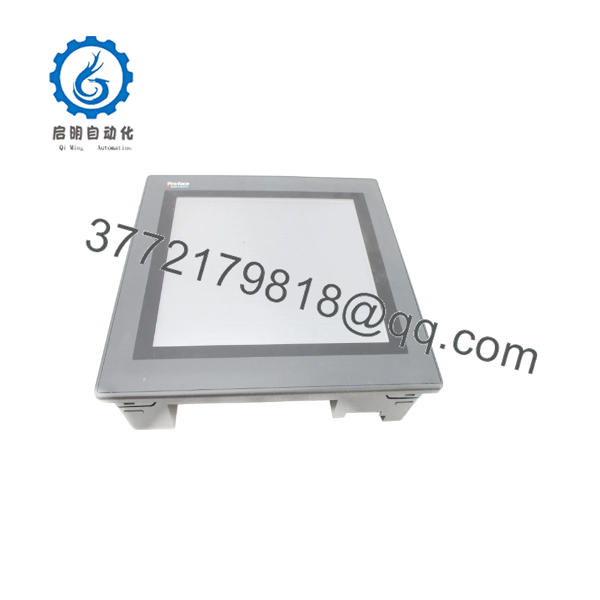
QPL21100C2P
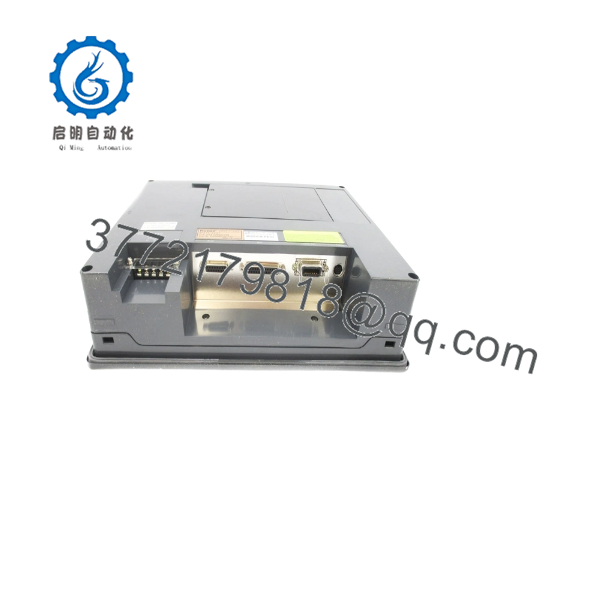
QPL21100C2P
Firmware/Software Versions & Upgrade Notes
- Programming Environment: The QPL21100C2P is configured using QuickDesigner (Version 3.7 or higher recommended).
- Communication Drivers: Ensure the protocol driver selected in QuickDesigner matches the specific PLC brand and baud rate (e.g., Modbus RTU, Allen-Bradley DF1, GE SNPX).
- Serial Cable Configuration: COM1 supports RS-232C, RS-422, and RS-485 modes. Protocol selection and pinout jumpers must be set prior to applying power to match the connected PLC interface.
- Firmware Transfer Warning: Never disconnect 24V DC power while downloading runtime files or flashing system firmware. Interrupting power during Flash EPROM writing will corrupt the bootloader and disable the unit.
Frequently Asked Questions (FAQ)
What makes buying a New Surplus more strategic than buying a refurbished panel?
Refurbished legacy panels often hide internal component aging, such as heat-stressed capacitors, dim backlights, and worn touch layers that fail under high thermal loads. Our New Surplus inventory consists of 100% genuine, unused original units preserved in climate-controlled reserves. You receive factory-grade reliability and a full service life at a fraction of the cost required to convert the entire machine to a modern HMI platform.
Are these Pro-face / TCP units guaranteed to be brand new and genuine?
Yes. Every unit supplied is certified Original New Surplus. They feature zero operational field hours, pristine glass surfaces, intact gasket seals, and clean terminal header pins. Package seals are opened strictly under ESD-safe bench conditions for incoming quality control validation.
Since the QPL series is legacy, why should our plant maintain an on-site spare?
Keeping 1–2 units of the on-site serves as an essential risk-management tool. If an operational display fails, having a direct replacement on the shelf converts days of troubleshooting and re-engineering into a simple 30-minute physical swap, preventing tens of thousands of dollars in lost plant output.
Can I hot-swap the while the control cabinet power is active?
No. You must shut off 24V DC power before removing or installing the HMI panel. Unplugging power or serial communication cables while live can cause arcing, trip upstream fuses, or damage sensitive serial transceiver chips on both the HMI and the connected PLC.
Will the retain its screen files and project logic during long power outages?
Yes. Screen graphic layouts and system drivers are stored in non-volatile Flash EPROM memory, which retains software indefinitely without external power or battery support. System clocks or alarm variables are backed up by an internal lithium battery.



