
 WhatsApp: +86 16626708626
 Email:
  Phone: +86 16626708626
Description
Key Technical Specifications
| Parameter | Value |
|---|---|
| Model | 5201-MNET-103M |
| Brand | ProSoft Technology |
| Product Family | ProLinx Gateway |
| Gateway Function | Modbus TCP/IP to IEC 60870-5-103 Master |
| Ethernet Protocol | Modbus TCP/IP |
| Ethernet Port | 1 × Ethernet |
| Ethernet Speed | 10/100 Mbps |
| IEC 60870-5-103 Port | 1 configurable serial port |
| IEC 60870-5-103 Role | Master |
| IEC 60870-5-103 Devices | Up to 16 slave devices |
| Internal Data Memory | Up to 4,000 registers |
| Mounting | DIN-Rail |
| Power Supply | 24 VDC nominal |
| Allowed Supply Range | 10–36 VDC |
| Operating Temperature | −25 to +70 °C |
| Storage Temperature | −40 to +80 °C |
| Relative Humidity | 5–95% RH, non-condensing |
The core gateway architecture is documented by ProSoft as one Ethernet port plus one configurable IEC 60870-5-103 Master serial port, with the 103M driver capable of monitoring and controlling up to 16 slaves. The protocol manual also specifies a 4,000-register internal data area.
Product Introduction
The ProSoft Technology 5201-MNET-103M is a ProLinx protocol gateway designed to exchange data between a Modbus TCP/IP network and IEC 60870-5-103 field devices. It provides one Ethernet interface and one configurable serial interface for IEC 103 Master communications.
The gateway is intended for applications that need Ethernet-based Modbus TCP/IP connectivity to IEC 60870-5-103 protection, monitoring, or control equipment. Its internal data area supports up to 4,000 registers, while the IEC 103 Master driver can communicate with up to 16 slave devices.
Installation & Configuration Guide
Stage 1: Pre-Installation Preparation — 5 Minutes
⚠️ Safety First: Notify operations, place the controlled process in a safe state, and follow the site’s lockout/tagout procedure before removing the gateway.
Tools Required:
- ESD wrist strap
- Small screwdriver
- Digital multimeter
- Wire labels
- Smartphone or camera for configuration records
Data Backup:
- Record the existing 5201-MNET-103M configuration.
- Document the Ethernet IP address, subnet mask, and gateway settings.
- Record IEC 60870-5-103 serial parameters.
- Photograph terminal wiring and any configuration switches.
- Save the existing configuration file if available.
Stage 2: Removing the Old Module — 5 Minutes
- Remove power from the gateway.
- Label all connected wiring before removal.
- Disconnect the Ethernet and serial connections carefully.
- Release the DIN-rail mounting mechanism.
- Remove the gateway without pulling against connected wiring.
- Inspect the wiring and mounting area for damage or contamination.
⚠️ Keep the original module until the replacement has completed communication testing.
Stage 3: Installing the New Module — 5–10 Minutes
- Put on the ESD wrist strap and verify the replacement model is 5201-MNET-103M.
- Mount the gateway securely on the DIN rail.
- Reconnect the Ethernet cable.
- Reconnect the IEC 60870-5-103 serial wiring according to the applicable wiring documentation.
- Clone the original communication parameters, including serial settings and Ethernet addressing.
- Check that all terminals are secure before applying power.
Self-Checklist:
- Exact model verified
- DIN-rail latch secured
- Ethernet connection secured
- IEC 103 serial wiring verified
- IP configuration documented
- Serial parameters copied
- Original unit retained for comparison
Stage 4: Power-On & Testing — 10 Minutes
- Check the DC supply with a multimeter before powering the gateway.
- Apply power to the gateway.
- Observe the power, configuration, error, and communication indicators.
- Connect the engineering PC using the appropriate Ethernet connection.
- Verify the configured IP address.
- Confirm communication with the Modbus TCP/IP host.
- Verify the IEC 60870-5-103 Master can reach the configured slave devices.
- Check diagnostic/status data for communication errors.
- Perform controlled read/write tests appropriate to the application.
- Return field equipment to normal operation only after communication has been verified.
⚠️ Replacement Trap: Do not assume that a replacement gateway has the same IP address or serial configuration as the unit being removed. Record the original settings before shutdown.
ProSoft documentation describes configuration and diagnostic access through its configuration software and Ethernet connection.
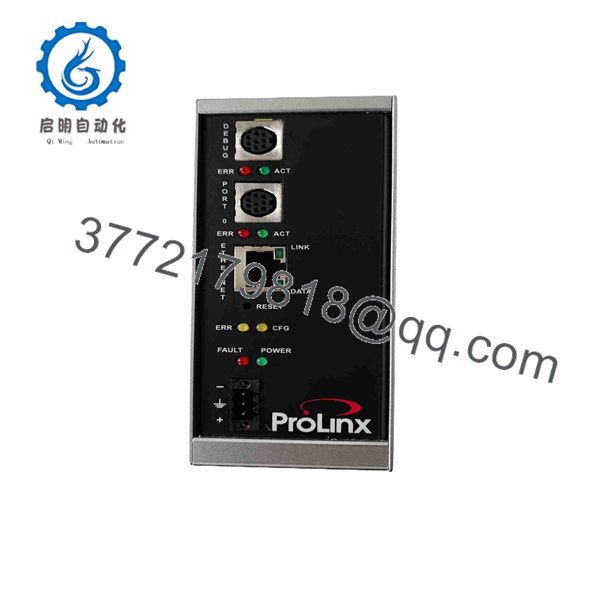
5201-MNET-103M
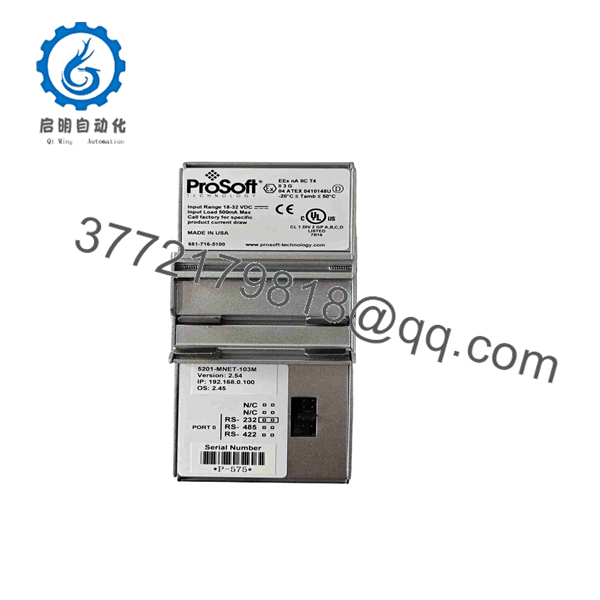
5201-MNET-103M
Frequently Asked Questions (FAQ)
Can the 5201-MNET-103M be hot-swapped?
Do not assume hot-swapping is permitted. For a planned replacement, remove power and follow the site’s electrical and equipment isolation procedure before removing the DIN-rail gateway.
Is the 5201-MNET-103M obsolete?
Yes. ProSoft’s legacy-product documentation identifies as a legacy product. ProSoft currently lists no replacement product for this exact model.
What protocols does the 5201- connect?
It connects Modbus TCP/IP on the Ethernet side with IEC 60870-5-103 Master communication on its serial side.
How many IEC 60870-5-103 slave devices can it communicate with?
The ProSoft product documentation specifies support for monitoring and controlling up to 16 IEC 60870-5-103 slave devices.
Will replacing the gateway erase my PLC or host configuration?
The gateway replacement does not inherently rewrite the external PLC or Modbus TCP/IP host configuration. However, the replacement gateway must be configured with the required IP and protocol parameters. Back up and document the existing configuration before removing the old unit.
Is the 5201- still available as new original stock?
Availability varies because ProSoft classifies this model as a legacy product. For surplus inventory, confirm the exact part number, serial number, physical condition, firmware/configuration status, and test results with the supplier before ordering. ProSoft’s official legacy-product list confirms the model’s legacy status.
Is there a direct ProSoft replacement?
ProSoft’s published legacy replacement list shows N/A for the 5201- rather than specifying a direct replacement. A modern migration therefore requires an application-level compatibility review rather than assuming a one-for-one substitute.



