
 WhatsApp: +86 16626708626
 Email:
  Phone: +86 16626708626
Description
Key Technical Specifications
| Parameter | Value |
|---|---|
| Manufacturer | Reliance Electric |
| Part Number | 57C431 |
| AutoMax Designation | 6011 Processor Module |
| System Series | AutoMax / DCS 5000 |
| Product Type | Rack-mounted processor / CPU module |
| Microprocessor | Motorola 68010, 16-bit |
| Processor Clock Speed | 8 MHz |
| Installed RAM | 512K parity RAM |
| Approximate Application Memory | 300K available for application tasks |
| Supported Programming Languages | BASIC, Control Block, and Ladder Logic |
| Serial Communications | Two RS-232C interfaces |
| Serial Port Labeling | Programmer/Port B and Port A |
| Serial Electrical Isolation | 450 V |
| Serial Signaling Level | ±12 V |
| Maximum Serial Current | ±30 mA per channel |
| Battery Type | 3.6 V lithium, AA-size |
| Battery Capacity | 2.0 Ah |
| Typical RAM Retention with Battery | Approximately 333 days |
| Published Minimum RAM Hold-Up with Battery | 42 days |
| Typical Retention Without Battery | Approximately 10 hours |
| Average Power Dissipation | 15 W |
| Operating Temperature | 0 to +60 °C / +32 to +140 °F |
| Storage Temperature | −40 to +85 °C / −40 to +185 °F |
| Relative Humidity | 5–90%, non-condensing |
| Module Dimensions | 11.75 × 1.25 × 7.375 in |
| Processor-Rack Capacity | Up to four AutoMax processors in one rack; verify common-memory and slot restrictions |
| Lifecycle Status | Obsolete / legacy processor hardware |
The Reliance Electric 57C431 is an AutoMax 6011 Processor Module for AutoMax and DCS 5000 racks. Available instruction-manual and part-specific references identify a 16-bit Motorola 68010 processor running at 8 MHz, 512K parity RAM, approximately 300K application memory, two isolated RS-232C ports, and 15 W average power dissipation.
Product Introduction
The Reliance Electric 57C431 is a 6011 processor module for the AutoMax and DCS 5000 industrial-control platform. It plugs into the AutoMax rack backplane and executes control applications written in BASIC, Control Block, or Ladder Logic. Typical installed applications include coordinated drives, material handling, process control, machine sequences, and legacy Reliance automation systems.
The 57C431 is a 512K processor, not a general-purpose I/O card. It is commonly needed to keep an installed AutoMax system running without redesigning control logic, network architecture, or rack hardware. Confirm the application backup, processor operating-system version, battery status, rack slot, companion memory modules, serial-port wiring, and existing processor count before replacement.
Troubleshooting Quick Reference
| Symptom | Possible Cause | Relevance to This Part | Quick Check Method | Recommendation |
|---|---|---|---|---|
| Processor has no LEDs or no display after power-up | Rack power-supply fault, poor backplane contact, failed CPU module | ⚠️ Medium | Measure the AutoMax rack supply rails at the backplane according to the system documentation; power down and inspect card-edge contacts | Verify rack power, fuse condition, and module seating before replacing the 57C431 |
| BAT OK LED is off | Discharged lithium battery, missing battery, battery connector fault | ✅ High | Measure battery voltage with the processor powered down if permitted; inspect battery holder and connector for corrosion | Replace the battery using the approved procedure and confirm the application backup before power removal |
| Processor loses application or configuration after shutdown | Battery failure, RAM corruption, extended power outage, incorrect battery replacement procedure | ✅ High | Check BAT OK status and battery voltage; compare loaded application against the latest archived AutoMax project | Restore from a validated backup. Do not remove the old battery without a backup and a planned retention strategy |
| Fault-code LEDs show an error after startup | Invalid application, corrupt operating system, incompatible module configuration, failed memory | ✅ High | Record the exact two-digit fault code, review processor diagnostics, and compare hardware inventory with the saved project | Diagnose the documented code before swapping hardware. Incorrect rack configuration can look like CPU failure |
| Programmer cannot communicate with the processor | Wrong serial cable, incorrect port selection, RS-232 settings mismatch, damaged serial port, software configuration issue | ⚠️ Medium | Verify cable pinout and port selection; confirm communication settings in the programming terminal; test both Port A and Programmer/Port B | Check cables and port settings before replacing the CPU. Legacy RS-232 wiring is often nonstandard |
| Controller runs but communicates intermittently | Cable shielding issue, ground-potential difference, serial noise, damaged connector, software timing problem | ⚠️ Medium | Inspect serial cable shielding and connector hardware; check for correlation with VFD starts or contactor operation | Correct grounding and cable routing. The CPU may not be at fault |
| System fault begins after a replacement CPU is installed | Wrong operating system, missing application, incompatible firmware, hardware configuration mismatch | ✅ High | Compare old and replacement labels, OS version, boot behavior, rack slot, memory configuration, and full project backup | Load a verified compatible project only after documenting the old processor configuration |
| New CPU boots but machine logic does not run | Application not loaded, processor not placed in correct operating mode, interlocks active, I/O network fault | ✅ High | Connect with the AutoMax programming tool, verify program presence and controller mode, then review I/O diagnostics | Verify the loaded application and operating mode before concluding the replacement module is defective |
| Outputs remain off but processor reports healthy status | External safety circuit open, I/O rail fault, remote I/O communication loss, PLC logic conditions unmet | ❌ Low | Check remote I/O status, output-module LEDs, safety relays, permissives, and application online logic | Do not replace the CPU based solely on inactive outputs |
| CPU runs intermittently or fails after warming up | Aging components, rack power ripple, poor ventilation, marginal backplane connection | ✅ High | Monitor rack supply rails and processor temperature; run an extended test where safe and observe fault recurrence | Test the CPU in a known-good rack before replacement. Correct power and cooling problems first |
❗ The lithium battery is not optional. The 57C431 can retain RAM for about 333 days typically with a healthy battery, but retention drops sharply without one. Before removing the existing CPU or battery, archive the AutoMax application, OS information, hardware configuration, and all serial settings. A dead battery plus an unplanned power outage can turn a simple CPU swap into a recovery project.
Take photos of the processor faceplate, fault-code LEDs, rack slot, serial cables, battery condition, and every adjacent module before removal. Record the exact fault code before cycling power. That information is more useful than a generic “CPU fault” report.
If you need technical support, provide the fault code, CPU front-panel photos, battery voltage, rack supply readings, AutoMax project backup status, programming-terminal error message, and full rack module inventory.
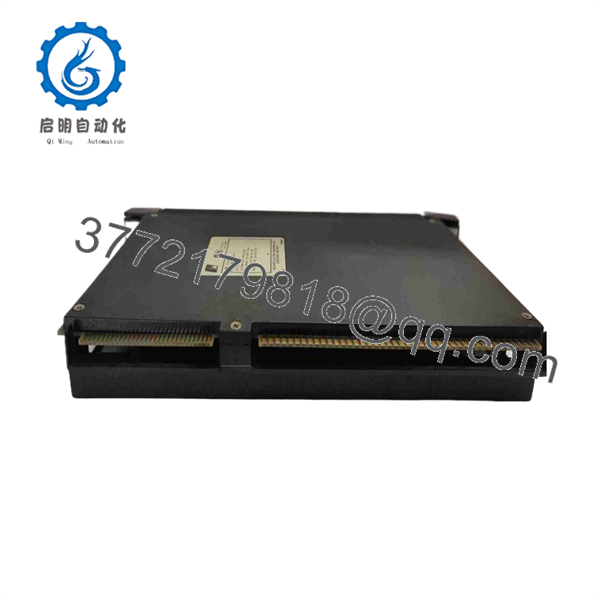
57C431
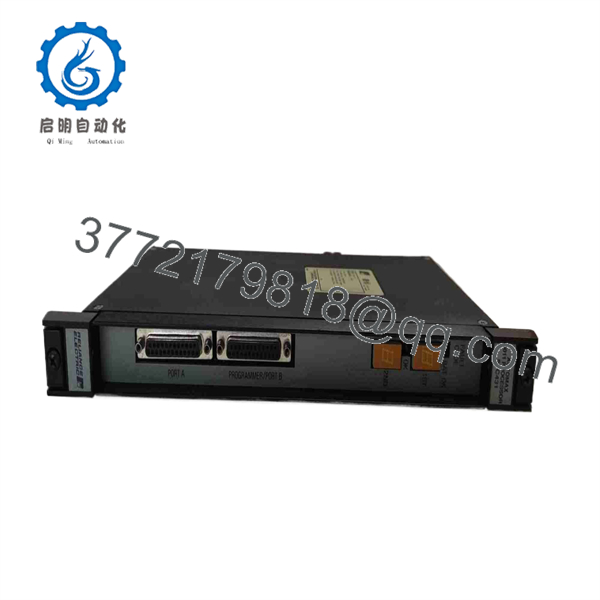
57C431
Frequently Asked Questions
What is the Reliance Electric 57C431?
The Reliance Electric 57C431 is the AutoMax 6011 Processor Module for Reliance AutoMax and DCS 5000 control racks. It uses an 8 MHz Motorola 68010 16-bit processor and includes 512K parity RAM for control execution and application storage.
What is the difference between the 57C431 and 57C430A?
The main published difference is memory capacity. The 57C431 contains 512K parity RAM, while the 57C430A contains 256K RAM. Do not assume that a 57C430A is an automatic replacement for a 57C431. Verify project memory requirements, processor operating-system compatibility, rack configuration, common-memory requirements, and machine application behavior before substituting.
Does the 57C431 support Ladder Logic?
Yes. AutoMax applications for the 57C431 can be developed in BASIC, Control Block, and Ladder Logic. The processor executes the application stored in its configured memory and communicates through its rack and serial interfaces.
Can I hot-swap the 57C431 processor?
No. Do not hot-swap this legacy processor module. Place the system in a safe state, back up the program, shut down and lock out the control rack as required by your site procedure, and verify power removal before handling the card. Hot removal can corrupt memory, interrupt drive control, disrupt remote I/O communications, and damage the rack backplane.
Will I lose the program when replacing a 57C431?
You can lose it if the existing battery is depleted, the processor RAM clears during power removal, or the replacement module does not contain the correct application and operating-system information. Back up the complete AutoMax project before removing anything. Verify the backup by opening it on the programming system, then record the CPU fault code, operating mode, hardware configuration, and serial settings. After replacement, load and validate the correct project under controlled conditions.
How long does the 57C431 battery retain RAM?
Published information gives approximately 333 days of typical RAM retention with the specified 3.6 V, 2.0 Ah lithium battery, with a published minimum hold-up time of 42 days. Without the battery, typical retention is roughly 10 hours, and the stated minimum can be as low as 10 minutes. Actual retention depends on battery condition, temperature, storage history, and processor condition.
Is the 57C431 obsolete, and should I hold a spare?
Yes. The 57C431 is legacy AutoMax hardware, and replacement supply normally comes from New Surplus, used, refurbished, or repair inventory. For any production-critical AutoMax rack, keep a verified spare processor, an approved replacement battery, a current offline application backup, the required programming software and cable, and documented startup procedures.
What condition and testing should I request before purchasing?
For New Original / New Surplus stock, request photos of the exact faceplate and labels, confirmation that the card edge has no corrosion or rework evidence, battery condition or battery replacement status, packaging photographs, and a written condition statement.
For Refurbished stock, request testing in a genuine AutoMax or DCS 5000 rack. The supplier should document boot operation, processor diagnostics, both RS-232C ports, battery-status circuit, application-memory test, communication with representative local and remote I/O, a controlled run under normal rack power, thermal observation, and final quality-control sign-off. Ask for the test report, actual unit photos, warranty terms, and confirmation of the processor operating-system version before shipment.



