
 WhatsApp: +86 16626708626
 Email:
  Phone: +86 16626708626
Description
Key Technical Specifications
| Parameter | Value |
|---|---|
| Manufacturer | Schneider Electric / Modicon |
| Part Number | 140CRP93200 |
| Product Family | Modicon Quantum automation platform |
| Product Type | Remote I/O head-end adapter module |
| Network Architecture | Quantum S908 remote I/O network |
| Installation Location | Local Quantum CPU rack |
| Primary Function | Exchanges I/O data between the CPU and remote I/O drops |
| Redundancy Configuration | Dual coaxial connections for redundant-cable operation |
| Connector Type | Two female right-angle F connectors |
| Cable Requirement | 75 Ω coaxial cable |
| Network Transmission Rate | 1.544 Mbps |
| Maximum Remote I/O Drops per Network | 31 |
| I/O Data per Drop | 64 input words and 64 output words |
| Dynamic Range | 35 dB |
| Coax Center-to-Ground Isolation | 500 V DC |
| Compatible Remote-Drop Family | Quantum RIO drop adapters, including 140CRA93200 where system design supports it |
| System Role | Head-end module only; not a remote-drop adapter and not a PLC CPU |
| Lifecycle Status | Discontinued March 15, 2022; scheduled end of service December 31, 2029 |
| Replacement Requirement | Match 140CRP93200 exactly and validate the complete S908 network configuration before replacement |
Schneider identifies the 140CRP93200 as a Modicon Quantum RIO head-end adapter with two connectors for redundant cable. Published specifications state 75 Ω coaxial media, 1.544 Mbps transmission, up to 31 drops per network, and 64 input plus 64 output words per drop.
Product Introduction
The Schneider Electric 140CRP93200 is a Modicon Quantum RIO head-end adapter module for the S908 remote I/O architecture. It installs in the local Quantum CPU rack and transfers deterministic I/O data between the PLC and distributed Quantum remote I/O drops across a 75 Ω coaxial network.
The module provides two right-angle F connectors for redundant-cable network arrangements. It supports up to 31 remote drops per network and transfers up to 64 input words and 64 output words per drop at 1.544 Mbps. Use the exact 140CRP93200 when maintaining an existing redundant Quantum RIO system.
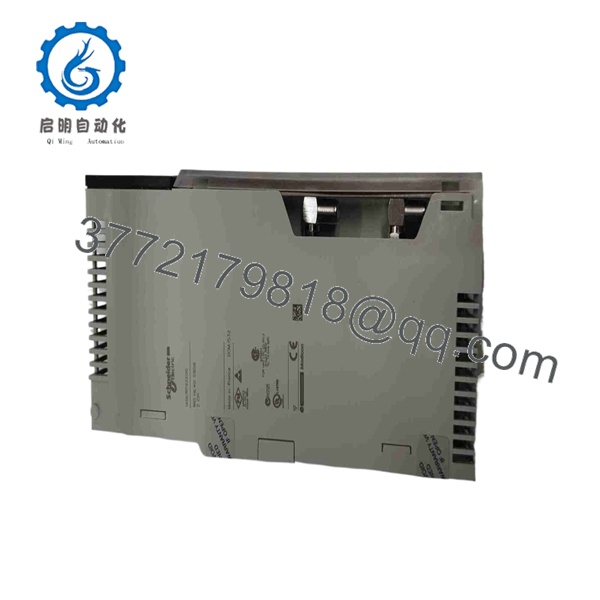
140CRP93200
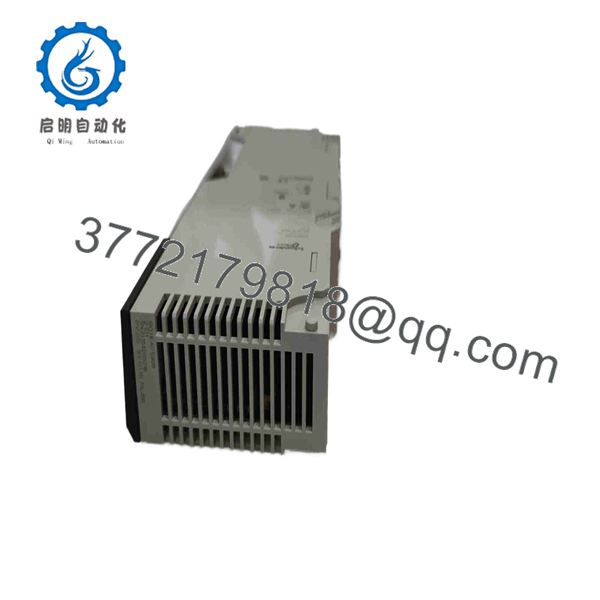
140CRP93200
Troubleshooting Quick Reference
| Symptom | Possible Cause | Relevance to This Part | Quick Check Method | Recommendation |
|---|---|---|---|---|
| All remote I/O drops are offline | Head-end module fault, missing rack power, CPU in STOP, disconnected coax trunk, failed tap, incorrect network configuration, or damaged coax | ✅ High | Verify Quantum CPU RUN status and rack power. Inspect both F connectors at the 140CRP93200. Confirm the coax trunk is connected to the correct primary and redundant ports. Check the first network tap and cable continuity. | Start at the CPU rack and first tap. Do not replace every remote-drop adapter when the entire network fails together. |
| One remote I/O drop is offline while downstream drops also fail | Open coax segment, failed tap, damaged F connector, wrong tap connection, water ingress, or failed drop adapter | ❌ Low to Medium | Identify the first failed drop from PLC diagnostics. Inspect the coax segment and tap between the last healthy and first failed drop. Check F connectors for loose center conductors, corrosion, and incorrect termination. | Repair the cable or tap section first. A downstream group failure is usually a physical network break, not a failed head-end module. |
| Only one remote drop is offline | Drop adapter fault, local remote-rack power loss, address conflict, failed local I/O module, poor coax connection, or incorrect tap configuration | ❌ Low | Check the remote rack power supply and drop-adapter indicators. Confirm the drop address is unique. Inspect the local coax connector and tap. Compare the configured drop number with the installed hardware. | Troubleshoot the remote rack and drop adapter first. The 140CRP93200 is usually not the cause when other drops remain healthy. |
| Intermittent remote I/O faults during vibration or temperature changes | Loose F connector, damaged coax shield, degraded tap, moisture ingress, poor cable strain relief, or marginal head-end electronics | ✅ Medium | Review fault timestamps and identify whether faults occur on one cable path or both. Inspect all F connectors for proper center-pin engagement and cable retention. Check cabinet and field enclosure conditions for moisture. | Correct cable, connector, and tap issues before replacing the head-end module. Coaxial network faults are frequently intermittent. |
| Network fault occurs after replacing the module | Primary/redundant coax cables reversed, incorrect connector seating, damaged center conductor, wrong module type, CPU configuration mismatch, or ESD damage | ✅ High | Photograph the original cable routing before removal. Confirm each coax cable returns to the same labeled port. Inspect the center conductor of each F connector and ensure connectors are hand-tightened, then torqued only to the supplier’s recommendation. | Recheck cable identity and physical connections before replacing the new module. Reversed redundant paths can create confusing intermittent faults. |
| Remote I/O faults occur only on one redundant path | Open or shorted redundant cable, damaged F connector, tap fault, missing cable shield, or one interface path fault | ✅ Medium to High | Review controller diagnostics to identify the active path. Temporarily test one path at a time only under approved maintenance procedures. Inspect and continuity-test the suspected coax run and F connectors. | Repair the affected cable path first. Replace the 140CRP93200 only if a verified good cable path still fails at the head-end port. |
| Communication errors appear after adding a new remote drop | Duplicate drop address, incompatible drop adapter, incorrect tap position, wrong cable type, excessive network attenuation, or incorrect configuration | ❌ Low | Verify the new drop has a unique address and approved remote adapter. Confirm 75 Ω cable and proper tap hardware. Check that I/O mapping stays within 64 input and 64 output words for the drop. | Correct network design, address, and cable issues. Do not add remote drops by physical connection alone. |
| CPU is healthy but remote data is stale or missing | PLC configuration issue, CPU application stopped, network fault, remote-rack power failure, or I/O mapping problem | ✅ Medium | Compare live remote I/O diagnostic status with application values. Verify the CPU is in RUN, remote I/O is configured correctly, and the module’s rack position matches the saved hardware design. | Separate network communication health from PLC application logic before replacing hardware. |
| Head-end module shows physical damage or repeated fault after storms | Surge, grounding issue, induced voltage on long coax, water ingress, or damaged cable shield | ✅ High | Remove power under approved procedures. Inspect coax shields, cabinet bonding, surge protection, and all connectors. Check for water contamination or corrosion at outdoor/field connections. | Correct the grounding, shielding, and cable issue before installing a replacement. A new head-end card can fail again if the surge path remains. |
❗ Cable warning: The 140CRP93200 requires 75 Ω coaxial cable. Do not substitute random CCTV or RF coax based only on connector fit. Verify impedance, approved tap hardware, cable condition, and overall network design.
❗ Redundancy warning: Photograph and label both coax cables before removal. Primary and redundant paths may appear identical, but reversing them or disturbing one F connector can produce intermittent remote-I/O alarms that waste hours.
❗ Address warning: Every remote I/O drop needs a unique configured address. A duplicate address can make a healthy network appear to have a failed module or bad cable.
❗ Physical-layer warning: I have seen a Quantum RIO network blamed on the head-end card when the real problem was a loose F connector with a barely engaged center conductor. Check the cable and tap chain before spending money on electronics.
If the issue remains unresolved, provide technical support with the Quantum CPU model, 140CRP93200 slot location, network drawing, remote-drop addresses, diagnostic screens, photos of both coax ports and all nearby taps, cable type, fault timestamps, and the complete module label. Keep these checks in mind and you will save yourself 90% of typical rework time.
Frequently Asked Questions (FAQ)
What does the Schneider 140CRP93200 do?
The 140CRP93200 is a Modicon Quantum RIO head-end adapter. It installs in the local CPU rack and exchanges remote I/O data between the Quantum controller and distributed RIO drops on the S908 coaxial remote-I/O network. It is not a CPU and it is not the adapter installed in each remote rack.
Does the 140CRP93200 support redundant remote I/O cabling?
Yes. It has two female right-angle F connectors and is specified for redundant-cable operation. The redundant network arrangement helps retain communication when one approved cable path or connection is interrupted, provided the complete S908 network is designed and maintained correctly.
How many remote I/O drops can one module support?
The published limit is 31 remote I/O drops per network. Each drop supports up to 64 input words and 64 output words. Verify I/O mapping, cable attenuation, tap hardware, and the installed Quantum CPU’s system limits before expanding the network.
What type of cable does it use?
Use 75 Ω coaxial cable with the correct F-connector and approved Quantum RIO tap arrangement. The network operates at 1.544 Mbps. Cable impedance, connector quality, tap selection, shielding, and proper termination all affect communication reliability.
Is the 140CRP93200 interchangeable with the 140CRA93200?
No. The 140CRP93200 is the head-end adapter that belongs in the CPU rack. The 140CRA93200 is a remote-drop adapter for a remote Quantum I/O rack. They use related RIO network concepts but do not perform the same role and cannot be swapped.
Can I hot-swap the 140CRP93200?
Do not assume hot swapping is acceptable. Removing the head-end adapter can interrupt all remote I/O data and may cause the PLC to place remote points in a fault state. Put the process in a safe condition, stop or isolate affected equipment, document the coax connections, and follow your site-approved Quantum maintenance procedure before removal.
Is the 140CRP93200 obsolete?
Yes. Schneider Electric lists the 140CRP93200 as discontinued on March 15, 2022, with end of service scheduled for December 31, 2029. For a critical system, keep a verified spare and develop a documented migration plan before the remaining stock and specialist support become difficult to obtain.
Why is a New Surplus 140CRP93200 less expensive than current factory hardware?
New Surplus stock usually comes from unused project inventory, system upgrades, plant storerooms, distributor liquidation, or legacy spare holdings. It can be original Schneider hardware, but it is outside current factory distribution and may have limited traceability or an older date code.
A credible supplier should inspect manufacturer labels, case condition, backplane contacts, and both F connectors for corrosion, recessed center contacts, impact damage, or thread damage. Functional testing should use a genuine Quantum rack and a simulated or actual S908 RIO network with 75 Ω coax. The test should verify CPU communication, primary and redundant paths, remote-drop recognition, alarm behavior, and stable operation under a sustained test.
Request actual unit photographs, the complete 140CRP93200 label, serial number visibility where available, a dated test report, verification of both coax ports, ESD-safe packaging, confirmed stock quantity, shipping lead time, and written warranty terms before issuing a purchase order.



