
 WhatsApp: +86 16626708626
 Email:
  Phone: +86 16626708626
Description
Key Technical Specifications
| Parameter | Value |
|---|---|
| Manufacturer | Schneider Electric / Telemecanique |
| Model | XBTF024510 |
| Product Family | Magelis XBT F |
| Product Type | HMI Operator Interface Terminal |
| Display Size | 10.4 in. |
| Display Type | Color graphic display |
| Resolution | 640 × 480 pixels |
| Operator Input | Keypad, function and alphanumeric keys |
| Processor | Pentium |
| Supply Voltage | 24 VDC |
| Power Consumption | 35 W |
| Communication | Downloadable protocols; protocol selection depends on configuration |
| Mounting | Panel mount |
| Approx. Dimensions | 340 × 300 × 100 mm |
| Approx. Weight | 2.7 kg |
| Lifecycle | Obsolete / discontinued |
The 10.4-inch display, 24 VDC supply, Pentium processor, and approximately 2.7 kg weight are supported by the available Magelis documentation and product records.
A key compatibility detail: catalog documentation lists XBTF024510 as the 10.4-inch color terminal with a Pentium processor and 24 V supply, while Ethernet-equipped variants are identified separately in the same XBT-F family.
Product Introduction
The Schneider Electric XBTF024510 is a Magelis XBT F-series industrial HMI operator terminal with a 10.4-inch color graphic display, keypad input, Pentium processor, and 24 VDC power supply. It was designed for operator control and process visualization in legacy industrial automation systems.
This is a legacy HMI, so the main procurement issue is not simply finding a unit with the same part number. Check the installed communication protocol, application software, cables, accessories, and terminal condition. Schneider Electric’s documented replacement is HMIGK5310, but migrating an existing XBTF project requires conversion to Vijeo Designer.
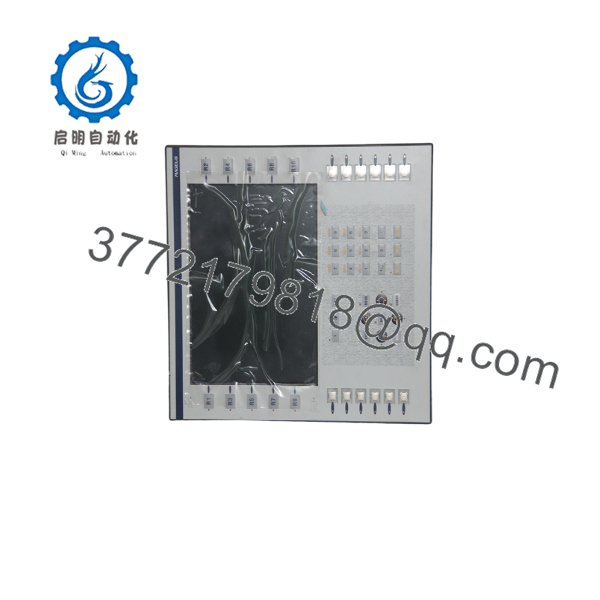
XBTF024510
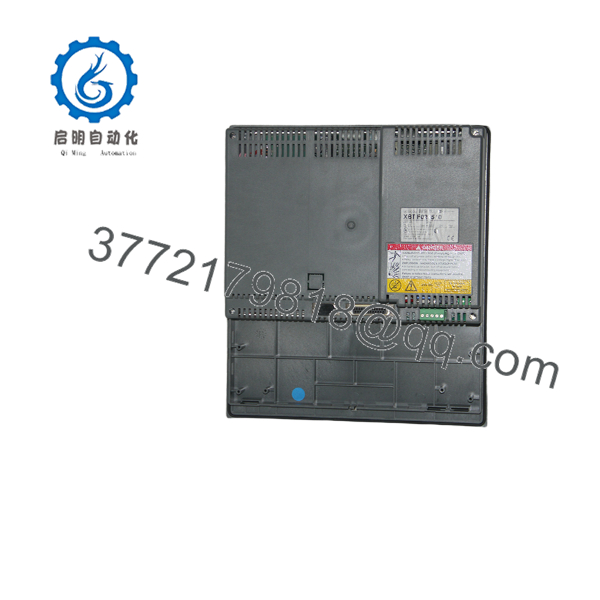
XBTF024510
Installation & Configuration Guide
Stage 1: Pre-Installation Preparation — Approximately 10 Minutes
⚠️ Safety First: Notify operations, place the machine or process in a safe state, and follow the site’s lockout/tagout procedure before disconnecting the HMI.
Tools Required:
- ESD wrist strap
- Appropriate screwdriver
- Digital multimeter
- Wire labels
- Smartphone or camera
- Existing programming/transfer cable, if required
Data Backup:
- Confirm the replacement part number is XBTF024510.
- Record the existing HMI’s complete nameplate information.
- Photograph all communication and power connections.
- Record the installed communication protocol.
- Identify the PLC connected to the terminal.
- Back up the existing HMI application before removing the working terminal where possible.
- Record cable part numbers and connector locations.
⚠️ Do not assume that another XBT-F terminal with a similar 10.4-inch display is electrically or software-compatible.
Stage 2: Removing the Old Module — Approximately 5 Minutes
- Isolate the 24 VDC supply.
- Verify the terminal is de-energized with a multimeter.
- Label the power and communication cables.
- Disconnect the communication cable without pulling on the connector body or wiring.
- Disconnect the 24 VDC supply.
- Release the panel mounting hardware.
- Carefully remove the HMI from the panel cutout.
- Inspect the wiring, connectors, and panel opening for damage.
⚠️ Keep the original XBTF024510 until the replacement has completed a functional test.
Stage 3: Installing the Replacement — Approximately 5–10 Minutes
- Use ESD precautions before handling the replacement terminal.
- Verify the nameplate reads XBTF024510.
- Check the panel cutout and mounting hardware.
- Install the terminal without stressing the display or enclosure.
- Secure the mounting hardware evenly.
- Reconnect the 24 VDC supply with correct polarity.
- Reconnect the communication cable.
- Verify every connection against the photographs taken before removal.
Self-Check:
- model confirmed
- 24 VDC polarity verified
- Communication cable connected
- Mounting hardware secured
- Existing protocol identified
- Application backup available
Stage 4: Power-On & Testing — Approximately 10–15 Minutes
- Measure the 24 VDC supply before energizing the HMI.
- Apply power to the terminal.
- Confirm the terminal completes its startup sequence.
- Check the display and keypad.
- Verify communication with the PLC.
- Open representative operator screens.
- Test status indications and alarm displays.
- Test a non-critical command or control function.
- Confirm that PLC data values displayed on the HMI match the controller.
- Return the process to normal operation after the complete functional check.
Legacy Software and Replacement Consideration
This is where many replacement jobs become more complicated than expected.
Schneider Electric states that the HMIGK5310 replaces the XBT-F024 series, including . The HMIGK5310 uses Vijeo Designer V6.2, and an existing XBTF project must be converted to Vijeo Designer, either manually or with Schneider technical support.
Therefore, if the objective is to keep the existing application unchanged, sourcing a correctly configured may be preferable to an immediate modernization project.
Frequently Asked Questions (FAQ)
Is the obsolete?
Yes. Current product listings identify the as discontinued/obsolete, and Schneider Electric provides HMIGK5310 as its replacement.
What display does the have?
The uses a 10.4-inch color display with 640 × 480 resolution. Available documentation identifies it as a keypad-equipped terminal rather than the touchscreen variant in the same XBT-F family.
What power supply does the require?
The documented supply is 24 VDC, with a listed power consumption of approximately 35 W.
Can I directly replace with HMIGK5310?
Not as a simple hardware swap. Schneider identifies HMIGK5310 as the replacement, but the existing XBTF project must be converted to Vijeo Designer. The is programmed with Vijeo Designer V6.2.
Will I lose my HMI application when replacing the terminal?
The risk depends on whether the application has been backed up and how the replacement is being performed. Before removing the working terminal, preserve the existing application and document its communication settings. If migrating to , plan for project conversion rather than assuming the original XBTF application can simply be downloaded unchanged.
Does have Ethernet?
Do not assume it does. The Magelis catalog distinguishes from the Ethernet-equipped XBTF024610 variant. If the existing system communicates through Ethernet, verify the exact installed terminal model before ordering a replacement.
Can I still buy a new ?
Possibly, but condition must be verified carefully. Current industrial surplus suppliers list the model in several conditions, including new, new surplus, used, and refurbished. For an obsolete HMI, ask for the exact nameplate, photographs, display condition, accessories, and test status before purchasing.



