
 WhatsApp: +86 16626708626
 Email:
  Phone: +86 16626708626
Description
Key Technical Specifications
| Parameter | Value |
|---|---|
| Product Model | FBG31C-08 |
| Manufacturer | SEW-EURODRIVE |
| Item Number | 822 997 X / 0252435 |
| Product Type | Plug-in Operator Panel |
| Compatible Drive Series | MOVITRAC 31C |
| Function | Parameter setting, commissioning, diagnostics |
| Display Type | Illuminated plain text display |
| Keypad Type | 6-key membrane keypad |
| Language Support | German, English, French, Spanish, Portuguese |
| Connection Method | Direct plug-in to inverter X4 interface |
| Protection Rating | IP40 according to EN 60529 |
| Mounting | Front-mounted inverter connection |
| Menu Structure | User menu and parameter menu |
| Operating Temperature | According to MOVITRAC 31C environmental specifications |
| Compatible Software | MC_SHELL commissioning software support |
| Weight | Approximately 0.1 kg |
The SEW FBG31C-08 is the operator keypad option for MOVITRAC 31C frequency inverters. It provides commissioning access, parameter editing, and drive diagnostics through a local display interface.
Product Introduction
The SEW FBG31C-08 is a plug-in operator panel designed for SEW-EURODRIVE MOVITRAC 31C frequency inverters. It provides local parameter adjustment, fault diagnosis, and commissioning functions without requiring a PC connection. The keypad includes an illuminated plain text display and selectable multilingual menus.
This module is commonly used during drive installation, maintenance, and troubleshooting where engineers need direct access to inverter parameters. It connects directly to the MOVITRAC 31C control interface and works alongside SEW commissioning tools such as MC_SHELL.
Installation & Configuration Guide
Stage 1: Pre-Installation Preparation (Approx. 5 minutes)
⚠️ Safety First
- Notify operations before removing or installing the keypad.
- Stop the motor drive safely.
- Apply lockout/tagout procedures if accessing the inverter cabinet.
- Remove control power and wait at least 5 minutes for DC bus discharge.
Tools Required
- ESD wrist strap
- PH1 screwdriver (if enclosure access is required)
- Digital multimeter
- Smartphone for documentation photos
Data Backup
Before replacement:
- Record the MOVITRAC 31C inverter model.
- Document current parameter values.
- Photograph existing keypad position and wiring.
- Record fault history if available.
Stage 2: Removing the Old Module (Approx. 5 minutes)
Steps
- Remove the front cover if required.
- Release the existing FBG31C keypad from the inverter interface.
- Pull the module straight outward.
- Inspect the connector pins for contamination, bending, or oxidation.
- Check the inverter mounting area before installation.
⚠️ Note:
Keep the removed keypad until the replacement unit has been tested. It can provide important reference information during commissioning.
Stage 3: Installing the New Module (Approx. 5 minutes)
Steps
- Wear an ESD strap before handling the replacement keypad.
- Verify the replacement model is FBG31C-08.
- Align the connector with the MOVITRAC 31C interface.
- Press the keypad firmly into position until fully seated.
- Check that the display window and mounting clips are secure.
Configuration Clone (Critical)
- Power on the inverter.
- Verify language settings.
- Compare parameter access with the previous keypad.
- Confirm no communication or display errors appear.
Self-Checklist
- Correct FBG31C-08 model installed
- Connector fully seated
- Display operational
- Parameter menu accessible
Stage 4: Power-On & Testing (Approx. 10 minutes)
Pre-Power Check
- Verify inverter supply voltage.
- Confirm keypad connection is secure.
- Ensure no loose components remain inside the cabinet.
Power-On Steps
- Energize the MOVITRAC 31C inverter.
- Observe the keypad display startup sequence.
- Verify menu navigation using all six keys.
- Access inverter parameters.
- Check fault history.
- Perform a controlled motor test.
⚠️ Troubleshooting Note
- If the display remains blank, check connector seating and inverter power supply.
- If keypad access fails, verify compatibility with the MOVITRAC 31C model.
- If parameter values appear incorrect, reload documented settings.
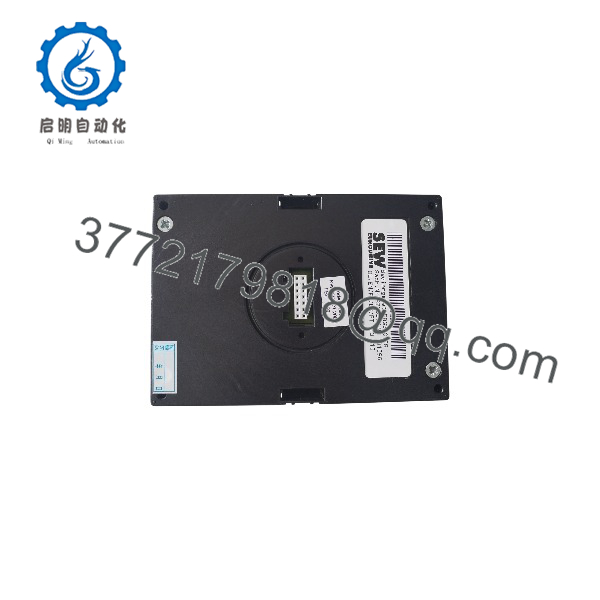
FBG31C-08
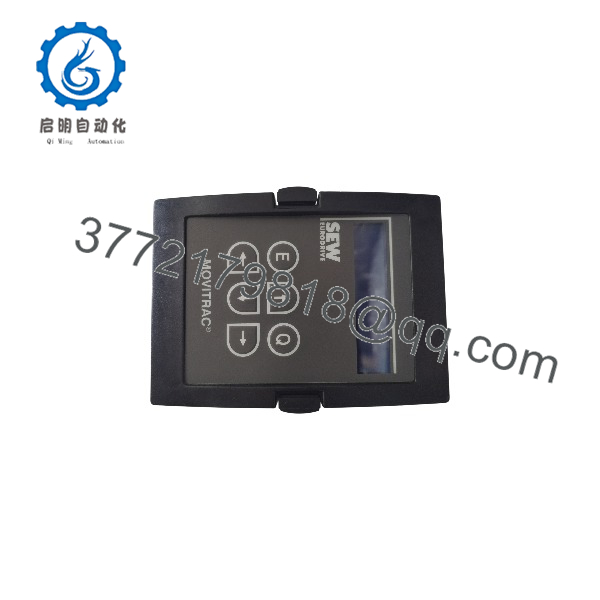
FBG31C-08
Frequently Asked Questions (FAQ)
Q1: Can the SEW FBG31C-08 be replaced while the inverter is powered?
No. The is a plug-in operator interface, not a hot-swappable module. Remove power before disconnecting it. Working on the keypad connection under voltage can damage the interface electronics.
Q2: Is the obsolete?
The belongs to the older MOVITRAC 31C drive generation. Many installations still use MOVITRAC 31C equipment, so replacement demand exists, but availability depends on remaining inventory. Verify your inverter firmware and hardware revision before ordering.
Q3: What is the difference between and FBG31C-09?
The hardware function is the same, but the language package differs.
- German / English / French / Spanish / Portuguese
- FBG31C-09: English / Italian / Swedish / Danish / Finnish
Select the version that matches the maintenance team’s preferred language.
Q4: Will replacing the keypad erase my MOVITRAC 31C parameters?
No, normal keypad replacement does not erase inverter parameters because the settings are stored in the drive electronics. However, always document parameters before replacement because incorrect commissioning settings can still affect motor operation.
Q5: Why is the price lower than a new OEM accessory?
Older automation accessories are often available through surplus inventory channels, discontinued equipment stock, or maintenance inventory liquidation. The price difference does not confirm condition by itself.
Available conditions should be clearly identified:
- New Original / New Surplus: Unused inventory condition.
- Factory Sealed: Original unopened packaging when available.
- Refurbished (tested): Inspected and function-tested before shipment.
Q6: What inspection process should be completed before installing a surplus ?
A proper inspection process should include:
1. Inbound Inspection & Traceability
- Verify source documentation.
- Check model label and item number.
- Inspect housing for cracks, corrosion, scratches, or repair marks.
- Confirm display window condition.
- Check connector pins.
2. Functional Testing
- Test on a genuine SEW MOVITRAC 31C inverter.
- Verify power-up display sequence.
- Test all six keypad buttons.
- Confirm menu navigation.
- Verify parameter read/write functions.
3. Electrical Testing
- Check connector continuity.
- Verify no abnormal current draw.
- Inspect insulation condition.
4. Firmware & Configuration Verification
- Record compatible inverter firmware where available.
- Document test configuration.
- Save test photos.
5. Final QC
- QC inspector approval.
- Anti-static ESD packaging.
- Protective bubble wrap.
- QC label with inspection date.
- Test report available upon request.
Q7: What are common mistakes when replacing an ?
❗ The most common mistake is assuming every MOVITRAC keypad is interchangeable.
SEW has multiple inverter generations with different operator interfaces. I have seen maintenance teams install a visually similar keypad, only to find that the connector and parameter functions do not match.
Common checks:
- Confirm MOVITRAC 31C compatibility.
- Verify versus other FBG variants.
- Record existing parameters before removal.
- Avoid forcing the connector.
A five-minute compatibility check prevents hours of commissioning delay. Keep these checks in mind and you will avoid most keypad replacement rework during drive maintenance.



