
 WhatsApp: +86 16626708626
 Email:
  Phone: +86 16626708626
Description
Key Technical Specifications
| Parameter | Specification |
| Manufacturer | Siemens |
| Model Number | 6ES7623-1SB01-0AC0 |
| Product Line | SIMATIC C7-623 |
| Integrated CPU | Equivalent S7-300 Controller |
| Integrated HMI | OP17 Text Panel Display (4 lines x 20 characters) |
| Digital Inputs | 16 Channels (24 VDC) |
| Digital Outputs | 16 Channels (24 VDC / 0.5 A) |
| Analog Inputs | 4 Channels (Voltage / Current / Pt100) |
| Analog Outputs | 2 Channels (±10 V, 0-20 mA) |
| Work Memory | 31 KB RAM |
| Interface Ports | MPI (Multi-Point Interface), RS-232 / TTY |
| Supply Voltage | 24 VDC (18.7 to 30.2 VDC range) |
| Dimensions (W x H x D) | 240 mm x 170 mm x 91 mm |
Product Introduction & Supply Chain Strategy
The Siemens 6ES7623-1SB01-0AC0 SIMATIC C7-623 is a fully integrated industrial controller combining an S7-300 CPU, onboard digital and analog I/O, and an OP17 operator text panel into a single panel-mounted unit. Designed for compact machine automation, it manages real-time logic execution and operator interfacing without requiring separate fieldbus modules or cabling.
This component is an obsolete legacy unit. Securing a genuine New Surplus 6ES7623-1SB01-0AC0 unit avoids severe plant downtime. Buying refurbished options exposes your facility to degraded membrane keypads, dim backlight displays, and failed onboard RAM backup capacitors. Maintaining a unused, factory-fresh spare guarantees zero operating hours, full memory retention, and absolute operational reliability.
Installation & Configuration Guide
1.Stage 1: Pre-Installation (Prep & Safety):Power & Backups.
- Perform full Electrical Lock-Out/Tag-Out (LOTO) on the cabinet main breaker.
- Verify and record existing STEP 7 PLC program and ProTool HMI project backups via MPI cable.
- Wear a grounded ESD wrist strap before handling terminal connectors.
- Take clear photos of all terminal block wiring, MPI network connectors, and grounding straps.
2.Stage 2: Removal:Panel Extraction.
- Disconnect 24 VDC main power supply connectors and detach the MPI communication interface.
- Unplug the screw-terminal blocks for digital and analog I/O directly without unscrewing individual wires.
- Loosen the panel-mounting tension clamps surrounding the rear chassis.
- Carefully slide the unit forward out of the enclosure cutout to avoid snagging cabinet wiring.
3.Stage 3: Installation (Clone & Seat):Mechanical Mounting.
- Inspect the panel cutout gasket seal to ensure protection against dust and moisture ingress.
- Insert the new 6ES7623-1SB01-0AC0 module into the cutout and tighten mounting clamps evenly.
- Reattach all pre-wired terminal blocks onto their designated I/O slots.
- Reconnect the MPI network line and secure the 24 VDC power terminals with correct polarity.
4.Stage 4: Power-On & Testing:Logic & Function Test.
- Apply 24 VDC power and verify the power LED illuminates green while the OP17 display initializes.
- Download the target STEP 7 system hardware configuration and PLC logic via the MPI port.
- Download the corresponding ProTool project configuration to the integrated HMI panel.
- Cycle the key-switch to RUN mode; verify all digital inputs trigger correctly and display zero system faults.
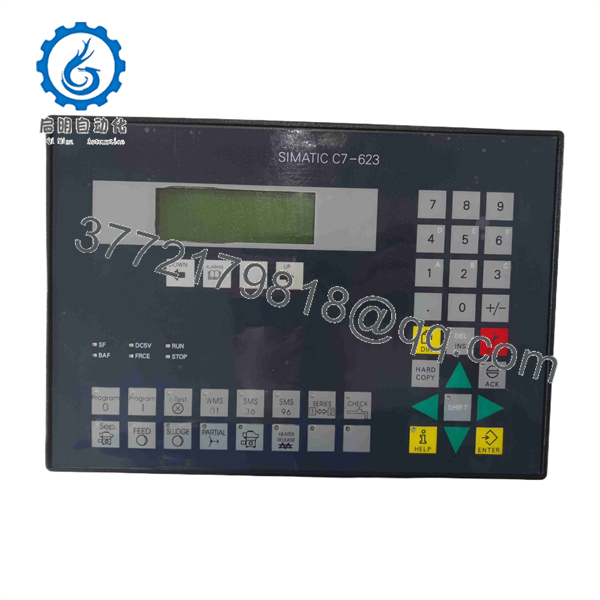
6ES7623-1SB01-0AC0
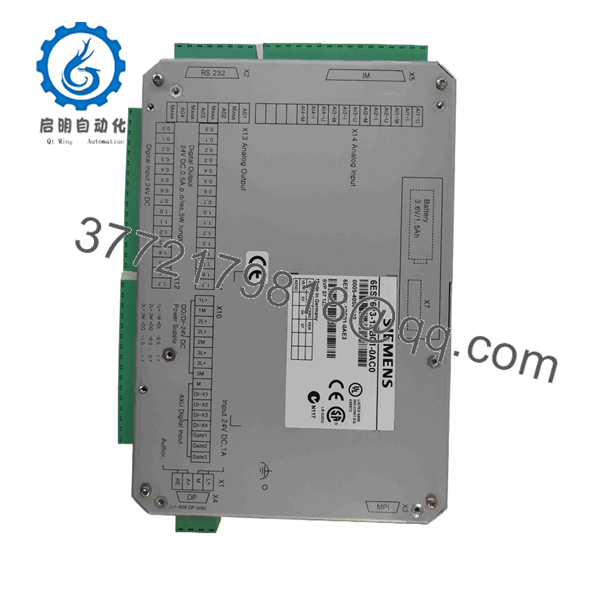
6ES7623-1SB01-0AC0
Firmware/Software Versions & Upgrade Notes
- Software Engineering Tools: System logic requires STEP 7 (V5.1 or higher) for PLC programming, while operator screens require ProTool (V5.1 or higher) or WinCC flexible (Legacy Compact edition).
- Memory Card Dependencies: Ensure the original Memory Card (MC) or Micro Memory Card (MMC) format matches the exact C7 CPU hardware generation. Transferring legacy PCMCIA-style memory cards into different hardware sub-revisions without re-compiling in STEP 7 can cause system STOP errors.
- Protocol Compatibility: When replacing older C7-623 units, verify that the MPI baud rate (typically 187.5 kbps) matches all connected drive controllers and ET 200S remote I/O nodes to prevent communication dropouts.
Frequently Asked Questions (FAQ)
Q: Why is this New Surplus C7 unit priced higher than refurbished modules available online? A: Refurbished C7-623 units frequently suffer from worn membrane keypads, dried-out electrolytic capacitors, and failing LCD backlights due to thousands of previous field hours. Our New Surplus inventory consists of unused hardware with zero runtime, providing OEM-level longevity and eliminating the threat of a secondary plant shutdown.
Q: Is this 6ES7623-1SB01-0AC0 unit guaranteed to be authentic Siemens manufacture? A: Yes. All stock is guaranteed genuine Siemens original manufacture. Every unit undergoes strict quality verification, terminal pin inspection, and power-on test procedures prior to final dispatch.
Q: The SIMATIC C7 series is obsolete. Is this unit still supported for emergency swaps? A: While Siemens has discontinued active manufacturing of the C7 series, our strategic stocking model keeps factory-fresh units available for direct drop-in replacement. This allows plant maintenance teams to avoid the massive engineering expenses required to re-design and re-wire an entire control cabinet to modern S7-1200 or ET 200SP hardware.
Q: Can I replace this module while the control cabinet is under power? A: No. Hot-swapping a panel-mounted compact unit can short 24 VDC field power to the CPU logic board or cause high-voltage transients that destroy onboard analog inputs. Always disconnect cabinet power before removal or re-installation.
Q: Will this unit retain its PLC program during a power outage? A: The internal RAM requires an active backup battery or EEPROM memory card for long-term retention of non-volatile markers and data blocks. Ensure a fresh backup battery (or memory card) is installed prior to commissioning.
Q: What warranty coverage is included with this New Surplus product? A: We provide a full 1-Year Comprehensive Replacement Warranty on this 6ES7623-1SB01-0AC0 unit. If any hardware defect occurs within 12 months under standard operating conditions, we will replace the unit or issue a full refund.



