
 WhatsApp: +86 16626708626
 Email:
  Phone: +86 16626708626
Description
Key Technical Specifications
| Parameter | Value |
|---|---|
| Manufacturer | Woodward |
| Part Number | 8440-2047 |
| Product Family | easYgen-3000 |
| Model | easYgen-3500-5/P1 Marine |
| Product Type | Marine genset controller |
| Supply Voltage | 12/24 VDC |
| Supply Range | 8–40 VDC |
| Mounting | Front-panel |
| Generator Voltage Measurement | 3-phase / 4-wire |
| Generator Current Measurement | 3 × TRMS |
| Current Input Version | 5 A |
| Bus Voltage Measurement | 1-phase / 2-wire |
| Operating Modes | Automatic, Manual, Stop, Test |
| Synchronization | GCB and MCB synchronization |
| LS-5 Units | Up to 16 |
| Configurable Alarm Inputs | 10 |
| Configurable Digital Outputs | Up to 12 |
| Analog Inputs | 3 |
| Analog Outputs | 2 |
| CAN Interfaces | 3 |
| Modbus RTU | RS-232 / RS-485 |
| Event Recorder | 300 entries |
| Display | Color LCD with programmable function keys |
| Spare Mounting Kit | 8923-1314 |
| Manual | Woodward 37531 |
| Product Specification | Woodward 37533 |
Woodward’s product specification lists the Marine easYgen-3500 as supporting generator voltage/current measurement, GCB/MCB synchronization, AMF, island operation, load sharing, configurable PID controllers, J1939, CAN, and Modbus RTU.
The 8440-2047 specifically corresponds to the 5 A CT-input, front-panel easYgen-3500 Marine configuration with additional BV and DNV approval. Woodward lists 8440-2046 for the 1 A version, so the CT-input rating must be checked before replacement.
Product Introduction
The Woodward 8440-2047 is an easYgen-3500-5/P1 Marine genset controller designed for marine generator applications. It provides generator measurement, breaker control, synchronization, engine control, protection, load sharing, and communications in a front-panel controller. Woodward specifies the 8440-2047 for the 5 A CT-input configuration with additional BV and DNV marine approvals.
The controller supports up to 16 Woodward LS-5 units, three CAN interfaces, configurable analog and digital I/O, and Modbus RTU over RS-232/RS-485. When replacing another easYgen-3000 controller, compare the exact P/N, CT rating, software version, I/O assignment, and marine approval requirements rather than matching only the enclosure.
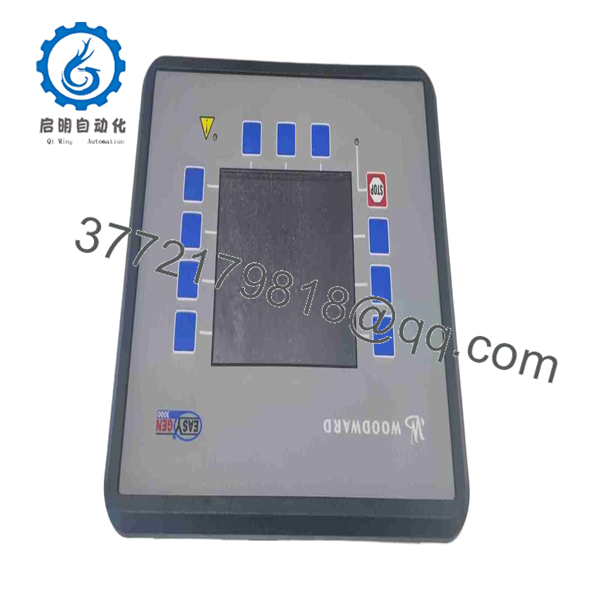
8440-2047
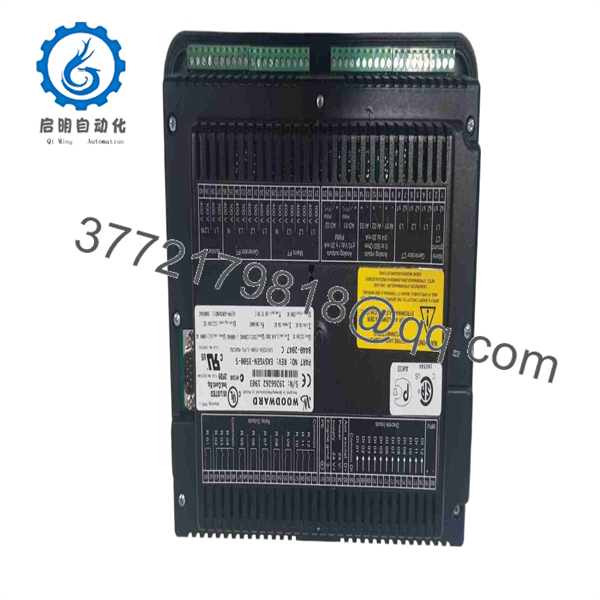
8440-2047
Installation & Configuration Guide
Stage 1: Pre-Installation Preparation
Estimated time: 30–45 minutes
- Notify vessel or plant operations and place the generator in the approved maintenance state.
- Apply the required LOTO procedure.
- Isolate controller power and prevent unintended generator starting.
- Verify the DC supply is de-energized.
- Wear an ESD wrist strap.
- Prepare:
- Digital multimeter
- PH1 screwdriver
- Wire labels
- Camera/phone
- Generator single-line diagram
- Existing easYgen configuration
- CT/PT data
- Engine ECU/J1939 configuration
- Photograph the controller and every terminal group.
- Record the complete 8440-2047 nameplate and serial number.
- Record the software version and application parameters.
- Record CT ratio and confirm the system uses 5 A secondary current inputs.
⚠️ Do not confuse 8440-2047 with 8440-2046. Both are easYgen-3500 Marine variants, but Woodward assigns different current-input configurations.
Stage 2: Removing the Old Module
Estimated time: 20–30 minutes
- Confirm the generator cannot start or close a breaker unexpectedly.
- Isolate the controller supply.
- Photograph the complete wiring before removal.
- Label generator voltage and current inputs.
- Follow the approved CT isolation procedure before disconnecting CT circuits.
- Label breaker-control outputs.
- Label engine start/stop and alarm wiring.
- Label CAN/J1939 and Modbus connections.
- Disconnect the terminals carefully.
- Release the panel mounting hardware.
- Remove the controller without stressing the wiring.
- Inspect the terminal wiring for corrosion, loose connections, or heat damage.
⚠️ Never open an energized CT secondary circuit. Follow the vessel’s or plant’s approved current-transformer isolation procedure.
Stage 3: Installing the New Module
Estimated time: 30–45 minutes
- Verify the replacement is Woodward 8440-2047.
- Confirm the controller is the easYgen-3500-5/P1 Marine version.
- Verify the 5 A CT-input configuration.
- Confirm the BV/DNV approval requirements for the installation.
- Mount the controller in the front panel.
- Reconnect control power.
- Reconnect generator voltage inputs.
- Reconnect the three generator current inputs.
- Verify CT polarity and phase sequence.
- Reconnect bus/line voltage sensing.
- Reconnect GCB and MCB control circuits.
- Reconnect engine I/O.
- Reconnect CAN/J1939 networks.
- Reconnect Modbus wiring if used.
- Check terminal torque and grounding.
Configuration Clone — Critical
- Record generator nominal voltage.
- Record nominal frequency.
- Record CT ratio and 5 A secondary rating.
- Record breaker feedback assignments.
- Record synchronization parameters.
- Record engine start/stop logic.
- Record load-sharing configuration.
- Record CAN/J1939 parameters.
- Record Modbus settings.
- Record protection thresholds and delays.
Stage 4: Power-On & Testing
Estimated time: 60–120 minutes
- Complete a wiring inspection.
- Verify DC supply polarity and voltage.
- Power the controller without starting the engine.
- Check the display and diagnostic status.
- Confirm generator voltage measurements.
- Confirm all three generator current measurements.
- Verify phase sequence.
- Confirm frequency measurement.
- Check digital input states.
- Check breaker feedback.
- Verify engine communication through J1939 if installed.
- Verify Modbus communication if used.
- Start the generator under the approved procedure.
- Verify stable engine operation.
- Test synchronization with the approved commissioning procedure.
- Verify GCB/MCB operation.
- Verify load-sharing functions where applicable.
- Record all final parameters and software information.
⚠️ Do not close a generator breaker solely to test synchronization logic. Use the approved synchronization test procedure and coordinate with the vessel or plant operating authority.
Woodward’s specification identifies automatic, manual, stop, and test modes, along with GCB/MCB synchronization and AMF functionality for the Marine easYgen-3500 family.
Frequently Asked Questions (FAQ)
1. What is Woodward 8440-2047?
The 8440-2047 is a Woodward easYgen-3500-5/P1 Marine genset controller. Woodward specifies it as the 5 A version with additional BV and DNV marine approvals.
2. Is 8440-2047 a 1 A or 5 A controller?
It is the 5 A CT-input version. Woodward lists 8440-2046 as the corresponding 1 A version. This distinction is important when replacing a controller because CT secondary ratings cannot simply be assumed from the enclosure or display.
3. What voltage does the 8440-2047 use?
The controller is a 12/24 VDC model, with a documented supply range of approximately 8–40 VDC.
4. Can the 8440-2047 communicate with an engine ECU?
Yes. The easYgen-3500 Marine platform provides CAN interfaces and supports data acquisition. The actual ECU compatibility and supported SPNs depend on the engine and configured application.
5. Does 8440-2047 support Modbus?
Yes. The platform provides Modbus RTU interfaces over RS-232/RS-485. Verify the actual port assignment and configured communication parameters before commissioning.
6. Can I replace 8440-2047 with another easYgen-3500?
Not automatically. Compare the complete part number, CT input rating, marine approval requirements, software version, I/O configuration, breaker logic, synchronization settings, and communication configuration. Woodward identifies 8440-2047 specifically as a Marine 5 A configuration.
7. What should I verify when buying a surplus 8440-2047?
Request photographs of the actual nameplate, serial number, front panel, connectors, and packaging. Woodward’s Product History Lookup specifically recommends using the product label’s part number and serial number when checking maintenance, service, or upgrade information.
For this part, also verify the 5 A CT configuration, Marine designation, BV/DNV approval markings, software version, and physical condition. A supplier listing may describe a unit as “new” or “refurbished,” so the actual condition should be confirmed before purchase.



