
 WhatsApp: +86 16626708626
 Email:
  Phone: +86 16626708626
Description
Key Technical Specifications
| Parameter | Value |
|---|---|
| Manufacturer | YASKAWA Electric Corporation |
| Model | CP-9200SHSVA |
| System Series | CP-9200SH |
| Module Type | SVA motion/servo adapter module |
| Power Supply | 24 VDC |
| Controlled Axes | Up to 8 axes per SVA module, according to available technical listings |
| Maximum System Axes | Up to 224 axes is reported for expanded configurations |
| Motion Cycle | Selectable 0.5 ms, 1 ms, or 2 ms |
| Feedback | Incremental and absolute encoder interfaces reported |
| Programming Environment | YASKAWA MPE720 |
| Protection Rating | IP20 |
| Operating Temperature | 0 to 55 °C |
| Installation | CP-9200SH chassis/backplane |
| Application | Multi-axis machine and servo motion control |
The available documentation identifies CP-9200SHSVA as part of the CP-9200SH motion-control architecture. One source reports a maximum of eight controlled axes per SVA and selectable 0.5/1/2 ms motion cycles. These specifications should be confirmed against the machine’s original YASKAWA documentation before replacement.
Important specification note: Some reseller pages incorrectly describe CP-9200SHSVA as a conventional AC servo drive and publish conflicting voltage/current figures. Other references identify it specifically as an SVA motion-control module for the CP-9200SH system. For procurement and replacement, the latter identification is the safer basis, but verify the nameplate and system manual before installation.
Product Introduction
The YASKAWA CP-9200SHSVA is an SVA motion-control module used within the CP-9200SH machine-control platform. It handles servo-axis control as part of a modular motion architecture and interfaces with the CP-9200SH system backplane. Available technical references associate the module with MPE720 engineering software and multi-axis applications.
For a replacement, the critical checks are the exact CP-9200SHSVA part number, CP-9200SH controller configuration, firmware/software compatibility, axis configuration, and encoder setup. Do not substitute a similarly named SVA module without checking the machine documentation and original hardware revision.
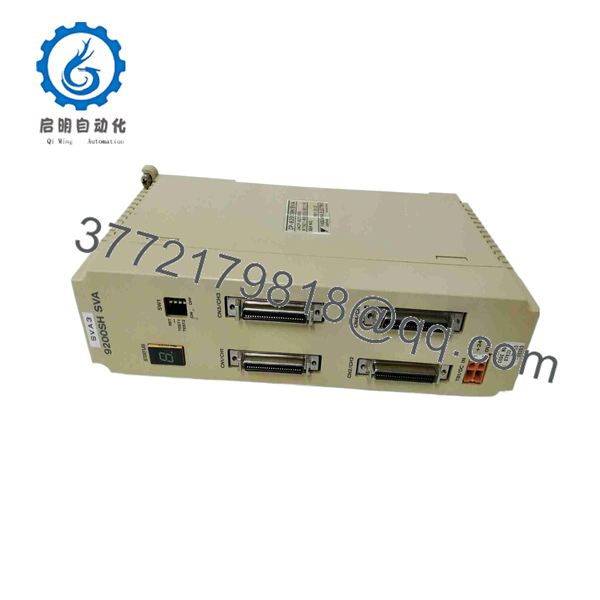
CP-9200SHSVA
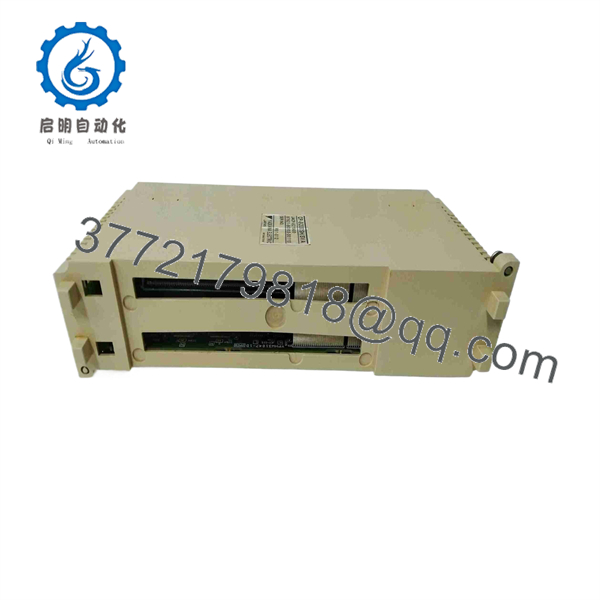
CP-9200SHSVA
Installation & Configuration Guide
Stage 1: Pre-Installation Preparation — Approx. 5–10 Minutes
⚠️ Safety First
- Notify operations and confirm the machine can enter a safe stopped state.
- Apply lockout/tagout (LOTO) to the applicable control-system power sources.
- Wait at least 5 minutes for DC bus and other capacitive circuits to discharge.
- Confirm the absence of hazardous voltage with an appropriately rated multimeter.
Tools Required
- ESD wrist strap and grounded ESD work surface
- PH1 screwdriver or the correct driver for the cabinet hardware
- Digital multimeter
- Wire labels
- Smartphone or camera for configuration photographs
Data Backup
- Back up the existing CP-9200SH program and configuration where the machine architecture permits.
- Record controller and module firmware information.
- Photograph the CP-9200SHSVA front panel and all switch/jumper positions.
- Record axis assignments, encoder settings, and relevant MPE720 parameters.
- Photograph the module position and adjacent modules before removal.
⚠️ Do not rely on memory for an old machine configuration. Photograph it before touching anything.
Stage 2: Removing the Old Module — Approx. 5 Minutes
- Remove the front bezel or protective cover as applicable.
- Label every removable connection before disconnecting it.
- Disconnect wiring or interface connections without pulling on cable conductors.
- Release the applicable rack/module locking mechanism.
- Pull the module straight out of its slot.
- Do not twist the board while removing it. This protects the backplane connector.
- Inspect the CP-9200SH backplane for contamination, damaged contacts, or mechanical damage.
Keep the removed CP-9200SHSVA beside the replacement until commissioning is complete. The old module is your physical reference for switch settings, labeling, orientation, and revision information.
Stage 3: Installing the New Module — Approx. 5–10 Minutes
- Attach the ESD wrist strap and verify the replacement part.
- Confirm the complete model number: CP-9200SHSVA.
- Compare the replacement against the removed unit, including hardware revision and connector arrangement.
- Clone all applicable DIP-switch and jumper settings from the original module.
- Pay particular attention to axis configuration, termination, addressing, and any hardware-specific options.
- Align the module with the correct CP-9200SH chassis slot.
- Insert it straight into the backplane connector.
- Confirm that the module is fully seated and mechanically locked.
- Reconnect wiring and interfaces according to the original labels and wiring documentation.
- Check every connection before applying power.
Self-Checklist
- Exact CP-9200SHSVA model verified
- Hardware revision checked
- DIP/jumper configuration copied
- Module fully seated
- Connectors secured
- Wiring labels verified
- Backplane inspected
- ESD precautions maintained
Stage 4: Power-On & Testing — Approx. 10–15 Minutes
- Before power-up, check the relevant supply rails with a multimeter.
- Energize the control rack according to the machine’s approved startup procedure.
- Observe the module status indicators during boot.
- Confirm that the CP-9200SH controller recognizes the SVA module.
- Connect the appropriate YASKAWA engineering environment, such as MPE720 where applicable.
- Verify the detected module identity and firmware information.
- Restore the backed-up configuration only after confirming hardware compatibility.
- Verify axis assignments and encoder parameters.
- Run the machine in a safe, unloaded or controlled test condition.
- Check servo enable, feedback direction, positioning, limits, and emergency-stop behavior.
- Perform a controlled dry run before returning the machine to production.
⚠️ If the controller does not recognize the SVA module, stop commissioning rather than repeatedly cycling power. Check module seating, backplane compatibility, firmware, configuration, and the CP-9200SH system setup.
Frequently Asked Questions (FAQ)
Q1. Is the YASKAWA CP-9200SHSVA a conventional servo drive?
Not in the usual standalone-drive sense. Available references identify it as an SVA motion/servo adapter module within the CP-9200SH system. Some reseller listings incorrectly describe it as a 200–240 VAC servo drive, so the machine’s original documentation and nameplate should take precedence.
Q2. Can I hot-swap the CP-9200SHSVA?
Do not assume that it can be hot-swapped. One reseller specification claims hot-swap capability, while another explicitly advises against hot-swapping during heavy-load motion operation. Without a confirmed YASKAWA procedure for your exact CP-9200SH configuration, power down and isolate the system before removing the module.
Q3. Will removing the old module erase my machine program?
Removing the physical SVA module does not by itself establish whether the machine’s motion parameters or application program are retained elsewhere. The CP-9200SH architecture can include separate controller and motion configuration data. Back up the CP-9200SH system before removal and document the existing axis configuration.
Q4. Is CP-9200SHSVA obsolete?
The CP-9200SH platform is a legacy YASKAWA motion-control family, and CP-9200SHSVA is primarily encountered as a replacement/spare component rather than a current mainstream motion platform. Current stock condition varies by supplier. Treat New Original, New Surplus, and Refurbished/Tested as different conditions and request photographs and serial/label information before purchasing.
Q5. Can another SVA module be used as a direct replacement?
Not automatically. Similar YASKAWA part numbers can represent different hardware functions or revisions. Verify the complete CP-9200SHSVA designation, hardware revision, controller compatibility, firmware, axis configuration, and connector arrangement before accepting a substitute.
Q6. What should I provide when requesting a replacement?
Provide the complete CP-9200SHSVA nameplate information, photographs of the front and rear, CP-9200SH controller model, machine/controller firmware information, and the current axis configuration. This is much safer than ordering from the shortened description “CP-9200 SVA.”
Q7. How should a surplus CP-9200SHSVA be tested?
A meaningful incoming inspection should include serial/label verification, visual inspection, connector inspection, power-up diagnostics, controller recognition, configuration verification, and a controlled motion test where a compatible CP-9200SH system is available. For surplus stock, ask for the actual unit photographs and test report rather than relying only on a generic catalog description.
QC note: For this legacy module, a responsible inspection record should document the exact hardware revision and test setup. Test photos and videos can be provided upon request when available. Do not claim a module is “factory new” unless its packaging and traceability support that condition.



