
 WhatsApp: +86 16626708626
 Email:
  Phone: +86 16626708626
Description
Key Technical Specifications
| Parameter | ALP111-S00 Specification |
|---|---|
| Manufacturer | Yokogawa Electric |
| Model | ALP111-S00 |
| Product Type | PROFIBUS-DP Communication Module |
| Application | FIO / CENTUM CS 3000 / CENTUM VP |
| PROFIBUS Role | DP Master |
| PROFIBUS Version | DP-V0 |
| Physical Interface | EIA-RS-485 compliant |
| Signal Isolation | Isolated |
| Transmission Speed | 9.6 kbps to 12 Mbps |
| Transmission Medium | Shielded PROFIBUS cable |
| Maximum Distance | 1.2 km/segment at 9.6 kbps |
| PROFIBUS Port | 1 × 9-pin D-sub female |
| Maintenance Port | 1 × 9-pin D-sub male |
| Maintenance Interface | RS-232C |
| Maximum Current Consumption | 0.7 A |
| Weight | Approx. 0.3 kg |
| Installation | Yokogawa FIO Field Control Unit / applicable communication module slot |
The published ALP111 hardware specification gives an EIA-RS-485-compliant PROFIBUS-DP interface, 9.6 kbps–12 Mbps transmission speed, shielded transmission route, one communication port, 9-pin D-sub female connector, RS-232C maintenance port, and 0.7 A maximum current consumption.
System Compatibility
The ALP111 is used as a PROFIBUS-DP master to exchange data with PROFIBUS-DP slave devices. Yokogawa and PROFIBUS documentation associate the module with CENTUM CS 3000 and CENTUM VP systems.
Yokogawa’s system documentation also places ALP111 among the communication modules installable in FIO-based field control architectures. The documentation specifically states that ALP111 and ALP121 cannot be mixed within the same Field Control Unit.
Product Introduction
The Yokogawa ALP111-S00 is a PROFIBUS-DP communication module for Yokogawa FIO-based control systems. It operates as a PROFIBUS-DP master, allowing a Yokogawa Field Control Station to exchange process data with PROFIBUS-DP slave devices such as remote I/O and other compatible field devices.
For replacement work, the important parameters are the model, PROFIBUS-DP master role, module suffix, FIO installation architecture, and existing PROFIBUS configuration. This is not an Ethernet communication module; the field network uses an EIA-RS-485 physical interface and shielded PROFIBUS cabling.
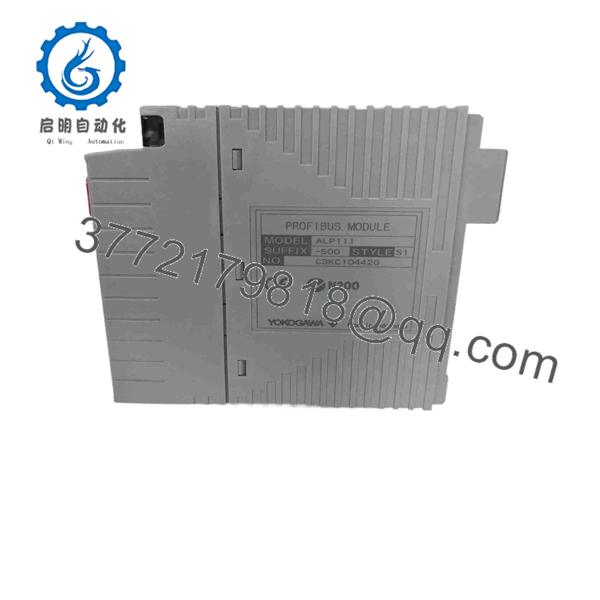
ALP111-S00
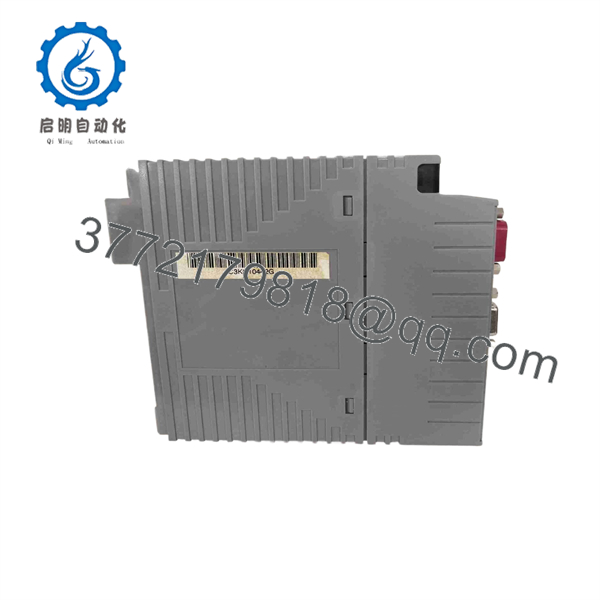
ALP111-S00
Installation & Configuration Guide
Stage 1 — Pre-Installation Preparation
- Confirm the replacement marking as .
- Verify the Yokogawa FCS model and FIO node configuration.
- Record the existing PROFIBUS network configuration, including station addresses, baud rate, slave list, and termination arrangement.
- Back up the CENTUM engineering database and relevant communication configuration.
- Identify the PROFIBUS cable and maintenance-port connections.
- Place the control system in the approved maintenance state before removing the module.
⚠️ Do not substitute ALP121 simply because it is another Yokogawa PROFIBUS module. Yokogawa documentation specifically restricts mixing and ALP121 in the same Field Control Unit.
Stage 2 — Removing the Existing Module
- Follow the plant’s approved shutdown or module-replacement procedure.
- Isolate power where required by the FIO hardware architecture.
- Label the PROFIBUS connection before disconnecting it.
- Disconnect the 9-pin PROFIBUS connector carefully.
- Remove the module retaining hardware.
- Withdraw the existing from its assigned slot.
- Inspect the connector and module slot for contamination or mechanical damage.
Stage 3 — Installing the -S00
- Verify the exact suffix: -S00.
- Check the replacement module for visible damage.
- Install the module into the designated FIO position.
- Secure the module according to the Yokogawa hardware procedure.
- Reconnect the PROFIBUS cable.
- Verify cable shielding and connector seating.
- Confirm that the bus termination arrangement has not been inadvertently changed.
Stage 4 — Power-On & Testing
- Restore the system according to the site’s commissioning procedure.
- Check the module status and diagnostic information.
- Confirm that the PROFIBUS master starts normally.
- Verify communication with each configured slave.
- Check for bus errors, station faults, or configuration mismatches.
- Confirm that process data is updating correctly in the FCS.
- Perform controlled I/O verification before returning the loop or process to normal service.
⚠️ A PROFIBUS physical-layer connection alone does not establish correct process communication. Station addressing, GSD/device configuration, baud rate, I/O mapping, and termination must match the existing system configuration.
FAQ
What is the Yokogawa -S00?
is a Yokogawa PROFIBUS-DP communication module used with FIO-based control systems. It operates as a PROFIBUS-DP master and communicates with PROFIBUS-DP slave devices.
an analog or digital I/O module?
No. It is a communication module, not a conventional analog or digital I/O module. Its purpose is to provide the PROFIBUS-DP interface between the Yokogawa control system and external PROFIBUS devices.
What communication speed does support?
The documented range is 9.6 kbps to 12 Mbps.
What connector does the PROFIBUS interface use?
The communication interface uses a 9-pin D-sub female connector. The module also has a separate 9-pin D-sub male maintenance interface using RS-232C.
What is the maximum PROFIBUS transmission distance?
The documented maximum is 1.2 km per segment at 9.6 kbps. The permissible distance decreases as the PROFIBUS transmission speed increases.
be replaced by ALP121?
Do not assume direct interchangeability. Yokogawa documentation explicitly states that and ALP121 cannot be mixed in the same Field Control Unit. The system revision and engineering configuration should therefore be checked before substitution.
compatible with CENTUM VP?
Yes. The PROFIBUS product database identifies as a PROFIBUS-DP communication module for CENTUM CS 3000 and CENTUM VP systems.



