
 WhatsApp: +86 16626708626
 Email:
  Phone: +86 16626708626
Description
Key Technical Specifications
| Parameter | Value |
|---|---|
| Manufacturer | Foxboro |
| Model Number | FCM2F2 |
| Part Number | P0914YZ |
| Product Type | Fieldbus Communications Module |
| System Platform | Foxboro I/A Series 200 Series |
| Primary Function | Fiber optic fieldbus extender |
| Fieldbus Interface | 2 Mbps HDLC Fieldbus |
| Fiber Type | Multimode fiber optic (MMF) |
| Maximum Transmission Distance | Up to 2 km (1.24 mi) |
| Communication Medium | Fiber optic cable |
| Installation Mode | Baseplate mounted |
| Configuration | Single or redundant pair installation |
| Redundant Operation | Supported |
| Environmental Rating | Class G3 harsh environment compatible |
| EMI/RFI Immunity | Fiber link provides electrical isolation from noise sources |
| Power Supply | 24 V DC system supply |
| Typical Application | Remote FBM installation and distributed I/O expansion |
Product Introduction
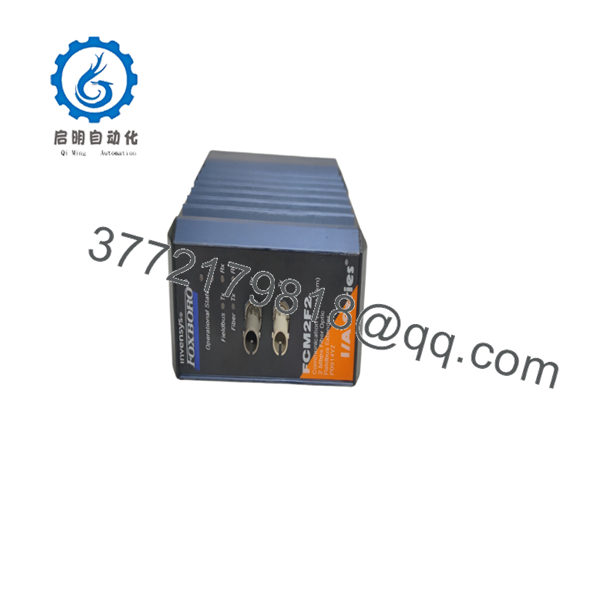
The Foxboro FCM2F2 P0914YZ is a 200 Series Fieldbus Communications Module used in Foxboro I/A Series DCS installations. It converts 2 Mbps HDLC fieldbus signals into multimode fiber optic communication, allowing remote FBM I/O modules to be installed closer to field equipment while maintaining communication with the main control system.
The module is commonly used in process plants where long copper cable runs, electrical noise, or grounding differences create installation challenges. FCM2F2 supports fiber links up to 2 km and can be installed in redundant configurations for critical control applications.
Installation & Configuration Guide
Stage 1: Pre-Installation Preparation (Estimated Time: 10 minutes)
⚠️ Safety First
Before replacing an FCM2F2:
- Notify operations about planned DCS maintenance.
- Confirm the remote I/O communication path can be interrupted.
- Apply lockout/tagout procedures if cabinet access requires power isolation.
- Verify cabinet supply voltage before handling the module.
Tools Required
- ESD wrist strap
- Digital multimeter
- PH1 screwdriver
- Fiber cleaning kit
- Fiber inspection flashlight
- Smartphone/camera
Data Backup
Record:
- Current FCM2F2 slot position.
- Baseplate identification settings.
- Fiber cable routing.
- Fiber connector type.
- Redundancy arrangement.
- LED status before removal.
⚠️ Important:
FCM2F2 must match the fiber distance requirement. Do not replace a 2 km with a different FCM type without checking the complete communication path.
Stage 2: Removing the Existing Module (Estimated Time: 10 minutes)
- Open the Foxboro I/A Series cabinet.
- Identify the module location.
- Photograph:
- Module labels
- Fiber connections
- Baseplate configuration
- Disconnect fiber connectors using proper handling procedures.
- Release module locking mechanism.
- Pull the module straight out from the carrier.
⚠️ Fiber Handling Warning
Do not touch fiber end faces with bare fingers. Contamination on the optical connector can create intermittent communication faults that are difficult to diagnose.
Stage 3: Installing the Replacement (Estimated Time: 15 minutes)
- Verify replacement part number:
Foxboro → P0914YZ
- Inspect:
- Fiber ports
- Connector condition
- Module pins
- Housing damage
- Install the module into the correct baseplate slot.
- Confirm the module is fully seated.
- Reconnect fiber cables.
- Verify fiber TX/RX connection orientation.
Configuration Checklist
☐ Correct FCM model installed
☐ Fiber type confirmed
☐ Fiber connectors cleaned
☐ Baseplate ID verified
☐ Redundancy arrangement confirmed
Stage 4: Power-On & Testing
- Restore system power.
- Observe FCM status LEDs.
- Verify fiber TX/RX activity.
- Confirm remote FBM communication from the Foxboro control system.
- Check I/O module online status.
Recommended tests:
- Confirm fieldbus communication.
- Verify remote FBM scan status.
- Check communication alarms.
- Monitor link stability.
⚠️ Troubleshooting Note
If communication does not recover:
- Check TX/RX fiber polarity.
- Verify fiber attenuation.
- Confirm multimode fiber is installed.
- Inspect connectors for contamination.
- Verify both ends use the same FCM type.
links require matching units at both ends of the fiber connection.

- P0914YZ
- P0914YZ
Frequently Asked Questions (FAQ)
Q1: What does Foxboro P0914YZ do?
The is a fiber optic fieldbus extender for Foxboro I/A Series systems. It allows remote FBM I/O bases to communicate with the control system through fiber optic cable instead of long copper fieldbus wiring.
Q2: What is the maximum distance supported by ?
supports fiber communication distances up to approximately 2 km using multimode fiber. For longer distances, Foxboro provides other FCM versions such as FCM2F4 and FCM2F10.
Q3: Can I replace with FCM2F4 or FCM2F10?
Not as a simple assumption. The fiber distance rating changes between models, and both ends of the fiber link must use compatible FCM types. Verify the installed system design before substitution.
Q4: Is obsolete?
belongs to the Foxboro I/A Series 200 Series product family. Many plants continue operating these systems, so replacement modules are typically sourced from industrial automation spare inventories.
Q5: Does replacing require software changes?
Normally, no application logic changes are required. However, the system should be checked after replacement to confirm the remote FBM communication status and eliminate configuration or addressing issues.
Q6: Why is available from automation spare suppliers?
Legacy Foxboro systems remain installed in many process facilities. Available units are usually supplied as:
- New Original / New Surplus
- Factory spare inventory
- Tested refurbished units
Before purchase, confirm serial number photos, test records, and warranty terms.
Q7: What should I verify before ordering ?
Check:
- Existing model:
- Part number:
- Fiber type: Multimode
- Required distance: ≤ 2 km
- Matching FCM type at the opposite end
- Baseplate compatibility
A fiber module mismatch can result in a communication failure even when the physical connector fits.



