
 WhatsApp: +86 16626708626
 Email:
  Phone: +86 16626708626
Description
3. Key Technical Specifications
| Parameter | Value |
|---|---|
| Manufacturer | KUKA |
| Part Number | 00-168-334 |
| Product Type | Teach Pendant |
| Compatible Controllers | KUKA KRC4 |
| Supply Voltage | 24 V DC |
| Current Rating | 1 A |
| Display / Input | Touch-screen keypad |
| Cable Length | 10 m (approx.) |
| Interface | KUKA robot controller specific |
| Status | Discontinued by manufacturer |
| Typical Weight | Approx. 1.1 kg |
| Application | Robot programming, jogging, and operation |
Exact cable connector type, firmware compatibility, and any hardware revision differences must be verified against the existing pendant and controller before installation.
4. Product Introduction
The KUKA 00-168-334 is a teach pendant designed for use with KUKA KRC4 robot controllers. It provides the primary handheld interface for programming, jogging, mode selection, and operational control of the robot.
This model features a touch-screen keypad and is supplied with a 10-meter connecting cable. It operates from the standard 24 V DC supply provided by the robot controller. The pendant is a direct replacement for systems originally equipped with this part number and is commonly sought for maintenance of existing KRC4 installations.
5. Installation & Configuration Guide
Stage 1: Pre-Installation Preparation (≈10–15 min) ⚠️ Safety First: Place the robot in a safe state (motors off, brakes set). Isolate power to the controller if required by site procedure. Confirm the robot cell is clear of personnel. Tools Required: None special beyond standard ESD precautions if opening enclosures; camera for documentation. Documentation: Photograph the existing pendant connections, cable routing, and any labels. Note the controller software version.
Stage 2: Removing the Old Pendant (≈5 min)
- Power down the controller or place it in a state that allows safe disconnection of the teach pendant.
- Disconnect the pendant cable from the controller.
- Remove the old pendant from service. ⚠️ Keep the original pendant available until the replacement is fully verified.
Stage 3: Installing the New Pendant (≈5–10 min)
- Confirm the incoming 00-168-334 matches the required configuration (cable length and connector).
- Connect the 10 m cable firmly to the matching port on the KRC4 controller.
- Route the cable to avoid pinch points, sharp edges, and robot motion envelopes.
- Secure any strain relief. Self-Checklist: [ ] Connector fully seated [ ] Cable clear of motion path [ ] No visible damage to cable or housing.
Stage 4: Power-On & Testing (≈15–20 min) Pre-Power Check: Visual inspection of cable and connector. Power-On Steps:
- Restore controller power.
- Verify the pendant powers up and displays the expected KUKA interface.
- Test enabling switch (dead-man), emergency stop, mode selection, and basic jogging functions in T1 mode.
- Confirm communication with the controller and that no pendant-related faults are present.
- Perform a short functional program run under controlled conditions. ⚠️ Troubleshooting Note: No display or communication faults are most often caused by connector seating, cable damage, or software version mismatch. Verify cable continuity and controller software compatibility if issues occur.
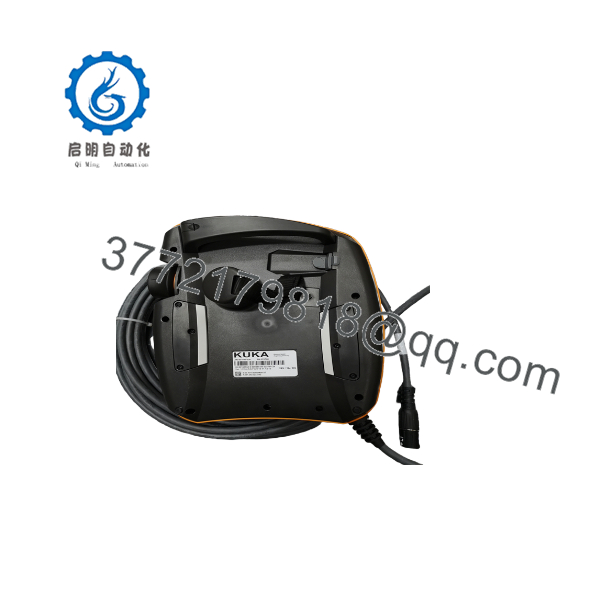
00-168-334
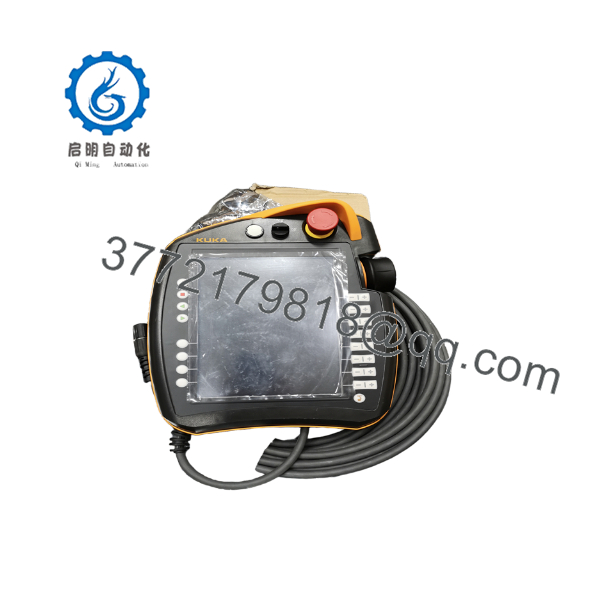
00-168-334
6. Frequently Asked Questions (FAQ)
Q: Can the 00-168-334 be hot-swapped while the controller is powered? KUKA generally recommends connecting or disconnecting the teach pendant only when it is safe to do so according to the controller documentation. Follow the specific KRC4 safety and maintenance procedures for your installation.
Q: Is this model still in production? No. The 00-168-334 has been discontinued by KUKA. Available units are new surplus or carefully tested secondary-market pendants.
Q: What is the direct replacement if this pendant is unavailable? Later KUKA smartPAD or smartPAD-2 pendants may be used on KRC4 systems, but they often require different cables, software versions, or configuration steps. Confirm compatibility with your specific controller and software release before substituting.
Q: Will I lose robot programs when replacing the teach pendant? No. Robot programs and configuration data reside in the controller, not in the teach pendant. The pendant is only an interface device.
Q: Why is the price lower than a current KUKA smartPAD? This is a discontinued model sold on the secondary market. Pricing reflects condition, testing, residual demand, and the cost of independent verification rather than current OEM list pricing for active products.
Q: What should I verify before installation? Confirm the pendant is the 00-168-334, inspect the cable and connectors for damage, and verify that the controller software version is known to support this pendant. Test all safety functions (E-stop, enabling switch) after connection.
Q: Are test reports available? Basic power-up and functional test results can be provided on request for the specific unit supplied. Full safety validation remains the responsibility of the end user according to applicable standards and site procedures.



