
 WhatsApp: +86 16626708626
 Email:
  Phone: +86 16626708626
Description
3. Key Technical Specifications
| Parameter | Specification Value |
| Manufacturer | Motorola (Embedded Computing Division) |
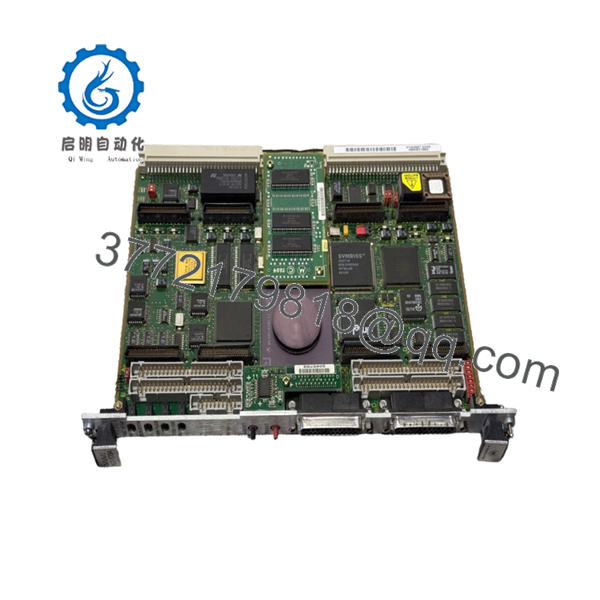
| Model Number | MVME162-533A |
| Processor | MC68040 (Full version with integrated FPU) |
| Clock Speed | 33 MHz |
| Onboard DRAM | 16 MB Shared Dynamic RAM |
| Non-Volatile RAM | 128 KB SRAM with battery backup |
| IP Slots | 4 Industry-Pack (IP) positions (Modular I/O) |
| Ethernet Interface | 10Base-T / AUI via 82596CA Controller |
| SCSI Interface | Integrated Small Computer System Interface (SCSI-2) |
| Serial I/O | 4 RS-232-C Multiprotocol Serial Ports |
| Bus Interface | VMEbus Master/Slave (IEEE 1014) |
4. Product Introduction & Supply Chain Strategy
The Motorola MVME162-533A represents the high-performance tier of the MVME162 family. Unlike the “LC” variants, the -533A features a full MC68040 processor with an integrated Floating-Point Unit (FPU), making it suitable for complex mathematical calculations and high-speed motion control. With 16 MB of DRAM and four Industry-Pack (IP) slots, it provides a dense, single-slot solution for high-level data acquisition, aerospace simulation, and advanced industrial processing.
Maintaining an MVME162-533A based system requires a strategic approach to spare parts inventory. As this module is long-discontinued, “New Surplus” units are increasingly rare but remain the only viable option for mission-critical reliability. A refurbished board often carries hidden risks such as degraded electrolytic capacitors or stress-damaged VME backplane connectors. By securing this New Surplus / Original New unit, procurement managers avoid the high Total Cost of Ownership (TCO) associated with intermittent failures and extend the lifespan of their legacy infrastructure by another 10 to 15 years.
5. Installation & Configuration Guide
Stage 1: Pre-Installation (Prep & Safety)
- Power down the VME chassis and follow Lock-Out/Tag-Out (LOTO) safety procedures.
- Use a grounded ESD wrist strap; the MC68040 and high-density DRAM arrays are extremely static-sensitive.
- Record the Jumper (J1–J20) settings on the existing board to ensure memory maps and interrupt levels are matched.
Stage 2: Removal
- Unscrew the front panel fasteners and disconnect all serial, Ethernet, and SCSI cabling.
- Engage the injector/ejector handles outward to safely disconnect the card from the 96-pin backplane.
- If you are transferring Industry-Pack (IP) modules, unscrew them from the old board using an ESD-safe screwdriver.
Stage 3: Installation (Clone & Seat)
- Transfer any IP modules to the new MVME162-533A, ensuring they are seated correctly in their respective slots and secured with screws.
- Align the board with the card guide rails and slide it into the designated slot.
- Press the ejector handles inward until the board is fully seated, then tighten the panel screws.
Stage 4: Power-On & Testing
- Re-energize the system and verify the front-panel LEDs. The “FAIL” LED should illuminate momentarily and then go dark.
- Use a serial console (configured to 9600 baud, 8N1) to access the 162Bug debugger.
- Run the
DI(Diagnostics) command to verify that all 16 MB of DRAM and all four IP slots are recognized by the system firmware.

- MVME162-533A
6. Firmware/Software Versions & Upgrade Notes
The MVME162-533A typically ships with the 162Bug system monitor. It is critical that the firmware revision (stored in EPROMs) is compatible with your host software environment (e.g., VxWorks, OS-9, or LynxOS).
⚠️ CRITICAL WARNING: The “533A” version uses a 33 MHz bus speed. If you are replacing an older 25 MHz version (such as a -212 or -222), verify that your real-time software does not rely on hard-coded timing loops calibrated for the slower clock speed. Additionally, ensure your system power supply can handle the increased current draw of the 33 MHz MC68040, which runs hotter and draws more power than the LC variants.
7. Frequently Asked Questions (FAQ)
Is this board truly “New Surplus”?
Yes. This is a Brand New Surplus unit. It is not used, not pulled from a decommissioned plant, and not refurbished. It has been stored in climate-controlled, ESD-safe conditions and has zero run-time hours.
Can I use this board to replace an MVME162-22 (LC processor)?
Technically, yes, the -533A is a higher-spec board. However, since the -533A has a full 68040 (with FPU) and more RAM (16 MB vs 4 MB), you must ensure your software can handle the larger memory map and that the timing differences don’t affect your specific application logic.
Does the board come with the IP modules installed?
No. The MVME162-533A provides the slots for Industry-Pack modules, but the modules themselves are usually application-specific (e.g., digital I/O, analog I/O, or specialized serial). You should transfer your existing IP modules to the new board during installation.
What is the purpose of the battery on the board?
The onboard battery maintains the contents of the 128 KB Static RAM (SRAM) and the Real-Time Clock (RTC). This is critical for retaining system configuration parameters and board-specific calibration data during power-off cycles.
What is the warranty for the MVME162-533A?
We provide a 1-year replacement warranty on this module. As a New Surplus item, we guarantee it will perform to original OEM specifications. If any hardware defect occurs, we offer a direct replacement or credit.



