
 WhatsApp: +86 16626708626
 Email:
  Phone: +86 16626708626
Description
Key Technical Specifications
| Parameter | Value |
|---|---|
| Manufacturer | Weidmuller |
| Order Number | 1134860000 |
| Product Designation | RSMB-16ROAD-XLXSM2BFB |
| Product Family | RSMB |
| Product Type | Terminal / Wiring Assembly |
| Configuration | RSMB-16 |
| Primary Function | Industrial wire termination and signal distribution |
| Application | Control cabinets and industrial automation panels |
| Installation | Panel/DIN-rail system, subject to assembly configuration |
| Manufacturer Origin | Weidmuller industrial connection technology |
| Replacement Check | Match complete order number and physical configuration |
| Condition | Verify actual unit condition before purchase |
Important identification note: Publicly indexed sources consistently associate 1134860000 with RSMB-16ROAD-XLXSM2BFB, but I could not verify a current OEM datasheet containing the complete electrical ratings for this exact configured assembly. Therefore, I would not invent voltage, current, conductor cross-section, pitch, or dimensions for a procurement specification.
Product Introduction
The Weidmuller 1134860000, identified as RSMB-16ROAD-XLXSM2BFB, is an RSMB-series industrial terminal assembly intended for electrical wiring and signal termination in control-panel applications. The RSMB designation and complete configuration code are important when matching an existing installation.
For replacement work, match the complete 1134860000 order number, not merely the RSMB-16 family designation. The suffix contains configuration information, and substituting a visually similar terminal assembly without checking the complete code can change the wiring arrangement.
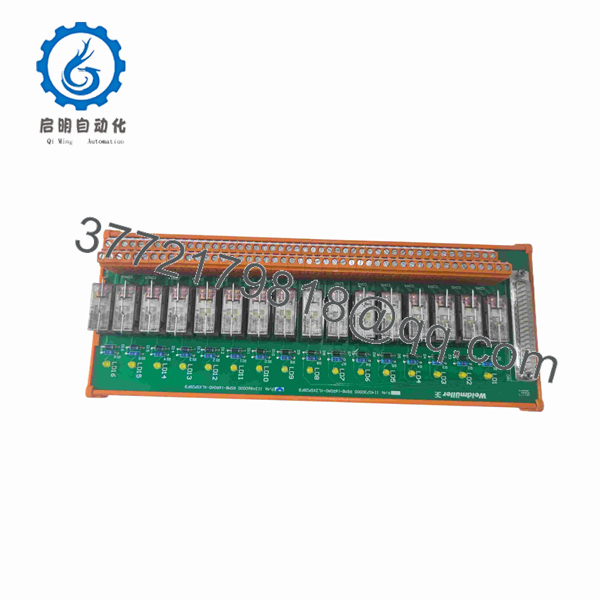
1134860000
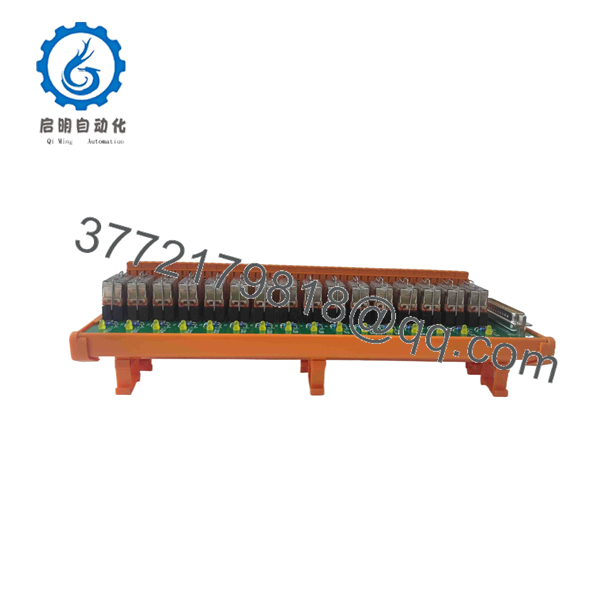
1134860000
Installation & Configuration Guide
Stage 1: Pre-Installation Preparation — Approximately 5–10 Minutes
⚠️ Safety First: Notify operations and place the affected control cabinet or circuit in its approved maintenance state. Follow the plant’s lockout/tagout procedure before disconnecting energized wiring.
Tools Required:
- ESD wrist strap where electronic equipment is nearby
- Appropriate insulated screwdriver
- Digital multimeter
- Wire labels
- Smartphone or camera
- Wiring schematic
- Terminal torque specification from the applicable Weidmuller documentation
Data Backup:
- Record 1134860000 from the existing component.
- Photograph the complete terminal assembly.
- Photograph each connected conductor and terminal position.
- Record wire numbers and circuit references.
- Document adjacent terminal modules and bridging arrangements.
- Confirm the replacement has the identical RSMB-16ROAD-XLXSM2BFB configuration.
Stage 2: Removing the Old Module — Approximately 5 Minutes
- Verify the circuit is de-energized.
- Confirm zero voltage with an appropriately rated multimeter.
- Photograph the terminal arrangement before removing wires.
- Label every conductor that is not already permanently identified.
- Loosen the terminal screws without pulling on the conductors.
- Remove the wiring one circuit at a time.
- Release the terminal assembly from its mounting system.
- Inspect the mounting rail and adjacent terminals for damage or contamination.
⚠️ Do not rely on wire color alone. In an industrial cabinet, terminal number and drawing reference are the authoritative identification points.
Stage 3: Installing the New Module — Approximately 5 Minutes
- Verify the complete order number: 1134860000.
- Confirm the physical configuration matches the removed RSMB assembly.
- Mount the terminal assembly in the original position.
- Reconnect conductors according to the wiring drawing.
- Confirm every wire number against the photograph taken before removal.
- Tighten terminals to the applicable manufacturer/site torque specification.
- Check that no conductor is trapped outside its terminal clamp.
- Verify adjacent jumpers, bridges, and end stops.
- Check mechanical retention on the mounting rail.
Self-Checklist:
- 1134860000 verified
- RSMB-16ROAD-XLXSM2BFB verified
- Correct mounting position
- Wire numbers verified
- Terminal positions verified
- Jumpers/bridges checked
- Terminal screws tightened
- No loose conductors
Stage 4: Power-On & Testing — Approximately 5–10 Minutes
- Perform a final wiring inspection before energizing.
- Check for unintended shorts between relevant terminals.
- Verify continuity where the circuit design requires it.
- Restore power according to the plant procedure.
- Check the associated PLC/DCS input or output status.
- Test representative field signals.
- Confirm that each signal reaches the intended I/O channel.
- Compare the result against the electrical drawing.
- Record the replacement date and component identification.
⚠️ A terminal assembly does not normally provide the diagnostic information available from an electronic I/O module. If a signal is missing after replacement, check field wiring, terminal position, bridge configuration, fuse/protection devices, and the associated PLC/DCS I/O channel before blaming the terminal assembly.
Frequently Asked Questions (FAQ)
Q1. What is Weidmuller 1134860000?
1134860000 is identified as Weidmuller RSMB-16ROAD-XLXSM2BFB, an RSMB-series industrial terminal assembly. Publicly indexed industrial-parts sources associate the exact order number with this designation.
Q2. Is 1134860000 a PLC or I/O module?
No. It should not be treated as a PLC CPU or electronic I/O module. The available identification associates it with the RSMB terminal assembly family, used for industrial wiring and signal termination.
Q3. Can I replace it with another RSMB-16 terminal?
Not automatically. RSMB-16 identifies the family/configuration, while the complete suffix identifies the particular assembly. For a field replacement, match rather than purchasing a generic RSMB-16 based only on the family name.
Q4. What electrical ratings does 1134860000 have?
I would verify the exact electrical ratings against the OEM documentation for before publishing voltage, current, wire-size, or insulation specifications. The publicly indexed sources I found confirm the part-number identification but do not provide sufficient primary-source data for those values.
Q5. Is 1134860000 still available as a new original part?
The part continues to appear in industrial spare-parts catalogs, but a catalog listing does not prove current OEM production status or physical stock condition. Request a photograph of the actual label and specify New Original, New Surplus, or Refurbished/Tested when requesting a quotation.
Q6. What should I send a supplier when requesting this part?
Use the complete identification:
Also provide a photograph of the existing terminal assembly if possible. That is particularly useful for verifying the physical configuration and avoiding substitution with another RSMB-16 variant.
Q7. What is the biggest replacement risk?
The main risk is ordering by family name instead of complete order number. With configured terminal assemblies, two products can look similar while having different connection arrangements or accessories. For this part, verify the complete 1134860000 code before purchasing or installing a replacement.



